Back to Cleverworkarounds mainpage
 

SharePoint Governance – Debategraph style

Quick note: This is another of the sort of posts where I cannot help but feel that some readers will wonder what I have been smoking. It is not essential, but reading the “one best practice” series will provide a lot of background to this post.

imageOn the grand scale of world problems, your average messed up SharePoint project would not be considered particularly “wicked”. If you compare a haywire SharePoint project to the truly *global* wicked problems, such as global warming, the Israeli/Palestinian conflict and Tom Cruise, then it kind of makes you realise just how good we SharePoint architects, developers and engineers have it. I mean, hey, if a bunch of nerds can’t make little ol’ SharePoint a success, what hope do we have for the big issues like making Tom Cruise less of a tool?

I know some people who have left SharePoint architecture work because of all the “people crap”. If you think “people crap” is bad in IT, imagine trying to mediate between the myriad of stakeholders involved in, say, cuts to carbon dioxide emissions. That is a world of hurt that is so huge that it pains my brain just to imagine it.

Last year when I was learning the dark Jedi arts of dialogue mapping I got to know David Price, one of my fellow students who operated in that world of hurt. David is a very smart man indeed, with a Ph.D in organisational learning and environmental policy. His career has included public policy consultancy, TV documentary production, academic research and mediation.

It was during that training course that David introduced me to a joint venture that he started with another scarily smart man named Peter Baldwin. Peter is an Australian who had a 15 year career in national politics, including six years as a federal minister in the Australian government. Unlike many Australian pollies, his background was engineering. After leaving politics, with a keen interest in how the web could “raise the quality of debate about public policy issues,” he cranked out visual studio and got down to some coding.

The “baby” from this collaboration between David and Peter is a unique tool called Debategraph and it is a very interesting tool indeed.

image

DebateGraph was conceived as a tool to improve the quality of public debate on contentious or complex issues. Public debate, in general, is usually pretty awful. David and Peter explain why this is the case pretty comprehensively below.

Public debates tend to be complex; with multiple data sources and perspectives and conflicting demands and values. In complex debates, the volume of information and arguments can seem like an overwhelming obstacle to someone, trying to develop a comprehensive understanding of the essential arguments advanced by all sides.

Public debate is all too often characterized by repetitive contributions, digressions, argumentative fallacies, rhetorical flourishes, manipulative framing, obfuscation and personal attacks that result in a high noise-to-signal ratio and confusion rather than clarity.

Conventional media reporting of public policy debates often struggles with the challenge of conveying nuanced, reasoned positions in a compressed linear form, when simple heated oppositions deliver a more dramatic and rewarding effect.

This, in turn, makes it harder for established public figures to think tentatively and creatively in public about new policy approaches and to acknowledge strengths and common ground in opponents’ positions.

We are talking about wicked problems here a lot of the time since public policy debates by definition respond to problems or questions where the general public are stakeholders. This means that there are a lot of varied stakeholders with even more varied world views and frames of reference. By creating a tool to improve the quality of a public policy discussion, DebateGraph is a tool that helps to deal with wicked problems themselves. What is interesting about DebateGraph is that like the IBIS based issue mapping that I practice, it is a visual, map based approach, yet it was developed independently from Conklin, Compendium or anything else in the space.
image

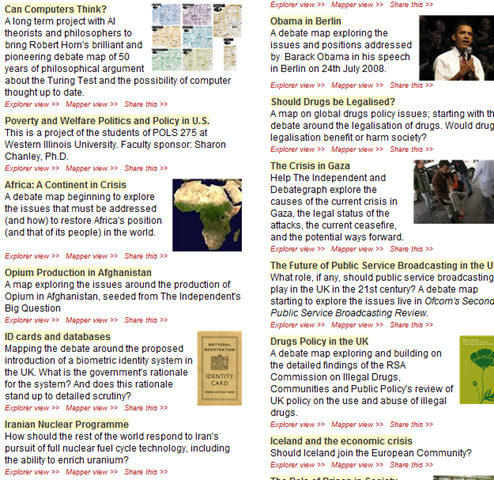
DebateGraph is a free online service. It allows the global community to collaboratively build maps of complex debates that accurately present all sides of the debate from a neutral standpoint, free of repetitive clutter and ‘noise’. Like a wiki, all aspects of the debate maps, both their content and structure, are continuously open to revision, refinement, comment, and evaluation by anyone who wants to join the community of thought. Each map is a cumulative work in progress.

Readers and editors of the maps can explore the top-level structure of debates and delve into specific strands or sub-structures of a debate. What interested me was the fact that the debate maps can be embedded into other websites; with changes made to the map on one site updating immediately across every site on which it appears.

DebateGraph also has RSS and email alerting like SharePoint, as well as a unique rating system where users can specify how much they relate to, or believe in a particular argument. The map then self reconfigures based on what arguments are considered the strongest. In effect, the map becomes a multi-dimensional poll or decision making tool.

“Although consensus can emerge from such a process, not least because it promotes the discovery of previously unidentified options, our hope is as much that the people who continue to disagree will do so on the basis of an enriched understanding of the reasons for their disagreement and having had the chance to test each other’s reasoning to the fullest.”

How DebateGraph works

Using DebateGraph is pretty easy, given that you can embed it into other web sites as I have done here in this post. From the hundreds of maps that I can choose, I’ve decided to embed the map of the global financial crisis for you to explore. Click on the bubbles below and move them around. You will find that like bubble-wrap, you will spend your first few minutes immersing yourself in moving nodes around and navigating here and there. Go ahead and have a play – I’m patient – I’ll wait for you 🙂

Right! I’m guessing around seven minutes have passed. Now that you’ve had a play, click on the first arrow, below the map and above the bottom toolbar. This will take you back to the top level financial crisis map. Let’s take a closer look at what is going on here.

Attached to this “Global Financial Crisis” map is several root questions covering the cause, consequences, triggers and response to this problem. If you hover your mouse over any of the nodes, you will find a more detailed view of the question. Hover your mouse over the arrows between nodes, and you will find that the questions “arise from” the central “global financial crisis” node.

Also, note the thickness of the arrows between nodes. The width represents the importance placed on this node by the community of users that have developed this map.

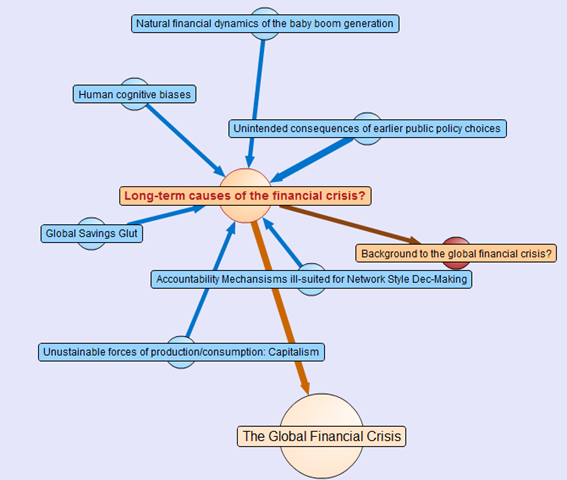
The node colours are important too. Click on the “Long term causes of the financial crisis?” node above, and it will break out to a sub-map. Here the nodes are blue, rather than orange as shown below. The difference in colour is because these nodes are possible responses to the question “Long term causes of the financial crisis?” Once again, the width of the arrows indicate the community’s view of the validity of the responses. Now let’s look at a response that would potentially be divisive. One of the potential answers to the long term causes of the current crisis is “Natural financial dynamics of the baby boom generation.” So, it’s all the baby boomers fault, is it? 😉
image

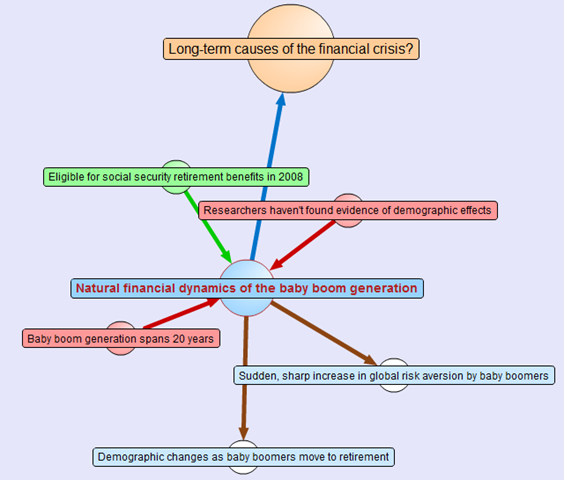
Clicking on the “Natural financial dynamics of the baby boom generation” and we see a map with a few different coloured nodes. This is because there are some supporting and opposing arguments to this idea. The green nodes support the idea and the red nodes oppose the idea. This is the essence of the pro and con type arguments used when you create IBIS maps.
image

There are also some other nodes where the direction of the arrow is the opposite to the ones we have examined so far. These are links to other maps, and if you highlight the outward arrows, you can see that our current map relates to nodes in completely separate maps.

This highlights a really important point about DebateGraph. It links related issues into a “web” of argumentation allowing readers to fully explore the myriad of interlocking issues that make up complex problems without “drowning” in information overload.

Contributing to debates

If you feel strongly on a particular subject then you are free to contribute to the debate. All DebateGraph maps have a toolbar that allows you to perform more advanced activities.

image

From left to right, the icons perform the following tasks

  • Open the DebateGraph home page
  • Show detailed text and comments for the currently selected item
  • Add comments to the selected item
  • Open this map in mapper (map edit) view
  • Edit this map in mapper (map edit) view
  • Search all DebateGraph maps for a given term
  • Share this map view or embed it in your own site
  • View the map in full screen mode
  • Key and explanatory notes for maps

SharePoint Governance?

Andrew Woodward suggested that I should create a DebateGraph map for us all to collectively explore how we could save Tom Cruise from complete agonising lameness. I chose not to do this for three reasons.

  1. Tom Cruise cannot be saved
  2. Tom Cruise’s lawyers would sue my ass
  3. There are more important topics to explore

Let’s instead talk about a pet topic of mine: SharePoint governance.

Governance in SharePoint is pretty misunderstood. There are many definitions of governance and they are all equally right, when judged through the lens of the person defining it. I have my own interpretation of governance (which is, of course, the definitive and completely correct one! – hehe). Maybe we should debate the issue?

Joel talks about a SharePoint governance plan needing to be a ‘living’ document and in fact he states this explicitly in the sample governance plan that he did for Microsoft. I agree wholeheartedly on this notion. The reality is that documents like MSWord documents are not overly conducive to this ideal. The paradox is that the bigger and more comprehensive the governance plan is initially, the harder it can be to maintain and manage over time, and therefore, the greater the likelihood that it can go out of date or fall into disrepair over time.

As a result, it occurred to me some time back that a DebateGraph map is the sort of “living” document that a governance plan really aspires to be. So, I roped in a couple of friends, most notably Andrew Jolly and Ruven Gotz, and together we experimented with DebateGraph to explore our own questions and ideas on the topic of SharePoint governance. The result is the map below which you can explore.

Seven Sigma web part for DebateGraph

It then occurred to me that others could benefit from this experimental exploration of the topic of SharePoint governance. This gave me the idea that having a “SharePoint governance web part” that could be added to any enterprise SharePoint portal would be a really great way to augment internal governance efforts. Additionally, one of my clients is responsible for conservation and sustainability at a local level in the community. They loved the DebateGraph debates around environmental, social and economic sustainability and this web part idea would work equally well for them.

Accordingly, my company, Seven Sigma, has just released a free webpart for SharePoint that allows you to embed DebateGraph debate maps into your SharePoint sites and tune their display to fit into enterprise SharePoint portals. The default debate is the SharePoint Governance debate shown above, but you can view any of the many Debategraph maps via the web part properties.

I have recorded a couple of webcasts, covering the installation and usage of the web part which can be viewed below. Otherwise, click here to download this free web part from the Seven Sigma web site.


dginstall  dgusage

Conclusion

This new web part and the SharePoint governance debate, are essentially an experiment in trying to tackle collaboration a novel way. Like any wiki, to make it truly “living”, the maps need contributions from people who have something to offer on the topic. I fully accept that this initiative is not going to be everybody’s cup of tea, but I hope that it might get people to think about the sort of possibilities presented by this sort of wiki based display. The fact that all of the issues, ideas and argumentation can so easily be made available to a wide audience via a simple web part I think is unique.

Thus, if you would like to contribute to this SharePoint governance debate sign up to Debategraph and we will add you to the governance debate.

I think that DebateGraph, and applications like it, may well represent the next step in the evolution of collaborative applications. While Twitter and Facebook have found interesting ways to bring people together, those applications aren’t exactly going to provide you with the sort of ‘container’ required to tackle really wicked problems. I foresee a lot of development in this sub-genre of collaborative applications in the future.

In other words, watch this space!

Thanks for reading

Paul Culmsee

www.sevensigma.com.au


Listen to me blab on about crap ;-)

Hi

I have been very busy on a number of fronts – which is why the blog hasn’t had much attention lately. I’ll be back soon enough though – once I get a few big jobs done.

For those of you that are not aware, there is a podcast interview that I did with Brett Lonsdale at Sharepoint Pod Show where he allowed me to blab on and on and on and on 🙂 Poor Brett – he didn’t know what he was getting himself into at all!

So if you think my posts are boring and wordy, wait till you hear me talk! 🙂

Paul


Perth SharePoint Users Group wrap

Today I presented a session at the Perth SharePoint Users Group. I was a little unsure whether my non-technically focussed content would be of interest to the geeks but the turnout was terrific and the feedback has been brilliant. (The 3 copies I gave away of Dux’s excellent “SharePoint for Project Management” book may have sweetened the deal – hehe )

My sincere thanks to new user group president Sezai Komur for giving me the opportunity to present this material as it was the first time it has seen the light of day in Perth.

If you want to check out the slide deck from the session, you will find it below. Expanded information that builds on this content can be found at the Seven Sigma site, as well as here at CleverWorkarounds.

Thanks for reading

Paul Culmsee

www.sevensigma.com.au


Issue Mapping Webinar Series in April 09

Hi all

There are a few people in my life who have had a big influence on me as a person, consultant and trainer. Jeff Conklin from CogNexus Institute is one of them. If I was to rank Conklin, I’d say he comes in somewhere between Jackie Chan and Freddie Mercury – illustrious company indeed. 🙂

Jeff armed me with the right set of skills and way of thinking that allowed me to defeat the likes of “SharePoint vs Skype guy”, a highly skilled foe that I previously wrote about in the “One Best Practice” series of posts. As it happens, Jeff is running another of his Issue Mapping webinar based training series starting April 8 2009. Anyone who is involved in highly complex projects (whether technically or socially challenging), including managers, project leaders, consultants and facilitators should consider attending.

SharePoint people? You are dealing with technical and social challenges almost by definition. Issue Mapping is the most effective craft I have come across to:

  • be able to lead a group to a robust decision that endures and that inspires consistent actions and outcomes despite the cross-currents of hidden and competing agendas
  • get traction in the "swamp" of a project that is cursed with both technical and social complexity
  • have real dialogue without getting bogged down in politics, personalities or an overload of information
  • help a group get its bearings in the fog of confusion, contradictory objectives and changing constraints
  • be able to focus a group’s energy in a way that boosts collective intelligence: the capacity to work with ambiguity and equivocal knowledge
  • be able to capture and organize a large volume of unstructured information to create a coherent foundation for thinking and learning in an organization

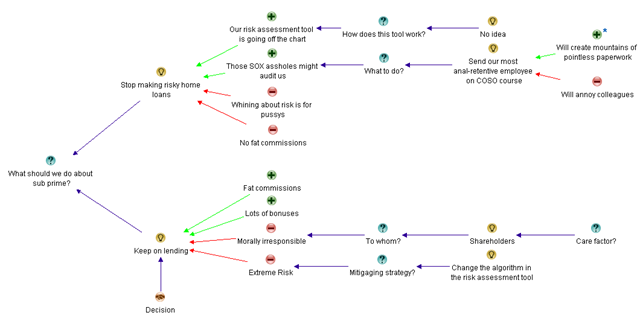
Consider my example below: I have summed up the entire global financial crisis in a single issue map – neat eh!

image

Like my above example, you will learn how to create great issue maps – maps that are clear, coherent, and expose the deep structure of an issue. (okay so I am being just a *tad* tongue in cheek with my example)

In all seriousness, it is a great course and well worth attending. If you enjoyed the “one best practice” series or my “wicked problems” sessions, this is your opportunity to learn from the master.

Thanks for reading

Paul Culmsee

www.sevensigma.com.au


A warning on “tame” metaphors

image 

Often people use metaphors to describe various aspects of SharePoint. I am guilty as charged here. One of the many that I use for SharePoint, is the metaphor of an Ikea modular storage solution to describe the new paradigm of moving from folders to document libraries, columns, views, workflow, sites, content types and the like.

But, I see a very common mistake with a lot of SharePoint metaphors that you must be careful with. People use tame metaphors for SharePoint, and this misleads.

Confused? Well consider this. There are two main types of problems in this world. Tame problems and wicked problems.

This is what a tame problem looks like according to Conklin.

  • A tame problem has a relatively well-defined and stable problem statement.
  • A tame problem has a definite stopping point, i.e. we know when the solution or a solution is reached.
  • A tame problem has a solution which can be objectively evaluated as being right or wrong.
  • A tame problem belongs to a class of similar problems which can be solved in a similar manner.
  • A tame problem has solutions which can be tried and abandoned.

A wicked problem on the other hand looks a little different.

  • A wicked problem is not understood until after formulation of a solution.
  • Stakeholders have radically different world views and different frames for understanding a wicked problem.
  • A wicked problem can be explained in different ways
  • A wicked problem is always considered a symptom of another problem. 
  • Constraints and resources to solve the problem change over time.
  • The problem is never solved.

Yeah, I know – it’s a rhetorical question, but which category do you think many SharePoint projects fall under? 🙂

Wicked metaphors

So, just like problems, there are two types of metaphors in the world too, tame ones and wicked ones.

The reason that my Ikea metaphor works has nothing to do with Ikea itself. The point I am  making is that even with the most spectacular modular Ikea storage solution, installing it is not that hard. I mean, if you read the instructions and take your time it can be done. Even if you rush, you might have a few scratches and hit your thumb with the hammer a few times, but you will get it installed. Even so, many prefer to get an Ikea guy to come in and do it.

But, here is the rub – the Ikea guy can’t help you agree with your dysfunctional family about whose underpants should go where. Guess what – *that* is the wicked bit! Wickedness has little to do with the Ikea furniture itself. It is all about the social complexity of those who have to work with it together.

So, be careful if you say something like “SharePoint is like building a house, you need to lay the foundations first…” Why? Remember that building a house is actually a very tame problem. People do them all the time and we pretty much follow the same script. Many collaborative solutions are not tame in this way. Therefore, this metaphor misleads and is completely inappropriate.

In fact, if you wanted a more accurate house metaphor, you need to add the social complexity and organisational chaos element to it. In my version, it is still a house building exercise, but this time you are the foreman and the construction crew consists of your mother in law, Homer Simpson, Eric Cartman, Tom Cruise and Paris Hilton.

I pity the project manager who has to deal with that combination of personalities!

image image image image


Thanks for reading!

Paul Culmsee

www.cleverworkarounds.com


The one best practice to rule them all – Part 6

BoromirRing

Hi again and welcome to the sixth and final post in this series aimed at enlightening readers to the often overlooked importance of shared understanding of a problem. For those of you who have come across this article for the first time, I suggest very strongly that you stop and read through its predecessors. There is a lot that was covered to get to here.

To recap, we have spent the last two posts delving into the deep structure of problems by using an issue based mapping method. This post will continue in that same vein, but I am going to move a little faster this time and cover more argumentation with a little less explanation. I’ll also finish off with some other interesting aspects to IBIS and dialogue mapping that we haven’t covered so far.

The first 4 posts were all about one of the key root causes of the organisational chaos that causes projects to go haywire, whether it is a SharePoint installation or trying to get the coffee machine fixed. I believe very strongly that if a group of participants can attain and maintain a sufficient level of shared understanding, then often what seemed like a polarising problem with intractable stakeholder positions, can start to make real progress toward resolution. The collective intelligence of a group is a powerful tool to be leveraged, but all too often it can be brought undone by social complexity and the inherent inefficiency of meetings. SharePoint is prone to social complexity because of its technical complexity, malleability and the fact that it is sold by Microsoft and they use that damn six pillar pie chart :-).

By the way IT people – your projects are rarely actually “wicked problems” in the true sense of the term. Until you have been involved in dialogue mapping a planning or social policy type problem with countless sub-issues and stakeholders, then you do not know just how good you have it! 🙂  In saying that, I recognise that many, if not all, IT projects have a lot of wicked elements to them.

Previously on CleverWorkarounds…

In my last post, we had developed an IBIS based issue map that I think is a reasonable reflection of a blog article written by Joel Oleson, incorporating some feedback by readers who disagreed with many of his points. What is great about Joel’s style of writing is that he likes to use headline grabbing titles for his articles. As a result of this, he stimulates rigorous debate and I could probably spend the rest of my days on CleverWorkarounds simply IBIS mapping his posts and all of the responses.

But, we haven’t finished issue mapping this site definitions thing, so let’s finish it off by mapping the rest of the responses. Below is a scaled down view of the map that we had by the end of part 5 (click to enlarge).

image_thumb9

Now, let’s go through some more responses and work them into the issue map. First up was this incredible quote showing much wisdom and maturity. Who uttered such pearls of wisdom? Oh, wait, that was me  :-)!

Joel and I spoke about this earlier in the day actually before this was posted – I hate them also but accept their need in WCM scenarios.
My biased view of the world stems from a site that I visited where branding had been put above all else and so it was an undocumented site definition with custom controls, dodgy web.config hacks all running in full trust to make it all work. 2 days later and I had it migrated. But it was all so *unnecessary* and I think that’s Joel’s point. They get used when they shouldn’t.

The client in this case had never been shown columns, views, versioning and this was a document centric intranet for cryin’ out loud! Instead they get a pretty site with a 50gig content DB because of a hacked site definition with custom nav controls to look pretty, application.master hacks to make it consistent and no thought process into information architecture. They simply took their existing ugly filesystem and whacked it in!

Hmm, when you read my response, all I did was support Joel’s original assertion that site definitions are modified unnecessarily, so in essence I did not really add that much to the conversation and in fact the example that I used was a client who had way more issues than the custom site definition alone. So as it happens, my post really didn’t add anything *new* to the discussion.

Next we have this anonymous response:

In situations where lots of sites need to be created from one pattern and you want old sites to get new changes, site definitions are a must. As mentioned above, you can’t staple features to a template.

I think you’ve swung the pendulum too far with your comment. Yes, big, bulky, all encompassing site definitions aren’t very maintainable. So don’t use them this way! As AC and others have blogged about, create a blank site definition for stapling purposes, and package everything in features. You still need that first site definition though! STP’s are for end users, IMO, not for solution developers.

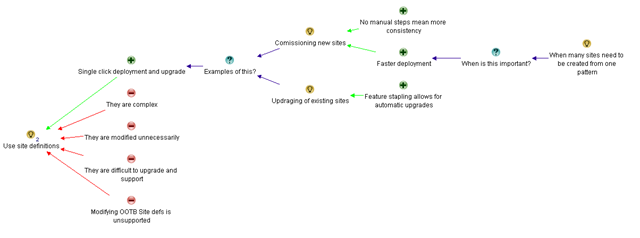
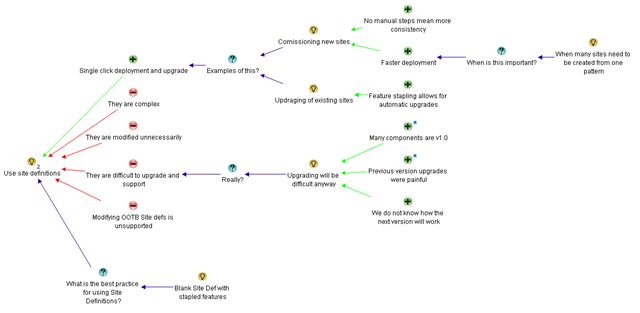
The quote above makes the important point that “if a lot of sites need to be created from one pattern” and “if you want old sites to get new changes”, then site definitions are pretty much required. I created an pro called “Single click deployment and upgrade” and then fleshed it out with the those ideas. The comment about pendulum is unimportant. Below is the new map

image

Next up Adam Toth makes an excellent, yet subjective counterpoint to the “difficult to upgrade” argument.

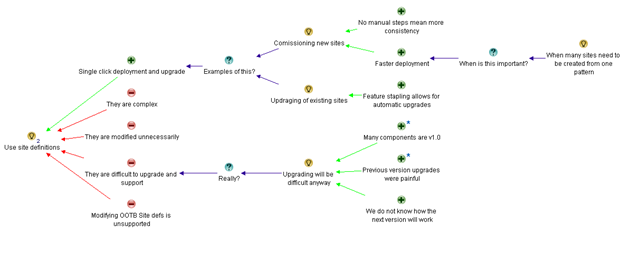
Since this is version 1.0 of Features, Solutions, Stapling, Content Types, Workflow, etc., I really believe that any upgrade to the next version is going to be a headache anyway. No matter what you did in sharepoint v1, it broke going to v2. v2 to v3 was also incredibly painful because the product changed so dramatically. We have no visibility into v4, and have no way to figure out what approach will make upgrades least painful. We can assume that things are starting to solidify, but there are no guarantees.

The above response from Adam questions the previous claim that site definitions “are difficult to upgrade and support” by arguing that upgrading will be difficult no matter what. I do not delete the original “difficult to upgrade and support” con, but incorporate Adam’s points as a new question “Really?” against the con, and then support that question with the idea that “Upgrading will be difficult anyway”. Adam supplied 3 arguments supporting his claim (many SharePoint components are V1, the previous versions were all painful upgrades and that we have no visibility into how the next SharePoint will work). Now the map looks like this.

image

Next is David Mann

Custom Site Definitions are a tool. Like any tool, they have benefits and drawbacks. Used properly, they provide much value. Used improperly, they cause pain.
Even the body of the article contradicts the sensationalist-headline by saying that there are some things you can’t do without a custom site def. The article of AC’s that this links to, and it’s comments, talk about a solution that is a totally blank CUSTOM SITE DEFINITION, that is then built up properly with Features/Solutions. They also mention publishing scenarios that the recommended approach is a custom site def.

So, the best approach is to do your homework. If a custom site def REALLY is the best approach, then feel free to use them. Just make it a conscious decision, knowing the trade-offs, not your default reaction because it’s easier.

At this point, it is time to add a new question to this map, as like other respondents, David is referencing Andrew Connell’s post on this subject. David mentions a specific application of site definitions (use a blank one and add to it with stapled features), which is in itself not a pro or con of site definitions, but a way of using them that mitigates many of the disadvantages of them.

Since we are IBIS, and we now have this new idea “Use a blank site definition with features/solutions”, and we need to infer the question behind the idea. My initial guess is “What is the best practice for using Site Definitions” and I have added it to the map as shown below. We could easily use Andrew Connell’s post on this subject to further flesh out the best practice for Site Definitions on this map, but for the sake of article size I have chosen to continue with the original responses to Joel’s post.

image

Chunk it up

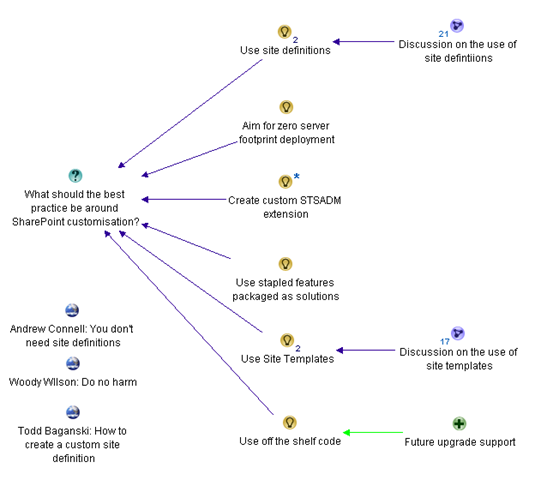
At this point, the map is getting large and we need to make it more manageable. Fortunately, this is very easy using tools like Compendium. I simply create a new sub-map and copy the nodes to the sub map. In effect I start to build a hierarchy of the logic behind the argumentation. Below shows the top level argument map at this point, now chunked into sections. Each sub map “Discussion on the use of site definitions” and “Discussion on the use of site templates” is now in its own sub-map that is accessed by clicking on the parent map.

image

The final response that I will cover off for now is from SharePoint Yoda, Eric Shupps who writes a really excellent factual based response to the post.

There are many scenarios in which they are required:
1. Automated Provisioning – Self-contained solutions that have all necessary functionality baked in (think hosting and SAS models).
2. Repeatability – They migrate better from dev to staging to production better than any other method.
3. Maintainability – New Features can be added or removed as required and the solution upgraded. Try doing that with an STP file.
4. One Click Deployment – The user simply selects the proper definition on the site creation page, to which you can add descriptive text and sample images (what do you think all those other options are? They’re OOTB site defs, that’s what).
5. Control – Nothing beats a site def for restricting what features site owners can and cannot use. Very important in many enterprise environments.
6. Ease of use – There are lots of workarounds for the power and flexibility that site defs provide but all require a great deal more code than a simple site def with stapled features.
Sorry to burst your bubble but you’re wrong on this one. Next time, ask a developer with experience doing Site Definitions the proper way before you go off on an opinionated rant. I’d be happy to help!

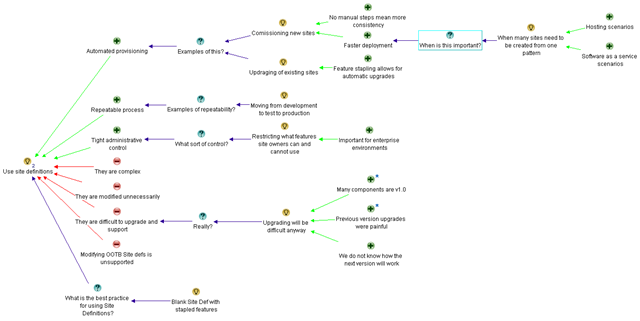
Some of Eric’s arguments are already in the map, but not all of them. Furthermore, he further expands on some of the arguments that already are there. First up, I changed my original pro of “Single click deployment and upgrade” to “automated provisioning” because I think this captures that argument more succinctly. Even though Eric then lists “1 click deployment” as a separate criteria, I think they belong together and it’s my map! ;-).

Eric also highlighted “hosted” and ”software as a service” scenarios where automated provisioning is particularly important. Since I already have a nice string of argumentation, asking for criteria of when to use site definitions, I have added these as supporting arguments to this existing set of nodes.

“Repeatability” and “Control” are excellent points, and I have captured Eric’s arguments in this area. To make the idea clearer, I captured “Control” as “Tight administrative controls” as this is less ambiguous in its meaning than “control” alone.

Then Eric hits the one argument that no-one seems to agree on. “Ease of use”. Clearly Eric’s idea of ease of use is different to Joel’s. When you look at Eric’s supporting arguments for ease of use, it appears that he is really reiterating the “automated provisioning” pro for site definitions and supported the “more manual customisations needed” con for site templates.

The adjusted map for the site definitions idea has now morphed into this.

image


Emergent Themes

I am going to stop this IBIS map now because otherwise, I could spend another 5 posts just working through all of the contributions made by various people. But more importantly I want to highlight a few really important points that might get lost in all of the screen-shots.

One of the things that I notice when performing Dialogue Mapping with a group is that the action of utilising a shared display like IBIS allows people to make connections much more quickly and really starts to make clear some of the underlying themes behind the discussion. It is much quicker and more efficient for participants to achieve the necessary breakthroughs when argumentation is visually represented and lots of seemingly abstract concepts can be logically related to each other. It seems to be that as human beings, our brains are particularly well-wired to visual based representation.

I want you to picture yourself in a meeting scenario where we are discussing a problem. It doesn’t have to be a face to face meeting either (although this is usually the case). It can be a group collaborating on a problem using blogs, wikis, discussion forums or any other medium. Without the issue map, there will be a number of problems that will combine to derail the meeting.

First up, there is likely to be a lot of points that have been made. If we were following the meeting in a traditional, linear fashion the argumentation would look something like this:

image

What you are looking at above is in effect, a visual version of traditional meeting minutes. (You know those documents that get sent around that you never read?). This also is not too dissimilar to the structure of a blog post (and the subsequent comments). Contrast this to the issue map that uses an issue based structure that makes the logic and flow of the conversation visible. Which is more meaningful? Which is easier to “read”?

For a start, people do not have to decipher any convoluted dialogue – we do not spend half the meeting disagreeing and then realising that we are actually talking about the same thing. The objectifying of the dialogue reduces those situations where the defences are high because people have inferred some bias that can easily be misconstrued. Different points of view are made much clearer and we do not continually revisit the same old topics over and over again. As the argumentation is further fleshed out, participants are much less likely to get lost or lose track of the conversation. Even if they do, we have a beautiful ‘corporate memory’ system here that is starting to form. Just because one person wants to return to a previous point and ask a question or add an argument to it, doesn’t mean that the next person has to take up this point at his or her turn. They can jump to wherever in the map their current train of thought takes them.

Death by repetition is also mitigated nicely. Death by repetition is those times in a meeting where there is a “true believer” who believes very strongly in a course of action to the point that they will find a way to work their answer into every question asked. Don’t feel too guilty when reading that – we all have done this.  Of course, it annoys the crap out of everybody else present, but the true believer will doggedly persist because they feel that their answer has not been considered enough or given the recognition that it deserves. But once captured on the issue map, the idea is visible and has equal footing to all of the other ideas. If the true believer persists, then the mapper simply asks the true believer if they have anything more to add to what is there already. Usually this only happens once :-).

There are other phenomena that are guaranteed to derail a meeting, usually leaving all participants emerging from the meeting annoyed that they never got to the actual agenda. Conklin calls this “grenade lobbing” and this is where a participant, usually with the defence drawbridge raised, will challenge the whole frame of the meeting. “That is not the real issue here”, they will explain, “it is this”. (Remember wicked problem rule number 8, every problem is a symptom of another problem). Every time you have emerged from a meeting, feeling deflated and wondering what happened to the agenda, chances are a few grenades were lobbed and the entire purpose for coming together was caught up on a tangent.

But issue mapping makes dealing with this easier too. Usually when a grenade is lobbed, where the frame of the meeting is challenged, it means that the root question of the map is not correct. Fortunately with an issue map, the answer is quite easy. You simply shift the map to the right and work with the grenade lobber to infer the deeper question. Once captured, the group can continue to work with the implications of this new question or continue to work with the rest of the map. The previous disruptive power of the grenade lob is significantly mitigated.

Final Note – Tech geeks vs Developers

I previously said that performing Dialogue Mapping and IBIS allows people to make logical connections much more quickly and really start to clear some of the underlying themes behind the discussion. This “Joel vs developers on site definitions” example that I have been working with was actually not a great IBIS example. The reason is that if we had started the entire conversation using IBIS, then a lot of the subsequent argumentation would have been very different. If say, Joel had used IBIS to structure his arguments to begin with, apart from making my job a lot easier, the map would have underpinned a very different blog post in structure and clarity of argument.

But despite the somewhat artificial nature of my example, from the mapping that we have performed so far it is clear to me that the two distinct viewpoints have emerged. This argument cuts to the heart of the IT Pro vs Developer world. Certainly a strong indication of this was the disagreement behind what is actually “easier”. It seemed that Joel’s easier is very different to the developer view of “easier”. Of course, we haven’t even counted the other stakeholders either and I bet the end-users’ definition of “easier” would be completely different from the two themes that emerged.

I personally come from an IT pro background and IT pro’s have become paranoid types because they are always the ones who have to deal with the after-effects of bad customisations (See the “mother hen reflex” post for how that has come to be). But through mapping this issue out, I was able to make some definite connections with the developer centric replies too. I didn’t necessarily agree with all of the points made, but I now have a much better understanding of their point of view.

At the end of the day, understanding those points of view is going to give you that shared commitment required to see a problem through to an effective a solution.

Well that is it for this series. I hope that you found it of some use and welcome any feedback. Since I am a trained, practicing and designated Dialogue Mapper, expect to see a lot more IBIS on CleverWorkarounds and Seven Sigma over the coming months.


Thanks for reading

Paul Culmsee

www.sevensigma.com.au


The one best practice to rule them all – Part 5

gandalv17

Hi again and welcome to the fifth article on this series of posts on the topic of group sense-making and the pursuit of shared understanding among a group of participants trying to solve a problem. If you haven’t read the previous articles of this series, then I strongly recommend you go back and read the previous articles in order.

If you have read through the first 4 posts, you should have a pretty good appreciation now for the sort of “lens” that I view the world of problems and the projects undertaken to try and solve those problems. You should also have a pretty solid appreciation of the concept of wicked problems, their characteristics, and the ways and means that those characteristics can turn a happy project into a toxic wasteland, destroying all of the initial enthusiasm and commitment among the participants. Microsoft’s Jason Guthridge recently nailed SharePoint’s place in it all when he wrote the immutable law of SharePoint that “By itself, SharePoint can neither create nor destroy organizational chaos, but does an excellent job of reflecting the level of organizational chaos that existed at the time of deployment” – hehe love that!

I approach all my engagements these days from the point of view that project failure is not due to a lack of rigour or governance around any project management methodology. More often than not, the root cause is in “organisational chaos” and this is *not* a process problem. It all boils down to the fact that shared understanding among a diverse team is an illusive goal which is deceptively difficult to achieve and maintain. That is because SharePoint’s technical complexity gives rise to social complexity. At the end of the day, we all have vastly varying behavioural and learning styles, we all come from varying organisational cultures, have different skills in varying disciplines and have different value sets and life skills. A collaborative platform almost by definition forces us to confront and work through this social complexity and that is where chaos and wicked problem characteristics find a fertile breeding ground.

It is this same underlying social complexity that makes SharePoint governance so hard. That is because governance at its essence is about accountabilities and risk. In short, governance is an attitude and the fact that it is a shared responsibility among participants gives rise to those same “people issues”.

But of course, none of this is helped by the common misdiagnosis that project failure is a failure of process. Although I believe that process is part of the answer, when we look at project failure as a process issue only, we inevitably apply process oriented tools and methods to get things back on track. But if you agree with me that a lot of the time, the real issue is the lack of shared understanding among participants, then it is clear that we are missing a critical step before we dive into process oriented solutions. How do we know that we are all on the same page? Will a 40 page project charter and project management plan do the trick? History tells us fairly convincingly that the answer is no.

Thus, in my last post I described IBIS (Issue based Information System). IBIS is an issue based argumentation system developed in the 1970’s by Horst Rittel and further refined by Jeff Conklin. I described the craft of Dialogue Mapping – a *practical* method that leverages a simple grammar and a shared display, to help groups gain understanding of complex problems right at the very beginning of the journey. This prevents the usual problem of jumping past the sense-making phase too quickly by diving headlong into process and rigour. Even before a project charter is committed to paper, IBIS fills that sense-making void that most of the other methodologies presume exists, but is rarely there in sufficient detail.

For an interesting little experiment, if you have found this series to your liking, now go back and look at your last project management plan and specifically re-read the charter and problem statement. Is it more than two paragraphs? Would all stakeholders read it and then tell you the exact same understanding of the problem being solved?

More IBIS and Issue Mapping

Now if you recall part 4, I created an IBIS issue map to demonstrate the arguments made by Joel Oleson some time back, when he wrote an article that was originally entitled “Just say no to site definitions”. It caused some vigorous debate at the time, and I demonstrated how I was able to both simplify and objectify Joel’s post into a simple issue map that was very easy for any reader to understand. That map is below and this is our starting point for part 5. Have a good look and if you need a refresher on how it was created, refer to part 4.

image

Now it is time to map some of the counter arguments made by those who responded to Joel’s ideas. The first response was anonymous and made various counter points. Let’s take a look at the first half of the counter spray :-).

Are you serious? You prefer STP files over a custom site definition? Man, you obviously have never had to try to build a solution around STP files before.

The first line of the response is actually very interesting from an IBIS nerd viewpoint because and it a perfect example of social complexity playing out and it made decide to change major aspects of the map. The above respondent immediately honed in on something that wasn’t actually all that clear to me to begin with. When I first mapped Joel’s statement in part 4, I never actually put the idea of using site templates into the issue map. Why? because Joel never actually suggested it! The closest he came was the statement “Site Templates as tough to work with as they are, are better than custom site definitions”. But I interpreted this as using the example of site templates to highlight the complexity shortcomings of site definitions. I simply captured the argument of “complexity”, supporting the idea “Do not use site definitions”.

image

But look here! Our first respondent interpreted it completely differently to me. They inferred (likely correctly) that Joel prefers site templates over site definitions. But the response then takes a shot at Joel’s credibility.

Are you serious? You prefer STP files over a custom site definition? Man, you obviously have never had to try to build a solution around STP files before

If that exchange happened in a meeting, you may as well call it quits, because it would be very likely that very little valuable dialogue would be obtained after such an exchange. Participants are on the defensive and the meeting will likely get derailed on this tangent. But this is a terrific example of how using IBIS grammar is extremely effective at teasing out ambiguous or poorly formed argumentation, thereby removing the “sting” out of these sorts of debates.

So what should this map look like then? Below is a new version with a few key adjustments.

image

The most obvious change that I have made to the argumentation presented above is Joel’s original idea. I have removed the negative connotation of “Do not use site definitions” to “Use site definitions”. As a result, the previous pros now become cons, because they are no longer supporting the idea. I did this because I have also added the idea “Use Site Templates”, so now we have presented the two ideas without any inferred bias and can simply examine the characteristics, pros and cons of each idea.

For what it’s worth, engineers sometimes unconsciously word questions in a manner that non engineers find biased because of the implied connotation. You can read more about this in my “it’s all how you ask the question” post.

Finally, I also removed the “there are easier alternatives” pro from the map altogether. I did this because this argument has became somewhat redundant. Note how we are now exploring all of the alternatives as separate ideas in the map anyway. More importantly, what does “easier” mean anyway? What is “easier” for an IT pro type person like Joel may be very different to what is “easier” for a SharePoint developer”.

Stepping back

The ability to restructure a map on the fly is one of the key benefits of IBIS. A skilled IBIS practitioner is able to quickly restructure the map as the conversation moves around the various topics, all the time leveraging collective intelligence of the group as they dissect the problem together.

Another key improvement from the previous map is that we have further objectified things. Our first respondent also supplied some great factual counter arguments to Joel, but hid it behind an initial barb that could easily be inferred as a cheap shot.

Nevertheless, here is the portion of the map with showing the additional argumentation from the respondent about using site templates. Now we are getting somewhere!

image

Let’s examine each of the statements of the respondent. All of the arguments made were dumping on site templates in some way, so we capture them as cons to the “Use site templates” idea. The respondent actually did a very good job with his arguments and they were very easy to add to the map.

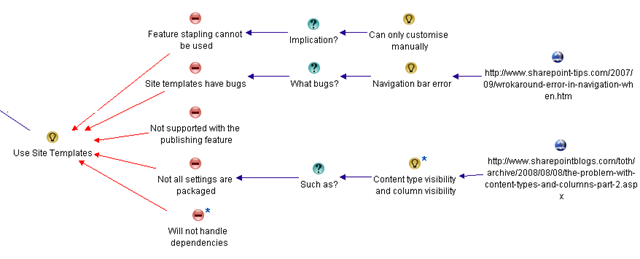
  • The statement “For one, you can’t feature staple to an STP file, so you are simply limited to the manual UI customizations. To run automation when a site is created, you need to use a site definition with a provision handler or feature stapling”, is a bundled up statement. There is the con argument “feature stapling cannot be used”, with an implication of that argument being “Can only customise manually”. I broke that out into three IBIS elements
  • “STP files are buggy, and sometimes you will randomly get errors like this one in your navigation bars” is stating that there are bugs, and supports that argument by stating a specific example of one. I split this out into separate IBIS elements and additionally linked to the specific example.
  • “STP Files do not support sites with the publishing feature activated” is a nice, simple argument that I captured as “Not supported with the publishing feature”.
  • “STP files do not package all your settings, especially content type visibility and column visibility on lists and libraries” is again a nice counter argument backed up with examples.
  • Finally, the comment “If an STP relies on elements from other higher-level sites or lower-level subsites, good luck”, is in effect stating a counter argument that site template files to not handle dependencies. In case this paraphrased statement is ambiguous, I added additional detail to this node with the original argument as shown below.

image

More arguments against?

Below is the rest of the response that is nowhere near as clear as the first half. Let’s drill down…

I disagree, I think it is lazy devs that want to use an STP file, instead of creating a custom site definition, just like it’s laziness to create a content type through the UI for a custom solution instead of in XML with a feature (which can then easily be moved from environment to environment).
And honestly, is it really easier to go through the machinations to customize the MySite template as recommended here (http://blogs.msdn.com/sharepoint/archive/2007/03/22/customizing-moss-2007-my-sites-within-theenterprise.aspx) to simply move a few web parts around, rather than just make a tweak to the original site definition? Honestly which is less maintenance for a customer, a quick documented change to an XML file in a folder, or a Feature+WebControl+Custom master page+stsadm commands to activate etc.?

I think you are way off base here, and painting with broad brushes.
(I do agree with zero footprint efforts, and only editing built-in site definitions for tiny tweaks).

The first argument is actually now a moot point. Joel did indulge in a bit of developer bashing in his post (and who doesn’t enjoy a bit of that from time to time) and this respondent is simply reacting to that. But since I have already objectified Joel’s original point then arguments about “lazy developers” is actually answering a different question altogether and does not belong here.

I previously removed Joel’s “it is easier” argument and what do we see here? We see the respondent questioning what is “easier”! This respondent argues that a documented tweak is “easier” than applying manual changes. Once again in a real meeting I can see where this would go. One party would probably then say “yeah but you lazy devs never document it” and we are off into a conversational tangent that will not achieve much. So like Joel’s arguments earlier, I am removing the “my easier is better then your easier” arguments.

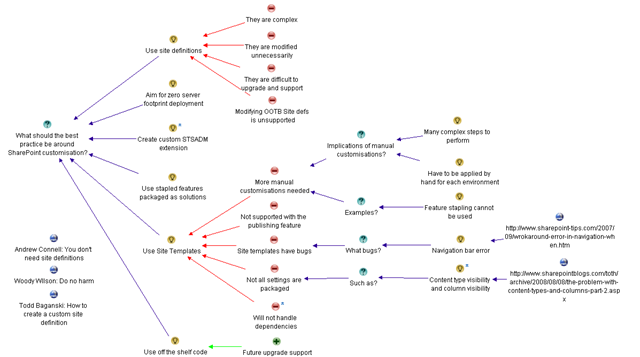
What’s left? Well, pretty much this entire bit of the conversation is talking about how much manual work is involved to manage changes when not utilising site definitions. So we can summarise this counter argument as “more manual customisation needed”. When I look at the map, I see that our existing argument “feature stapling cannot be used” is actually an example of this. So the adjusted arguments against site definitions now look like the map below. Note how I have removed the con of “Feature stapling cannot be used” and reworked it as an example of a new con, called “More manual customisations needed”. This now looks better.


image

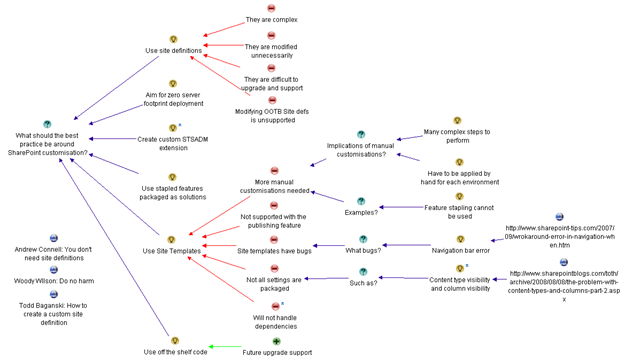
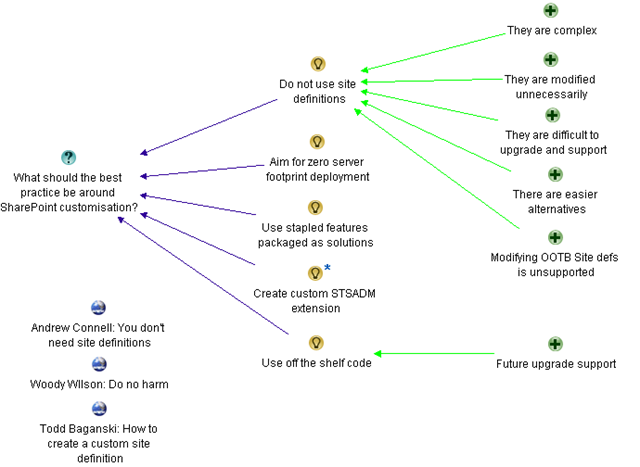
And finally for now, I have this consolidated map to represent our current understanding of the question “What should the best practice be around SharePoint customisation”. There are still other counterpoints, and we still have to add the pro argument into the map too. But by now, you should be getting the idea. Imagine yourself having this discussion in a meeting. Would this map, displayed on a projector have helped keep the meeting on track?

image

Thanks for reading

Paul Culmsee

www.sevensigma.com.au


Seven Sigma is officially a CogNexus Institute Designated Partner

image

Hi all

This is the culmination of a significant amount of effort and a long time in the making, but I am extremely proud that Seven Sigma, the company that I am a co-founder and partner of, is now officially recognised as the first CogNexus Institute "Designated Partner" in the world. I first came across the unique work of Jeff Conklin and CogNexus some time ago and it has changed forever the way that I and my Seven Sigma colleagues approach all of our client engagements. We have been using the CogNexus philosophy, teachings and methods for complex problem solving ever since and are now uniquely qualified in this craft – not only in Australia but much of the world.

This goes way beyond our original SharePoint competencies (and believe me, we are not too shabby at SharePoint!). We are regularly called upon to practice the craft of Issue and Dialogue Mapping outside of the traditional IT discipline, assisting clients to make sense of complex or wicked problems confronting them. Whether we are helping a group of stakeholders to decide issues of transport and road infrastructure, helping a board of directors determine their corporate strategy, or simply righting the ship of a SharePoint or IT project gone haywire, we have proven our competency in this craft. Hence, our skills are now formally recognised.

If you are wondering what this is all about, then it is best to to read my current "One Best Practice" series of articles found here. 

Does it work? Well, our clients seem to think so. Check out this quote from the ICT Manager of the Royal Flying Doctors of Western Australia

I can confirm that I have dealt with and are currently dealing with Seven Sigma Pty Ltd for our SharePoint implementation project. During the setup phase of our project we interviewed several SharePoint focused companies and found Seven Sigma to be above the rest with their overall knowledge of SharePoint and its underlying technologies.  Their approach and methodology to our project has been unique and refreshing and has been enthusiastically accepted by our project team and end-users. It is evident that their ability to map the underlying processes and clearly decipher these during the project kick-off will be a key success factor to our project. Their work to date has been a major factor in empowering our users which will directly assist in our intranet project becoming successful.

I can confidently recommend Seven Sigma Pty Ltd as a solid and reliable SharePoint supplier, and experts in their field.

Matthew Turany

ICT Manager

RFDS Western Operations

<plug>Want to learn more? Got a toxic wicked problem? Want to be trained on the Jedi-arts of IBIS? Then contact us and let’s talk!</plug>

Thanks for reading

Paul Culmsee

www.sevensigma.com.au


The one best-practice to rule them all – Part 4

image

Hi there

Welcome to the fourth post in my series on how to deal with the true root cause of project failure. The first three posts were really to set the scene for this post where I will explain the basics of my craft for resolving some of this. First up, I described my journey through the maze of of well known methodologies and best-practice standards, trying to make sense of a character known as “SharePoint vs Skype guy”. After seemingly taking one step back for every two steps forward, I finally found an area of research that I strongly identified with – the concepts and phenomena of wicked problems. I described how I have come to believe very strongly in the principle that understanding a problem comes from exploration of potential solutions, and that the act of exploring solutions will change your understanding of the problem. Traditional methodologies tend not to recognise this fact, and in fact, many force you into a problem solving model that precludes this perfectly natural sense-making activity.

This sense-making process is utterly critical to project success. The fact is, almost any project failure symptom (such as scope creep) can be traced back to a single root cause. That cause is a lack of shared understanding among participants of the problem behind the project. If you presume, however unlikely, that every stakeholder had an identical deep understanding of a problem and maintain that understanding, then almost by definition, things like “scope creep” and “unrealistic expectations” would not happen

In my last post, I turned my attention to the “inappropriate methods” that are all-too commonly used to tackle projects that have taken on wicked tendencies. We looked at the flawed logic of throwing “process” at a wicked problem, the sometimes misguided reasoning behind many scope restrictions, as well as the pros and cons of competitive and authoritative strategies. Finally, we examined the paradoxical effect where, to fully understand a problem, we have to understand all points of view. Yet in doing this, we leave ourselves susceptible to falling foul of wicked problem characteristics.

Hmm…Such a conundrum…Is there a way out?

From Rittel to Conklin (and IBIS)

Once again, we have to take a brief sojourn to the era of sideburns, flared jeans and excessive amounts of pubic hair…The 1970’s.

Years before Rittel wrote his seminal wicked problem paper in 1973, he had already come to the belief that the relationship of problem understanding was dependent on the solution being considered at any given time. He had also been thinking about tools and methods to overcome the problem. By 1970, Rittel had invented what he termed a “design augmentation” system that he called Issue-Based Information System (IBIS). Here is how IBIS was described back then.

Issue-Based Information Systems (IBIS) are meant to support coordination and planning of political decision processes. IBIS guides the identification, structuring, and settling of issues raised by problem-solving groups, and provides information pertinent to the discourse … Elements of the system are topics, issues, questions of fact, positions, arguments, and model problems.

For you trainspotters, You can read Rittel’s 1970 paper mentioning IBIS for the first time here. This paper is quite amusing when you read it nowadays as it is positively antiquated. But, hey, we are talking about a time before PC’s and when my father still had all his hair. The first time Rittel compared and contrasted “wicked to tame problems” was actually in a 1972 article. Rittel was also not alone in the search for tools and instruments to assist sense-making. He was influenced by the legendary Douglas Englebert (the dude who invented the mouse), who had spent the early half of the sixties examining tools and methods to “augment human intellect“.

Rittel’s original 1970 incarnation of IBIS had many elements to it. He called one component in particular an “Issue Map”. Rittel described the issue map as:

Representation of the various relations between issues, questions, etc., by graphic display of the state of argument

The issue map, 1970 style, involved pen and paper (probably those lead-laced black marker pens that made your head spin from the fumes). But over the following years, IBIS was refined and further developed. Many of the components of the 1970’s version were made obsolete by advances in technology and business practices, but Issue Maps in particular, remained. In the 1980’s, the era of personal computers dawned and later pioneers such as Jeff Conklin (who had worked with Rittel from 1984), could see the potential that IBIS had by utilising a computer-based visual display.

Independently from Rittel, Conklin was pursuing ways of capturing design rationale and had created his own notation called ISAAC. He recognized IBIS as the perfect solution when he heard Horst Rittel give a talk about it.

“His IBIS structure was simpler than my ISAAC structure, and his field experience with using IBIS showed that he understood the social and cognitive issues far better than any of us.  (Someone asked him what the IBIS process was for making decisions and he replied, “There is none.  Decision making is completely context and culture dependent)”

Conklin then adapted IBIS for use in software engineering and created the gIBIS (graphical IBIS) hypertext system to support this use of IBIS. Later Conklin used Rittel’s ideas about wicked problems to help motivate engineers and managers to use gIBIS on their projects. Conklin spent twenty years working with IBIS and sense-making software and systems, and all of that work now culminates today in a software tool called Compendium and a facilitation method called Dialogue Mapping. These days, utilising a projector, Compendium type software, a skilled IBIS practitioner can make a massive difference in helping a group develop a shared understanding and commitment of a problem.

To explain IBIS, let’s take a look at it being used for a well known SharePoint debate.

IBIS by example…

IBIS, at its heart, is a language specifically designed to break down the often convoluted and complex structure of a conversation into something much more simple to understand and digest. The premise of IBIS is that no matter how complex or argumentative an issue is, we can break it all down to just three basic artifacts:

  • Questions
  • Ideas
  • Arguments (pros and cons)

There are a couple of very basic rules by which these artifacts interact (the grammar behind the language). Ideas respond to questions, offering possible solutions to the question. The arguments argue for and against the various ideas. Questions can then be expanded on or challenge other questions, ideas, or arguments.

Here is a great example of IBIS in action for a SharePoint wicked problem. Mr Oleson well and truly got himself into trouble a while back when he made disparaging comments about site definitions and hurt the sensitive feelings of many a SharePoint developer. A large thread of discussion ensued, where various people voiced their opinion in a long series of replies.

A blog, along with its comment system is typical of many collaborative mediums that are not particularly well suited to dealing with a complex issue. The whole linear nature of a blog and its comments, means that the last person to comment, in effect tends to have the last word. That is also why newsgroups and discussion forums have flame-wars that degenerate into deep threads of point-counterpoint discussion that go nowhere because the positions taken get more and more intractable. Any linear based collaborative tool suffers from the last poster having the moral high ground – until someone posts below them.

So, let’s instead build the subsequent debate into an IBIS issue map.

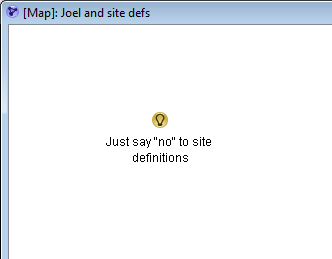
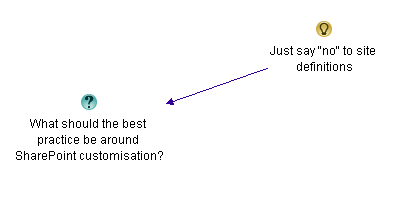
Joel started out with a nice, controversial statement, along the lines of “Just Say NO to Custom Site Definitions“. Sounds like an idea to me, so let’s get it into the map.

image

One of the rules in IBIS is that an idea is always an answer to a question. Sometimes that question can take a little while to tease out (and you may change the question a couple of times before it feels right), but it is very important that the root question be defined.

Why is this important? Well look at what happened – Joel eventually had to *clarify* his original post because of the fact that readers had different interpretations of the question he was answering. As a result, some missed the real message that he was trying to get across.

“After a lengthy conversation with all our favorite SharePoint MVPs from Andrew Connell, Robert Bogue, Todd Baginski… I need to soften some of the language here, but emphasizing in clarity what I’m concerned about in the spirit of this post”

Now, we have Joel’s “Just say no” comment captured as an idea. When you start using IBIS, you quickly find that a “comment” can take a couple of forms. As previously stated, it can simply be an idea, that is answering a question that hasn’t been specifically asked yet, but it can be a ‘bundled up’ question, idea and a supporting argument in one terse (or extremely verbose) statement.

Let’s think about the inferred question that Joel’s idea is answering. My guess is that the root question is along the lines of “What should the best practice be around SharePoint customisation?” I have worded the question quite deliberately and I’ll explain the logic a little later. I represent this new question on the issue map using the following IBIS notation.

image

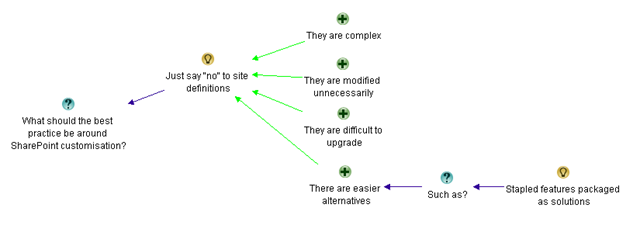
Joel made various arguments to support his position. Let’s see if we can disentangle his very first supporting paragraph into IBIS artifacts and issue based structure.

If you don’t need to modify [site definitions] don’t do it.  Consider them product code!  If you need to build something, do it in a feature, staple the feature and deploy it in a solution.  Site Templates as tough to work with as they are, are better than custom site definitions.  Even the use of site templates is controversial in the community due to the customizations that it causes in the database.  From an upgrade perspective, it’s Much Much easier to upgrade a site based on a site template than it is a site based on a custom site definition.  Now a site template based on a custom site definition is just as bad if not worse

image

Above I have created 4 supporting arguments to support Joel’s idea of not using site definitions.

  • The statement “Site Templates as tough to work with as they are, are better than custom site definitions”, is really using the example of site templates to highlight that site definitions are complex.
  • “If you don’t need to modify them don’t do it.  Consider them product code!” is to me arguing that site definitions are used or modified unnecessarily.
  • “From an upgrade perspective, it’s Much Much easier to upgrade a site based on a site template than it is a site based on a custom site definition” is another example based proposition that site definitions are difficult to upgrade.
  • Finally, the suggestion “If you need to build something, do it in a feature, staple the feature and deploy it in a solution” is in fact one of those “bundled” statements that I mentioned before. Here, Joel is making a supporting argument that there are alternatives, and goes onto suggest an alternative. I captured that in IBIS by breaking up the statement “If you need to build something, do it in a feature, staple the feature and deploy it in a solution” into the supporting argument (pro) “There are easier alternatives”, followed up by a question “Such as” and the idea of using stapled features packaged as solutions.

Objectification is the name of the game!

Now step back and take a look at what we have done here. We have two major advantages over the original statement.

Firstly, participants now do not have to read a potentially convoluted set of paragraphs where the question being answered is subject to interpretation. The issue map above is simple to read, logical and easy to understand. Secondly, and most critically, I have objectified the whole thing. When you look at this map, it is pretty hard to get all fired up and defensive at it, because the root question that I placed onto the map is in effect, calling for ideas, of which Joel’s is simply one of those ideas.

Cool huh? Shall we do some more Issue Mapping?

Back to the map…

Here is Joel’s next 3 statements and the updated map

Ok so it’s easier to modify an existing site definition.  WRONG Answer!  You just broke the out of the box product and you will have a hard time getting support.  Maybe the dev support people will help you, but poor customer.  Poor support.  Poor everyone who has to pay to try to undo what’s taken place.

Don’t modify the out of the box site definitions unless you are following some MSDN article…  Even then, make sure there is no other way and you know what you are doing so you can back it out.  Always back it up.  You may even consider backing it up to disk so you’ve got it for later.

I had to listen to customers crying about what consultants came in and did to their environments in the name of “Good SharePoint Development.”  If you can, leave the site def alone, and package up your code so it can be added and later removed or replaced at least.

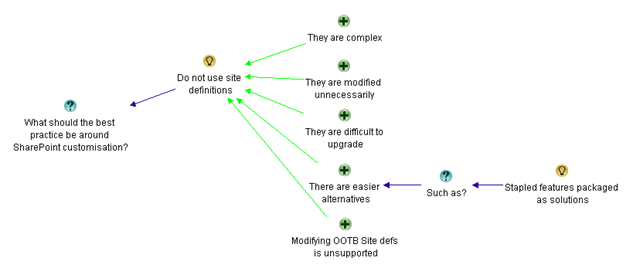
If you look at the map below, all I have done is reworded Joel’s idea and added a single additional supporting argument. Seems to me that the above three statements were really saying the same thing, that modifying the out of the box site definitions are unsupported by Microsoft. The rest of the arguments still fit within the first four that I captured previously.

image

I need someone to give me a list of reasons WHY you need to mess around with the site definitions.  I’ve had a couple of devs take me up on it, but I still think it’s WAY better if you just leave it alone and pretend like you can’t.  It will keep you honest and it will make upgrade and support TONS easier.

You’ve recently seen me in favour of client side code running server side elsewhere.  That’s great.  See if you can take things to a higher level and go with a zero server footprint deployment.  Or go with Off the shelf code where you get support for upgrade from an outside company with assurance.

I’m not totally against custom code, but I do want to see it thought through.

I’m sure nearly all SharePoint Dev classes have info on creating custom site definitions.  You may even have something in the certification test on them.

Any SharePoint developer can create a custom site definition, but the challenge is to see if they can fulfill those same requirements without using a custom site definition (The albatross around an admins neck).

Worried about users turning off the features?  Make an STSADM extension for provisioning your special site that activates the hidden feature.  Or consider feature stapling.  Get creative and think outside the V2 Box.  If you’re building custom site definitions on a regular basis you haven’t learned how to do things in the new world.

Now things get interesting. To me, Joel actually contradicts himself a little without realising. We started out with the premise of “Just say ‘no’ to site definitions”, but here he is actually adding *more* good ideas around best practices for customising SharePoint sites and less about why you should say no to site definitions. Example?

  • “See if you can take things to a higher level and go with a zero server footprint deployment”
  • “Go with Off the shelf code where you get support for upgrade from an outside company with assurance”
  • “challenge is to see if they can fulfill those same requirements without using a custom site definition”

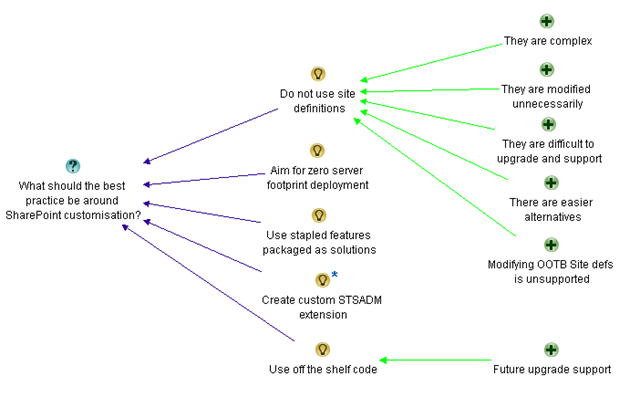
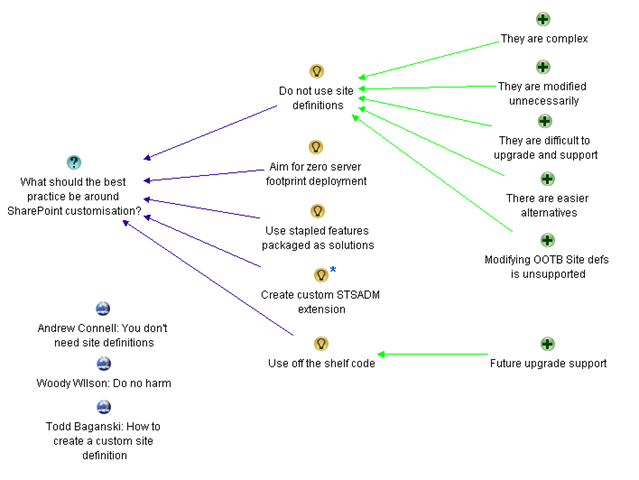
Remember that we now have a clear root question “What should the best practice be around SharePoint customisation?”.

I also adjusted the “They are difficult to upgrade” supporting argument to “They are difficult to upgrade and support”, acknowledging Joel’s “It will keep you honest and it will make upgrade and support TONS easier” comment.

Finally, Joel has actually offered us up two more alternative ideas, an STSADM extension, off-the-shelf code and he also mentioned again the option for feature stapling. I decided to capture these as separate ideas now and remove the “such as” argumentation that I previously used.

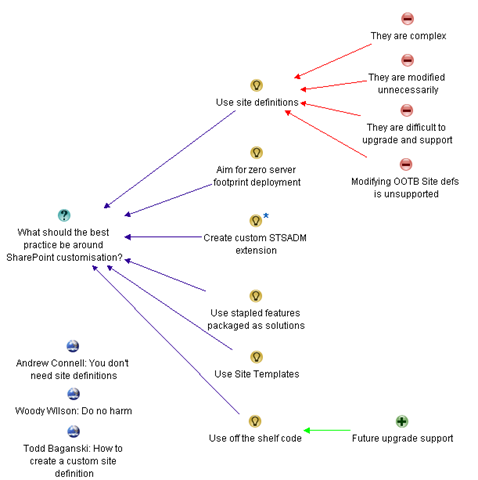
Below is my updated map that I think reflects where we are so far.

image

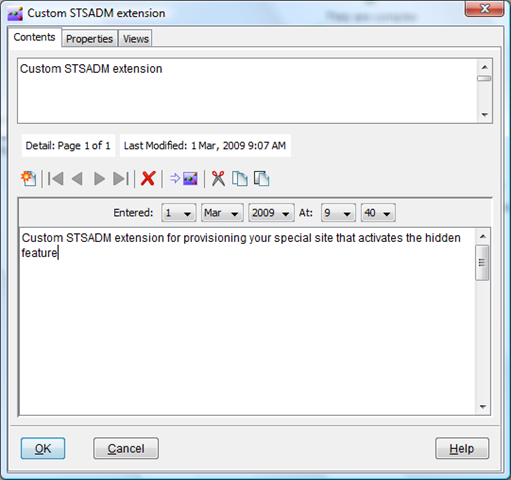
If you are *really* observant, then you may wonder what the little (*) is by the “Custom STSADM extension” node on the above map. All that it means is that I have more detail in that node as shown below.

image

Below is the rest of Joel’s opening salvo

Let’s continue to talk through the trade offs of site templates, feature stapling, and site definitions.  I think this is an important discussion.  In the future I’d love to see it to not be common at all when even hard things need to happen.

Ok, so developers don’t think much about upgrade, but let’s start preaching… Can we do this without custom Site Defs without a note from the teacher that agrees to says it’s a Requirement.  On the hierarchy of Scary Customizations.  The Custom Site Def is nearly the worst.  The only ones worse are customizing the out of the box site definitions and messing with the database and adding your own triggers and “fixing” the inefficient SharePoint stored procedures.

Todd Posts  “How to Create a Custom Site Definition” , but agrees we need to minimize what we do with them (see above).  Good job Todd, my friend, you show up as #1 using keywords… custom site definition)

I do think we need to see more about “How to NOT Create a Custom Site Definition” or

You don’t need to use Site Definitions (This is AC’s Love and the discussion) please point your devs to this one.  I continue to plan to point customers and developers to that one.

If you’re a lost developer or even one that’s looking to go through a ten step program, I recommend the Hippocratic Oath of SharePoint – First Do No Harm  (Thanks Woody).  There’s also SharePoint Dev guidance at by the Patterns & Practices Group. AC talks about it.  I’m anxious to see them provide guidance on when site definitions are necessary (yes as an IT pro, I want to see them used when features and solutions don’t do the job).

The first two paragraphs don’t really offer anything new to what has already been captured. But he then refers to Todd, Andrew and Woody’s posts. I have incorporated those URL’s into my map as reference material. If Joel had paraphrased specifically what their recommendations were, I would have created more idea or argument nodes in the map but for now, it if sufficient to simply reference those maps without linking them anywhere yet.

Remember, ideas can often “sit out there” for a while, before being worked into a cohesive issue map.

image

Conclusion

I believe that this issue map, as it stands, has captured the essence of Joel’s arguments thus far. As you might have guessed, part 5 is going to continue to dissect the site definition debate and continue to build out this issue map. As we delve deeper, the map will get frequently restructured. As a result, there will be lots of pretty map pictures. So, for all you readers who say you read playboy “just for the articles”, you can stop reading this series now :-).

Thanks for reading

Paul Culmsee

www.sevensigma.com.au


The one best-practice to rule them all – Part 3

Gollum the Ring (2)

This is the third post in a series that focuses on what I think is the Holy Grail of project success – particularly SharePoint projects. Like everybody else, I am a product of my experiences, and one of these experiences was a project that included one of my greatest career teachers – “SharePoint-vs-Skype guy”. If you have not yet heard of this luminary of SharePoint folklore, then I suggest you go back to Part 1 of this series and start there. Starting here at part 3 really makes no sense at all…seriously.

I’ve spent two posts explaining my so-called journey to enlightenment and in part 2 of this series, I made the assertion that the *true* root cause of failed projects is usually a lack of shared understanding (and therefore shared commitment) among project participants. This root cause is often misdiagnosed because it is reflected in more visible symptoms such as scope creep, vague/incomplete requirements, mismatched expectations and general all-round unpleasantness. I also spoke about my journey toward “problem fundamentalism”, where I have come to believe very strongly that if you can achieve and maintain that illusive “shared understanding” of a problem among participants, then the actual process that you adopt to implement the solution really doesn’t matter that much. In essence I am echoing the inventor Charles F. Kettering when he once said

A problem well stated is a problem half solved.

Let’s now turn our attention to the “how” of shared understanding.

“Inappropriate methods”

Rittel and Conklin say that many groups fail to recognise that they are dealing with a wicked problem, or a problem that has taken on wicked tendencies. As a result, they apply inappropriate methods to deal with them. There are a few reasons for this, but two major ones stick out in my mind.

The first reason is the “unconscious incompetency” factor, which is training speak for “you do not know what you do not know”. In other words, if you have never heard of wicked problems and their nature, how are you supposed to know how best to deal with them? Thus, like any other form of enlightenment, you have to move from unconsciously incompetent to consciously incompetent (you now know that you do not know) before anything else. This series of posts hopefully is doing the trick here.

The second reason is that the visible signs of wickedness manifest themselves as scope creep, incomplete requirements, wheel reinventing and the like. Since I have already asserted that these are actually symptoms and not the true root cause, the usual methods used to try and deal with them are treating those *symptoms* and not the true cause. At the very least, traditional techniques are inappropriate and at the very worst, they are going to make things significantly worse!

Jeff Conklin recently said this about shared commitment:

The ‘Holy Grail’ of effective collaboration is creating shared understanding, which is a precursor to shared commitment. If you accept that the crux of effective action is agreeing on what the problem is, then the challenge for organizations is coming to a shared understanding about what their particular dilemma is. Plenty has been written about how to get people ‘on board’ and create buy-in for a strategy; but the business of how to craft shared understanding – a deep and robust understanding of the circumstances – hasn’t been well understood. Shared understanding means that the stakeholders understand each other’s positions well enough to have intelligent dialogue about their different interpretations of the problem, and to exercise collective intelligence about how to solve it.

With Jeff’s quote in mind, let’s take a look at these traditional techniques and see how guilty we all are of using them 🙂 .

It’s the process stupid!

It is almost universal to blame all of the world’s faults on “process”. I went through this line of thinking as I was off in my “theory cave”, trying to make sense of “SharePoint vs Skype” guy and other mysteries of life. What logically follows from this is usually the implementation of some sort of best-practice methodology, in the guise of program or project management office. This in turn creates a lot of extra rigour around the activities and processes around *solving* problems. Don’t get me wrong. Process, structure and consistency are actually critical, but problem wickedness and shared understanding are in the *sensemaking* space. The problem is that most best-practice standards and methodologies are very much focused in the *solution space* and tend to work on a presumption of more shared understanding than is actually the case. Again, this is due to the focus on treating the symptoms of problem wickedness. For example: “You have a scope change? Well, let’s fill out a change request form then”.

As a result, the whole sensemaking half of the puzzle is entirely missing!

CleverWorkarounds’ Hindsight Rating: This is why a lot of SharePoint governance plans and information architecture exercises are misfocused or simply miss the point.

Nail the scope, baby!

The other common way to try and tame things is to restrict or lock down the scope. I’m sure all readers have engaged in this. The idea being that if we solve this smaller, more constrained bit of the problem, we can then solve the harder bits later. The great flaw in this logic is exposed once you understand the symbiotic relationship between problems and their solutions that I spoke about in part 2. To recap, each time you think of a potential solution, you will always have an effect on your understanding of the problem. This was Rittel’s first characteristic of a wicked problem and it fed the endless loop of the second wicked problem characteristic – the “no stopping rule”. Therefore, by restricting scope and implementing a smaller subset, you will likely significantly change the understanding of the problem among the participants to the point where you can be in an even more fragmented position than you were in the first place.

In other words, the goalposts have moved in the meantime and the scope is no longer relevant. Stakeholders with hindsight question the very logic of that original scope restriction!

CleverWorkarounds’ Hindsight Rating: It’s so easy in hindsight 🙂

The umpire is always right, right?

Sometimes a group will become so fragmented in their understanding of a problem and therefore become completely polarised on the various solutions. The positions become so intractable for some that even to talk about other options, gives those options more credence than deserved. For example, to an ardent mac or linux fanboy, Microsoft are so evil and nasty that you should not use their products like … ever, dude!

When this occurs, usually after a long, arduous and spiteful process of trying to reach consensus, parties will often give the problem to a “higher source” and agree to abide by their decision. This could be your mother, the CEO, or the International Court of Justice in the Hague. The point is that the decision process is transferred from many to a few. In doing so, we rely on the knowledge, expertise and authority of that higher source.

This does tend to speed things along because when buried in the mud of analysis paralysis (symptom of endless looping between problem and solution), the desire to “shut-up and make a decision already” can be very strong. The tradeoff with this approach however, is that the decision makers themselves are inherently subjective and may disregard what some see as critical considerations. Since this is a win/lose proposition, stakeholders can become disenfranchised and although the decision has been made, there is no true shared commitment to implementing that decision.

CleverWorkarounds’ Hindsight Rating: If there is no shared commitment then it doesn’t matter how technically valid the solution is. It’s still dead.

Selling Ice to Eskimos

Many organisations (and in particular, governments) use a competition based method to deal with complex problems. Just like the previous example with entrenched, seemingly intractable positions, outcome will be determined by the forces of competition. The theory is that the best ideas will stand up to scrutiny and rigour and via a process of natural selection, the best will survive.

This method of competition between potential solutions, and the stakeholders that propose them actually has some distinct benefits. For example, it can foster innovation, sharpen the sensemaking focus of participants and provide good solution choices.

Unfortunately, as with all forms of competition, someone has to lose, and as a result, people do not always like to play fair. Whether it is Olympic athletes drugging themselves with steroids or certain corporations taking illegal advantage of their dominant market position, competition is often a very dirty game. A great case in point is the debate around Intelligent Design. It is argued by some that intelligent design is a scientific theory and should be taught in schools. But critics argue that the concept is simply an ingenious way to get around the 1987 US Supreme court ruling that creationism based science being taught in science in public schools violated the constitution, because it advanced a particular religion. Whether the latter view is right or not, it is still a great case study in how the rules of the game can be manipulated.

CleverWorkarounds’ Hindsight Rating: Marketing has a lot to answer for!

The paradox of shared understanding

Given that complex problems have a lot of interlocking and multi-causal factors, combined with the social complexity of multiple stakeholders with different world views, is it any wonder that traditional methods of reining in haywire projects are largely ineffectual? Traditional thinking across many disciplines suggests that problem solving is a linear process. Whether you are trying to work out where to put a freeway offramp or install a SharePoint internet site, the process would usually start by defining the problem, gathering data, analysing that data and then planning and implementation of the solution. Call it “waterfall”, or the “scientific method” or whatever, this approach has been around since… forever.

I wrote in more detail about the perils of waterfall in the project fail series in the section “how we really solve problems”.

But here is the problem with that approach. Those complex, interlocking issues and social complexity cause significant differences in opinion on the best solution, yet we need all of the diverse views to really gain a true, deep understanding of the problem and obtain the critical shared commitment that we need. The “no stopping rule” means that it is exceedingly difficult to determine when participants have *sufficiently* defined the problem, gathered data or formulated a solution.
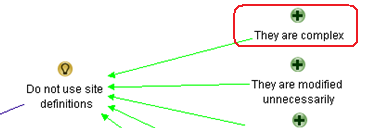
So, how can we reconcile this paradox?

Is it possible to have a holistic, systems approach to examining the deep structure of an issue, that somehow allows us all to see the illusive big picture, without the inefficiency of “analysis paralysis” and the endless loop of the “no stopping rule”? (not to mention and the other nine characteristics of wickedness that Rittel identified). How can we, as a diverse group of stakeholders, fully explore a problem and gain the deep understanding of an issue without social complexity and those wicked factors derailing everything?
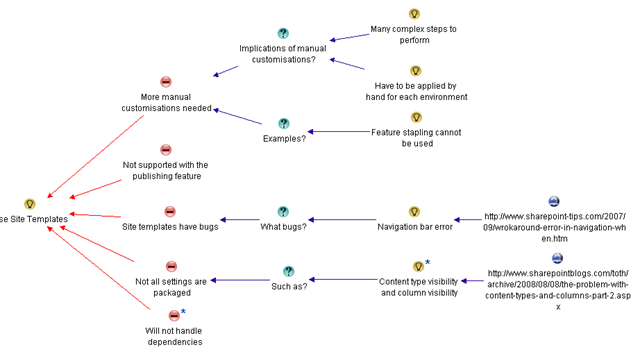
This is a question that Horst Rittel spent a lot of time thinking about and by 1970, had developed a potential answer. In part 4 I will tell you what his answer was and what it has now become, thanks to Jeff Conklin.


Thanks for reading

Paul Culmsee


« Previous PageNext Page »

Today is: Tuesday 19 May 2026 -