Back to Cleverworkarounds mainpage
 

More SharePoint Governance, Information Architecture and *Sensemaking* Classes Planned

imageHi all

A big chunk of last year had me off under a metaphorical mushroom, putting together several days of courseware on the topic of SharePoint Governance and Information Architecture. My take on these topics are influenced from some odd places, and the course drew on a lot of the non IT work that I do, that involves collaboration on some very complex problems indeed.

In November and December of 2010, we took this “on the road”, so to speak, firstly in Dublin, then London and Sydney. The courses were sold out and feedback was terrific. Here are a few choice quotes (check out the hyperlinks for full reviews)


“Did it meet my expectations? Well I’d have to say that it far exceeded them. There had obviously been a large amount of effort in preparing the courseware and modules. They covered the important missing links currently absent from the Microsoft and traditional training courses” – Wes Hackett.

“I’ve just finished the second day of the SharePoint 2010 Governance and Information Architecture Master Class presented by Paul Culmsee with the support of Andrew Woodward . I can wholeheartedly say it was one of the best courses I’ve attended both in content and presentation style and they deserve a lot of credit for putting together a fantastic course. Paul in particular has put a huge amount of effort into the slidedeck, sample documents and enormous manual (almost 500 pages worth!) let alone all the great additional insight he could provide in person over both days” – Brendan Newell

“Finally …. after 12 years in the IT industry a course which covers some of the fundamental issues governing project success.   This course is a real eye opener and a must for any IT professional involved in project planning and delivery” -  Stephen McWilliams

“I just came back from the best technology training I have had in years: a world-first Microsoft SharePoint Elite Information Architecture course designed and delivered by Paul Culmsee. It has taught me a great deal across ALL facets of the day-to-day work that I do as a SharePoint architect” – Jess Kim

Based on this and similar feedback, we are going to do it again. Locations confirmed so far are London (#SPIAUK), Sydney (#SPIAAU) and Wellington (#SPIANZ) in February and March 2011 and in the pipeline is The Netherlands (#SPIANL) and at least a couple of US cities!

In addition to the unique content on these classes, I am honoured to announce that I am now authorised to teach the official Cognexus Issue Mapping courseware – the only non Cognexus Dialogue Mapping practitioner authorised to do so. As such, we will be running the inaugural Issue Mapping class in London in late February as well (wohoo!)

So, here are the details for each location:

  • (Register now) February 21, 2011, London   #SPIAUK SharePoint Governance and Information Architecture Master Class (Download Flyer)
  • (Register now) February 23, 2011, London #IBISUK Issue Mapping Master Class (Download Flyer)
  • (Register now) March 10, 2011, Sydney  #SPIAAU SharePoint Governance and Information Architecture Master Class (Download Flyer)
  • (Register now)March 14, 2011, Wellington #SPIANZ SharePoint Governance and Information Architecture Master Class (Download Flyer)
  • (Register soon) May 9, 2011, Utrecht, Netherlands (watch this space)
  • Wondering what to expect in these classes? Read on!

     SharePoint Governance and Information Architecture Master Class. 2 full days of real world, examples knowledge and techniques

    Most people understand that deploying SharePoint is much more than getting it installed. Despite this, current SharePoint governance documentation abounds in service delivery aspects. However, just because your system is rock solid, stable, well documented and governed through good process, there is absolutely no guarantee of success. Similarly, if Information Architecture for SharePoint was as easy as putting together lists, libraries and metadata the right way, then why doesn’t Microsoft publish the obvious best practices?

    In fact, the secret to a successful SharePoint project is an area that the governance documentation barely touches.

    This master class pinpoints the critical success factors for SharePoint governance and Information Architecture and rectifies this blind spot. Paul‘s style takes an ironic and subversive take on how SharePoint governance really works within organisations, while presenting a model and the tools necessary get it right.

    Drawing on inspiration from many diverse sources, disciplines and case studies, Paul has distilled the “what” and “how” of governance down a simple and accessible, yet rigorous and comprehensive set of tools and methods that organisations large and small can utilise to achieve the level of commitment required to see SharePoint become successful.

    Master class aims:

    • Present SharePoint governance and Information Architecture in a new light – focus on the “blind spots” where the current published material is inadequate
    • Cover lessons learned from Paul’s non IT work as a facilitator and sensemaker in complex large scale projects
    • Examine the latest trends in the information landscape for industry and government and review studies that inform governance and Information Architecture efforts
    • Present an alternative approach to business-as-usual SharePoint governance planning that focuses on real collaboration
    • Provide quality information that is rigorous yet accessible, entertaining and interesting

    Master class outcomes:

    • Understand the SharePoint governance lens beyond an IT service delivery focus
    • Develop your ‘wicked problem’ radar and apply appropriate governance practices, tools and techniques accordingly
    • Learn how to align SharePoint projects to broad organisational goals, avoid chasing platitudes and ensure that the problem being solved is the right problem
    • Learn how to account for cognitive bias and utilise tools and techniques that help stakeholders align to a common vision
    • Understand the relationship between governance and assurance, why both are needed and how they affect innovation and user engagement
    • Understand the underlying, often hidden forces of organisational chaos that underpins projects like SharePoint
    • Understand the key challenges and opportunities that SharePoint presents for Information Architecture
    • Learn how to document your information architecture
    • Practical knowledge: Add lots more tools to your governance and IA toolkit!

    Course Structure: The course is split into 7 modules, run across the two days.

    Module 1: SharePoint Governance f-Laws 1-17:

    Module 1 is all about setting context in the form of clearing some misconceptions about the often muddy topic of SharePoint governance. This module sheds some light onto these less visible SharePoint governance factors in the form of Governance f-Laws, which will also help to provide the context for the rest of this course

    • Why users don’t know what they want
    • The danger of platitudes
    • Why IT doesn’t get it
    • The adaptive challenge – how to govern SharePoint for the hidden organisation
    • The true forces of organisational chaos
    • Wicked problems and how to spot them
    • The myth of best practices and how to determine when a “practice” is really best

    Module 2: The Shared Understanding Toolkit – part 1:

    Module 2 pinpoints the SharePoint governance blind spot and introduces the Seven Sigma Shared Understanding Toolkit to counter it. The toolkit is a suite of tools, patterns and practices that can be used to improve SharePoint outcomes. This module builds upon the f-laws of module 1 and specifically examines the “what” and “why” questions of SharePoint Governance. Areas covered include how to identify particular types of problems, how to align the diverse goals of stakeholders, leverage problem structuring methods and constructing a solid business case.

    Module 3: The Shared Understanding Toolkit – part 2:

    Module 3 continues the Seven Sigma Shared Understanding Toolkit, and focuses on the foundation of “what” and “why” by examining the “who” and “how”. Areas covered include aligning stakeholder expectations, priorities and focus areas and building this alignment into a governance structure and written governance plan that actually make sense and that people will read. We round off by examining user engagement/stakeholder communication and training strategy.

    Module 4: Information Architecture trends, lessons learned and key SharePoint challenges

    Module 4 examines the hidden costs of poor information management practices, as well as some of the trends that are impacting on Information Architecture and the strategic direction of Microsoft as it develops the SharePoint road map. We will also examine the results from what other organisations have attempted and their lessons learned. We then distil those lessons learned into some the fundamental tenants of modern information architecture and finish off by examining the key SharePoint challenges from a technical, strategic and organisational viewpoint.

    Module 5: Information organisation and facets of collaboration

    Module 5 dives deeper into the core Information Architecture topics of information structure and organisation. We explore the various facets of enterprise collaboration and identify common Information Architecture mistakes and the strategies to avoid making them.

    Module 6: Information Seeking, Search and metadata.

    Module 6 examines the factors that affect how users seek information and how they manifest in terms of patterns of use. Building upon the facets of collaboration of module 5, we examine several strategies to improving SharePoint search and navigation. We then turn our attention to taxonomy and metadata, and what SharePoint 2010 has to offer in terms of managed metadata

    Module 7: Shared understanding and visual representation – documenting your Information Architecture

    Module 7 returns to the theme of governance in the sense of communicating your information architecture through visual or written form. To achieve shared understanding among participants, we need to document our designs in various forms for various audiences.

    Putting it all together: From vision to execution

    As a take home, we will also supply a USB stick for attendees with a sample performance framework, governance plan, SharePoint ROI calculator (Spreadsheet), sample mind maps of Information Architecture. These tools are the result of years of continual development and refinement “out in the field” and until now have never been released to the public.

    Note: The workshop sessions will be hands on, we provide all of the tools and samples needed but please bring your own laptop.

    Issue Mapping Master Class. Your path towards shared understanding and shared commitment

    “Some problems are so complex that you have to be highly intelligent and well informed just to be undecided about them.” Laurence J. Peter

    Presented by: Paul Culmsee

    Courseware by: Cognexus Institute and Seven Sigma

    “Not another $#%@*$ meeting!”

    All of us have felt the frustration of walking from yet another unproductive meeting, wondering where the agenda went. Yet, as problems become more complex, meetings are still the place where critical strategic decisions are made.

    ibis-map

    What is Issue Mapping?

    Issue-Based Information Systems (IBIS) is a sense-making framework used to support group discussions to assist all involved to come to a shared understanding. It visually maps participants’ points of views, problems voiced, the rationale and reasons leading up to decision(s). The maps can be easily read and understood by everyone, even by those not part of the discussion group.

    Why Issue Mapping?

    • Maps detailed rationale behind decision-making as well as the decision; maps the thinking process of the group
    • Concentrates on pros and cons to an idea, encourages and explores all views, taking the sting out of differences
    • Represents and clarifies diverse points of views, conflicting interpretations and goals, inconsistent information and other forms of complexity
    • Everyone gets a chance to speak, if they want. People are heard and contributions are acknowledged. Interruptions, repetition and dominance of the loudest decreases
    • Keeps participants on topic because they can visually see the progress of the discussion
    • Keeps everyone’s attention
    • Meeting progress/result can be seen
    • Map helps participants come up with ideas/arguments
    • Visual display of progress to review summary if need so the brain can absorb the bigger picture and appreciate the validity and value of a larger perspective
    • Avoids jumping to easy answers or superficial conclusions
    • Promotes deeper reasoning, rigor and even wisdom
    • Everyone can visually see everything discussed- leaves no room for misunderstandings
    • Documents can easily be attached to map to back up ideas
    • Participants can see effectiveness of mapping and genuine will try to make it more productive

    About Seven Sigma

    Issue Mapping is a life skill that can be applied to many different problem domains and scenarios. Participants will gain proficiency in a craft that can be applied long into the future, to help them and others bring clarity and convergence to the management of complex problems. At Seven Sigma, we practice Issue and Dialogue Mapping routinely and this has brought us many satisfied clients. The Mapping in itself is part of the ‘secret sauce’ that makes Seven Sigma’s reputation renowned.

    Seven Sigma Business Solutions is the only recognised designated partner of Cognexus Institute, founder of the art of Issue Mapping, in the world. We recognise that without reaching shared understanding, you will find yourself at yet another meeting, rehashing the same unresolved problems, listening to the same arguments month after month. Or, if a decision has been made, it has not been followed up to fruition due to lack of commitment/buy-in.

    We are proud to be part of your journey towards shared understanding and shared commitment.

    Master Class aims and outcomes:

    • Be able to create great maps – issue maps that are clear, coherent, and inviting
    • Immediately start using Issue Mapping effectively in your work and life; the class will focus on practical experience and map building
    • Command a rich range of options for publishing and sharing maps
    • Lead with maps: create direction, momentum, and energy with issue maps
    • Quickly and effectively do critical analysis in dynamic situations
    • Organize unstructured information and discover patterns and connections within it
    • Make critical thinking visible for inspection and analysis
    • Recognise early, the symptoms of wicked problems and the forces behind group divergence
    • Recognise the importance of capturing the rationale behind decisions, as well as the decisions themselves
    • Rethink the traditional approach to meetings and decision making
    • Start capturing the rationale leading up to the decisions by using IBIS and Compendium software

    It will also give you a deeper understanding of:

    • The fundamentals of IBIS and Compendium
    • The structural patterns that give clarity and power to issue maps
    • How decision rationale is represented in a map

    This master class will be hands on – please bring your own laptop with Compendium software (freeware) installed.

    Duration: 2 days, with homework after the first day

    Audience: For both IT and non-IT audience; those involved in highly complex projects including leaders, consultants, facilitators, organisational development professionals, change agents, managers and engineers.

    Prerequisite: An open mind geared for shared understanding and shared commitment


    SharePoint Analysts–Stop analysing!

    Michal Pisarek wrote a nice write-up of what makes a good SharePoint Analyst. I feel I have something to offer here, given that I…

    1. am a cynical old bastard
    2. am an opinionated old bastard
    3. have had some opportunities that not too many SharePoint people have had
    4. wrote this post on a plane while suffering jetlag 🙂

    I am going to argue that as a SharePoint ”analyst”, the worst thing you can do is act like an analyst.

    I previously wrote about the identity crisis that Business Analysts have which became apparent to me when I spoke at a BA World Conference last year. The gist of my point in that post came from my observations of a panel discussion on role of a BA within Agile development. I noted that the whole discussion seemed based on an underlying presumption that the role of the BA was to translate between IT and “the business". Agile by its very nature, shifts the ground out from under this assumption which caused a bit of consternation on the part of the panel. My takeaway from this, was that a role does not define the person. The body of knowledge of your discipline (in this case BABOK) is not the one truth. When you think about it, the body of knowledge by definition, consists of the lowest common denominators of a discipline of knowledge – a starting point. This is because the skills that you have built are your skills. Sure, you can write about them, but that only conveys a small dimension of what your skills entail.

    Essentially, if everybody followed the BOK as the source of the truth then all consultancies would look the same. (Thinking about it, now you know why all large and expensive management consulting firms tend to sound the same…hehehe 🙂 )

    image

    The point is that it is the knowledge that you have earned that makes you what you are and what customers want. Knowledge comes from making mistakes, not by confirming your rightness. Therefore, people who practise constant learning by trying things out, challenging their models of reality, always build a hugely valuable corpus of tacit knowledge that is locked up in their brain where knowledge is connected and related in ways that form insight. It is because of this unique insight, that customers rarely want a “Business Analyst”.  They want Joe or Bob because of what Joe or Bob, as individuals, bring to the table. (Kailash writes about this in more detail if I am leaving you scratching your head at this point. I am going to quote him in a reply to Richard Harbridge).

    The point I would like to emphasise, however, is that best practices cannot capture tacit knowledge. Codified best practices (or standards) are therefore necessarily incomplete. One of the things standards don’t tell you is how you should “practice the practice”. Practices have to be customised or adapted to specific organisational contexts before they can be practiced. The process of customisation invariably involves the creation of tacit knowledge to fill in the missing bits. This is why I used the word “rediscover” to describe this process, rather than “customise” (or “adapt”) : the former gives a better sense for the magnitude and type of effort involved whereas the latter suggests that minor tinkering will do the job (which it won’t).

    So, here is a tip. Don’t define your own wellbeing by a role title or adherence to a body of knowledge because, if you do, you will inevitable have an identity crisis. The world simply moves on and with it, the problems that people are trying to solve tend to wriggle out of the domain of any single BOK. Any attempts to resist this will eventually become dogma and then we have “memetic smackdowns” as I describe in this EUSP Post.

    image

    Okay, so now that I have finished a mini rant, I’d like to address the whole “analyst” thing. Don’t get me wrong – it’s not the title of the role I am going to talk about here, but the analyst paradigm itself. That is, the notion that my purpose in life is to take some requirements, go to a back room, spend time “processing” and “synthesising” those requirements, translating away between "IT and “the business”, before formulating a solution for the customer.

    This does not work well with most SharePoint projects! Especially ones that seek to “improve collaboration”.

    Many people fail to see why this is the case, yet given the huge gap between the SharePoint that Microsoft shows you versus what you see on the ground, you would think that it would be kind of obvious. For what it’s worth, understanding why the analyst paradigm is dangerous also neatly explains why IT is generically predisposed to struggling with SharePoint.

    Consider the following projects:

    • Implementing Microsoft Exchange for a global organisation
    • Implementing Active Directory for unified and policy based user and resource management
    • Replacing PBX with a Voice over IP system
    • Upgrading your wide area network from site to site VPN’s to MPLS managed WAN
    • Determining support and escalation procedures for a SharePoint deployment
    • Replacing a Windows XP/Office 2003 desktop environment with Windows 7/Office 2010

    In the above list, if you ask the question “Will users accept and adopt this?” the answer is a fairly clear yes. At the end of the day, no matter what version of Exchange is in, Microsoft Outlook is still Microsoft Outlook. What the user sees is an Inbox and so long as mail comes in and goes out – they are happy. All Active Directory is to a user is a username and password to get to their computer. Irrespective of how clever the routing is in a Voice over IP system or a WAN network, a phone is just a phone. You can plan for support and escalation procedures for SharePoint, but at the end of the day, people will use the SharePoint system because it is the right solution for them. Sure they might get pissed if they have bad technical support, but if the solution is crap then no amount of awesome support structure is going to change this.

    This, my friends, is the realm of the analyst paradigm!

    You see, if you ask me to deploy Active Directory or Exchange, I will ask you a bunch of questions about your number of sites, number of users, communications infrastructure and the like, and I know that users will use it. I actually don’t need to talk to them. Oh sure, someone might do some communications planning, but I don’t need to address user adoption because adoption is already there! People adapted to email, telephone and Microsoft Windows years ago.

    Instead, I can go into a back room, read a bunch of whitepapers and design/deployment guides and blammo. Here is your solution and here is how much I think it will cost. Better still, I can use waterfall style of project methodology because as a specialist, I have done this before and have expertise. I can tell you what needs to be done in considerable detail and break it down into a plan.

    What it all boils down to is that there is a clear relationship between cause and effect, characterised by answering YES to the “If I do this, will users accept and adopt this” test. But most IT departments (and most IT integrators) are going to default to the analyst paradigm because many of their other projects tend to be in the above category. This analysis based mode of project delivery is very much ingrained into the reptile brain of a lot of IT professionals through years of repetition of implementing these types of projects. After all, it’s just IT, right?

    Also, note that many of these type of projects are characterised by being very technically complicated. Some are insanely so and require specialist technical expertise. This is the realm of the supremely skilled person who performs an analyst function with a body of knowledge behind them. The whole industry certification process is built on this fundamental underpinning and works really well with things like Cisco and Microsoft in areas like Exchange, Active Directory and the like.

    Now, consider the following projects or initiatives (I am deliberately picking things where people may disagree with me so go with me, ok).

    • Coming up with an navigational structure for a SharePoint collaborative portal
    • Installing SharePoint to improve collaboration
    • Replacing a folder based file share with a metadata based document repository
    • Designing a new road layout for a local suburb
    • Putting in a new intranet
    • Putting in a records management system
    • Installing a new time tracking system

    In all of these problems, it is difficult to answer yes to the “Will users accept and adopt this” question. Sure, you can go all big stick and say “We will force them to” but that fails the “accept” part of the test. Therein lies the danger for the analyst paradigm. You can go off to the “back room” and use your body of knowledge, read best practices and “analyse” until the cows come home. Until you deliver the solution, you will not know if it will be accepted.  The cause and effect relationship is not clear until after an action has been taken!

    image

    The reason you can’t confidently answer yes is that all of these projects above require adaption on the part of the target audience. Adaption leading to adoption is a hit and miss affair. While we might like to think that we are all rational, clearly we are not. If you want rational, think Dr Spock from Star Trek – and even he got mad sometimes! Office politics and organisational inertia stems from the irrational world. Butt covering by positioning for “blame avoidance” for decisions made by fear and anxiety are commonplace. If you work in a large organisation and listen carefully to a typical meeting, the logic and facts that are spoken out loud are rarely what matters compared to the complex non spoken interplays that go on underneath the words.

    For what it’s worth, I added a non IT example of designing a new road layout for a suburb. A rational analyst might think that residents have to accept the solution by definition because, after all, once a road is in, that’s it. But what typically happens is that residents of that neighbourhood see the plan, petition, form lobby groups and harass the hell out of their local political representatives. If this is enough to make the politician edgy then they will vote the plan down before it ever happens. Sure it might have been a good plan, but it’s gone now and the chances of further buy-in are greatly reduced.

    The pure analyst is often taking a rational approach to an irrational problem space. Sorry folks – this is simply asking for trouble. Like the politician who does what they think will keep them in power versus what is logical shows the rational world does not always get a good look in. A good example in SharePoint land, is the “metadata is good and folders are bad” thing. Any metadata fanboy with this mantra often find the hidden organisation will beg to differ 🙂

    So, what do we do then?

    image

    The facilitator paradigm instead aims to elicit resolution of problems using dialogue between stakeholders by achieving a greater degree of shared perception of the problem situation. Unlike the analyst paradigm, there is no back-room approach as such. By definition, we need to collaborate to do this. (Fancy that, eh? Collaborating to deliver a collaborative platform – who would have thought!)

    Now, I am not talking about facilitation in the classic sense with everybody sitting in a room in a circle and plays team building games. Some of the best project managers and business analysts I have met are facilitators without necessarily knowing it. What I mean by facilitation is that our starting point is to leverage the wisdom of the crowd, by creating an environment conducive to participants being able to surface the irrational as well as the rational. Only in this way, can we come to a shared understanding of a problem and what should be done about it.

    I previously termed this the holding environment, and it really is. A great business analyst or project manager knows this instinctively, and uses many tools (as well as some coercion and sometimes their own ego surrendering) to bring it about.

    If you take anything away from this post, remember this. Anytime you cannot confidently answer the “Will users accept and adopt this” question, it is highly likely that not all users see that there is even a problem yet. Therefore, expecting people to magically buy-in and adapt when they don’t recognise the problem is never going to fly. Like trying to get a Darwinist to accept that intelligent design should be taught in schools, someone who does not believe in it to begin with, is not going to easily buy into a solution that requires them to change their beliefs and therefore behaviour. 

    Conclusion

    When you think about it (rationally!) we usually look at SharePoint as an enabling technology that can address a legacy of poor collaboration and information management. Yet, how can the world of the analyst work out if their solution will create the very same legacy without all stakeholders being on the same page?

    So remember, in a project where the cause and effect relationship is not clear, use the facilitator paradigm and stop being such a bloody analyst!

    Thanks for reading. Comments most welcomed Smile.

    Paul Culmsee

    www.sevensigma.com.au


    In 2011, I will be posting sections of my Governance and Information Master Class here. Much of the content consists of mental models, alternative frames of reference, pattern and practices as well as other tools and methods, specifically for the facilitator paradigm. This is my interest area and feel the analyst paradigm is already well represented in the SharePoint space.


    A different kind of SharePoint Governance Master Class in London and Dublin

    The background

    Over the last three years, my career trajectory had altered somewhat where I spent half my time as a SharePoint practitioner, doing all of the things that us SharePoint practitioners do, and the other half was spent in a role that I would call sensemaking. Essentially group facilitation work, on some highly complex, non IT problems. These ranged from areas such as city planning, (envisioning and community engagement) to infrastructure delivery (think freeways, schools and hospitals), to mental health, team and relationship building, performance management, board meetings and various other scenarios.

    Imagine how much of a different world this is, where a group is coming together from often very different backgrounds and base positions, to come to grips with a complex set of interlocking problems and somehow try and align enough to move forward. We cannot simply throw a “SharePoint” at these problems and think it will all be better. By their very nature, we have to collaborate on them to move forward – true collaboration in all its messy, sometimes frustrating glory.

    As a result of this experience, I’ve also learned many highly effective collaborative techniques and approaches that I have never seen used in my 20+ years of being an IT practitioner. Additionally, I’ve had the opportunity to work with (and still do), some highly skilled people who I learned a huge amount from. This is “standing on the shoulders of giants” stuff. As you can imagine, this new learning has had a significant effect on how Seven Sigma now diagnoses and approaches SharePoint projects and has altered the lens through which I view problem solving with SharePoint.

    It also provided me the means to pinpoint a giant blind spot in the SharePoint governance material that’s out there, and what to do about it.

    The first catalyst – back injury

    In January this year, my family and I went on a short holiday, down to the wine country of Western Australia called the Margaret River region. On the very first day of that trip, I was at the beach, watching my kids run amok, when I totally put my back out (*sigh* such an old man). Needless to say, I could barely move for the next week or two after. My family, ever concerned for my welfare, promptly left me behind at the chalet and took off each day to sample wines, food and generally do the things that tourists do.

    Left to my own devices, and not overly mobile I had little to do but ponder – and ponder I did (even more than my usual pondering – so this was an Olympic class ponder). Reflecting on all of my learning and experiences from sensemaking work, my use of it within SharePoint projects, as well as the subsequent voracious reading in a variety of topics, I came to realise that SharePoint governance is looked through a lens that clouds some of the most critical success factors. I knew exactly how to lift that fog, and had a vision for a holistic view of SharePoint governance that at the same time, simplifies it and makes it easy for people to collectively understand.

    So I set to work, distilling all of this learning and experience and put it into something coherent, rigorous and accessible. After all, SharePoint is a tool that is an enabler for “improved collaboration”, and I had spent half of my time on deeply collaborative non IT scenarios where to my knowledge, no other SharePoint practitioner has done so. Since sensemaking lies in all that ‘softer’ stuff that traditionally IT is a bit weaker on, I thought I could add some dimensions to SharePoint governance in a way that could be made accessible, practical and useful.

    By the end of that week I still had a sore back, but I had the core of what I wanted to do worked out, and I knew that it would be a rather large undertaking to finish it (if it ever could be finished).

    The second catalyst – Beyond Best Practices

    I also commenced writing a non SharePoint book on this topic area with Kailash Awati from the Eight to Late blog, called Beyond Best Practices. This book examines why most best practices don’t work and what can be done about them. The plethora of tools, systems and best practices that are generally used to tackle organisational problems rarely help and when people apply these methods, they often end up solving the wrong problem. After all, if best practices were best, then we would all follow them and projects would be delivered on time, on budget and with deliriously happy stakeholders right?

    The work and research that has gone into this book has been significant. We studied the work of many people who have recognised and written about this, as well as many case studies. The problem these authors had is that these works challenged many widely accepted views, patterns and practices of various managerial disciplines. As a result these ideas have been rejected, ignored or considered outright heretical, and thus languish (largely unread) in journals. The recent emergence of anything x2.0 and a renewed focus on collaboration might seem radical or new for some, but these early authors were espousing very similar things many years ago.

    The third catalyst – 3grow

    Some time later in the year, 3grow asked me to develop a 4 day SharePoint 2010 Governance and Information Architecture course for Microsoft NZ’s Elite program. I agreed and used my “core” material, as well as some Beyond Best Practice ideas to develop the course. Information Architecture is a bloody tough course to write. It would be easy to cheat and just do a feature dump of every building block that SharePoint has to offer and call that Information Architecture. But that’s the science and not the art – and the science is easy to write about. From my experience, IA is not that much different to the sensemaking work that I do, so I had a very different foundation to base the entire course from.

    The IA course took 450 man hours to write and produced an 800 page manual (and just about killed me in the process), but the feedback from attendees surpassed all expectations.  This motivated me to complete the vision I originally had for a better approach to SharePoint governance and this has now been completed as well (with another 200 pages and a CD full of samples and other goodies).

    The result

    I have distilled all of this work into a master class format, which ranges from 1 to 5 days, suited to Business Analysts, Project and Program Managers, Enterprise and Information Architects, IT Managers and those in strategic roles who have to bridge the gap between organisational aspirations and the effective delivery of SharePoint solutions. I speak the way I write, so if the cleverworkarounds writing style works for you, then you will probably enjoy the manner in which the material is presented. I like rigour, but I also like to keep people awake! 🙂

    One of my pet hates is when the course manual is just a printout of the slide deck with space for notes. In this master class, the manual is a book in itself and covers additional topic areas in a deeper level of detail from the class. So you will have some nice bedtime reading after attending.

    Andrew Woodward has been a long time collaborator on this work, before we formalised this collaboration with the SamePage Alliance, we had discussed running a master class session in the UK on this material. At the same time, thanks to Michael Sampson, an opportunity arose to conduct a workshop in Ireland. As a result, you have an opportunity to be a part of these events.

    Dublin

    Storm_long_banner

    The first event is terrific as it is a free event in Dublin on November 17, hosted by Storm Technology a Microsoft Gold Partner in Dublin. As a result of the event being free, it is by invitation only and numbers are limited. This is a one day event, focussing on the SharePoint Governance blind spots and what to do about them, but also wicked problems and Dialogue Mapping, as well as learning to look at SharePoint from outside the IT lens, and translate its benefits to a wider audience (ie “Learn to speak to your CFO”).

    So if you are interested in learning how to view SharePoint governance in a new light, and are tired of the governance material that rehashes the same tired old approaches that give you a mountain of work to do that still doesn’t change results, then register your interest with Rosemary at the email address in the image above ASAP and she can reserve a spot for you. We will supply a 200 page manual, as well as a CD of sample material for attendees, including a detailed governance plan.

    London

    SamePage-Rect-BannerMed

    In London on November 22 and 23, I will be running a two day master class along side Andrew Woodward on SharePoint Governance and Information Architecture. The first day is similar to the Ireland event, where we focus on governance holistically, shattering a few misconceptions and seeing things in a different light, before switching focus to various facets of Information Architecture for SharePoint. In essence, I have taken the detail of the 4 days of the New Zealand Elite course and created a single day version (no mean feat by the way).

    Participants on this course will receive a 400 page manual, chock full of SharePoint Governance and Information Architecture goodness, as well as a CD/USB of sample material such as a SharePoint governance plan, as well as IA maps of various types. Unlike Ireland, this is an open event, available to anyone, and you can find more detail and register at the eventbrite site http://spiamasterclass.eventbrite.com/. In case you are wondering, this event is non technical. Whether you have little hands on experience with SharePoint or a deep knowledge, you will find a lot of value in this event for the very reason that the blind spots I focus on are kind of universally applicable irrespective of your role.

    Much of what you will learn is applicable for many projects, beyond SharePoint and you will come away with a slew of new approaches to handle complex projects in general.

    So if you are in the UK or somewhere in Europe, look us up. It will be a unique event, and Andrew and I are very much looking forward to seeing you there!

    Thanks for reading

    Paul Culmsee

    www.sevensigma.com.au


    Share2010 – A new kind of SharePoint conference

    Having spoken at the odd SharePoint event over the last three years or so, I’ve always lamented on the lack of a purely business focused SharePoint conference. Whilst the conferences I attend do cater for non technology oriented topics – particularly the best practice conferences, there is usually an equal or greater proportion of content aimed at the nerdier aspects of SharePoint.

    Sadly though, nerds don’t often sign the cheques. Those who do sign them, are rarely interested in deploying SharePoint via Powershell, or why sandboxed solutions are a good thing or not. They are looking for the ways and means to take SharePoint (the enabler) and work out what the hell SharePoint is enabling and to work out if it has done so properly.

    Some time back, via a reference from Kristian Kalsing, I received a call from the organisers of the forthcoming Share2010 in Sydney, asking for feedback on what I would like to see in a good business focused SharePoint conference. In speaking to Steve from Eventful Management and his team, it was clear that something unique was in the making here.

    Fast forward several months and after a whole lot of market research and round-table discussions from SharePoint customers (including a couple of our clients), we have a conference that puts many critical topics close to my heart, front and centre, namely governance, user engagement and adaption, business process automation and workflow; information architecture; collaboration; document and records management; resourcing and support; social networking; ROI; security and so on.

    I am honoured that I was also asked to participate as a speaker at this conference, along side the likes of Dux Sy, Erica Toelle, Andrew Jolly and Michael Sampson. You will find that speakers from this group have one thing in common: Their focus on the softer areas of SharePoint. There are also speakers from some of Australia’s leading organisations (and some international ones too), who will share their trials, tribulations and lessons learned. This is real problem/real solution type stuff and I am seriously looking forward to being part of it.

    I’ll be involved in the initial festivities on the Sunday evening, conducting a special interest kickoff session called SharePoint Governance Home Truths. This session aims to present a lot of my work in a more relaxed, entertaining manner and hopefully, set a good tone for the rest of the event.

    I will also be running a special event on Wednesday called “Microsoft SharePoint Governance f-Laws: Handy Hints for Those Who Question Business as Usual”. I am really excited about this. Developing the content for this session has been a labour of love for me since November last year – and is a kind of magnum opus of everything I have learned in my IT and non IT work. I have been very fortunate to work on some very large and complex non IT projects and worked with some amazingly talented people in the areas of project management, cognitive science, facilitation and community engagement. I can absolutely guarantee you that there will be many aspects to this session that would not have been seen before in one place in this distilled form. I am super excited about delivering this in full at Share2010 – there simply could not be a better conference for this type of workshop.

    By the way, I used elements of this material in the SharePoint 2010 Governance and Information Architecture course that was developed for the Microsoft NZ/3Grow Elite Program. The feedback from that course speaks for itself.

    The outcomes to expect for attendee of this session are:

    • Understand the SharePoint governance lens beyond an IT service delivery focus
    • Develop your ‘wicked problem’ radar and apply appropriate governance practices, tools and techniques accordingly
    • Learn how to align SharePoint projects to broad organisational goals, avoid chasing platitudes and ensure that the problem being solved is the right problem
    • Understand the relationship between governance and assurance, why both are needed and how they affect innovation
    • Understand the underlying, often hidden forces of organisational chaos that underpins projects like SharePoint

    There is a large amount of content and activities in this session that has never graced CleverworkArounds. In fact, if I ever get around to posting some of the content, I could blog for months. But more importantly than the content, you will have a lot of practical tools to leverage as well. Attendees to my session will receive a CD containing end-to-end governance artefacts ranging from IBIS maps, goal alignment and performance framework outputs, envisioning workshop sample outputs, Information Architecture mind-maps, BPMN diagrams, wireframes, user engagement tools, ROI calculations and more.

    As it happens, I collaborated on a lot of this stuff with Erica Toelle, so it is terrific that she is speaking at the event and her “Don’t reinvent the wheel” talk should not be missed, as well as her Tuesday keynote. If I ask her nicely, she might just pop a few of her goodies onto the CD as well!

    You can register here, for this unique event, and let’s hope that there are many more to come. There is opportunity for one on one meetings with speakers like myself as part of the deal.

    Thanks for reading


    Paul Culmsee

    www.sevensigma.com.au


    Why me? Web part errors on new web applications

    Oh man, it’s just not my week. After nailing a certificate issue yesterday that killed user profile provisioning, I get an even better one today! I’ve posted it here as a lesson on how not to troubleshoot this issue!

    The symptoms:

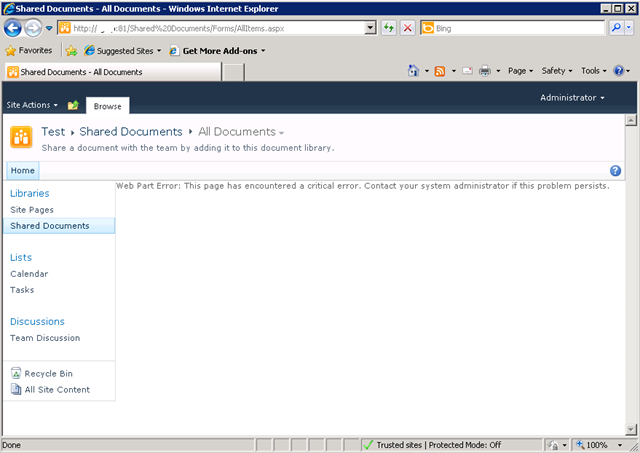
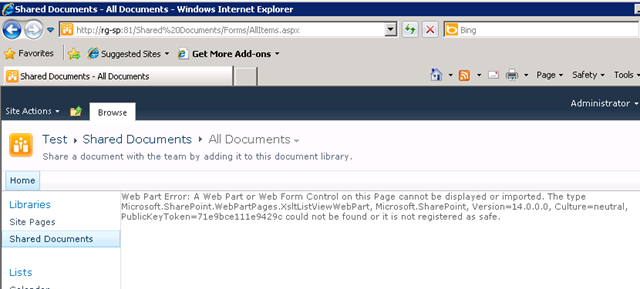
    I created a brand new web application on a SP2010 farm, and irrespective of the site collection I subsequently create, I get the dreaded error "Web Part Error: This page has encountered a critical error. Contact your system administrator if this problem persists"

    Below is a screenshot of a web app using the team site template. Not so good huh?

    image

    The swearing…

    So faced with this broken site, I do what any other self respecting SharePoint consultant would do. I silently cursed Microsoft for being at the root of all the world’s evils and took a peek into that very verbose and very cryptic place known as the ULS logs. Pretty soon I found messages like:

    0x3348 SharePoint Foundation         General                       8sl3 High     DelegateControl: Exception thrown while building custom control ‘Microsoft.SharePoint.SPControlElement’: This page has encountered a critical error. Contact your system administrator if this problem persists. eff89784-003b-43fd-9dde-8377c4191592

    0x3348 SharePoint Foundation         Web Parts                     7935 Information http://sp:81/default.aspx – An unexpected error has been encountered in this Web Part.  Error: This page has encountered a critical error. Contact your system administrator if this problem persists.,

    Okay, so that is about as helpful as a fart in an elevator, so I turned up the debug juice using that new, pretty debug juicer turner-upper (okay, the diagnostic logging section under monitoring in central admin). I turned on a variety of logs at different times including.

    • SharePoint Foundation           Configuration                   Verbose
    • SharePoint Foundation           General                         Verbose
    • SharePoint Foundation           Web Parts                       Verbose
    • SharePoint Foundation           Feature Infrastructure          Verbose
    • SharePoint Foundation           Fields                          Verbose
    • SharePoint Foundation           Web Controls                    Verbose
    • SharePoint Server               General                         Verbose
    • SharePoint Server               Setup and Upgrade               Verbose
    • SharePoint Server               Topology                        Verbose

    While my logs got very big very quickly, I didn’t get much more detail apart from one gem,to me, seemed so innocuous amongst all the detail, yet so kind of.. fundamental 🙂

    0x3348 SharePoint Foundation         Web Parts                     emt7 High     Error: Failure in loading assembly: Microsoft.SharePoint, Version=12.0.0.0, Culture=neutral, PublicKeyToken=b03f5f7f11d50a3a eff89784-003b-43fd-9dde-8377c4191592

    That rather scary log message was then followed up by this one – which proved to be the clue I needed.

    0x3348 SharePoint Foundation         Runtime                       6610 Critical Safe mode did not start successfully. This page has encountered a critical error. Contact your system administrator if this problem persists. eff89784-003b-43fd-9dde-8377c4191592

    It was about this time that I also checked the event logs (I told you this post was about how not to troubleshoot) and I saw the same entry as above.

    Log Name:      Application
    Source:        Microsoft-SharePoint Products-SharePoint Foundation
    Event ID:      6610
    Description:
    Safe mode did not start successfully. This page has encountered a critical error. Contact your system administrator if this problem persists.

    I read the error message carefully. This problem was certainly persisting and I was the system administrator, so I contacted myself and resolved to search google for the “Safe mode did not start successfully” error.

    The 46 minute mark epiphany

    image

    If you watch the TV series “House”, you will know that House always gets an epiphany around the 46 minute mark of the show, just in time to work out what the mystery illness is and save the day. Well, this is the 46 minute mark of this post!

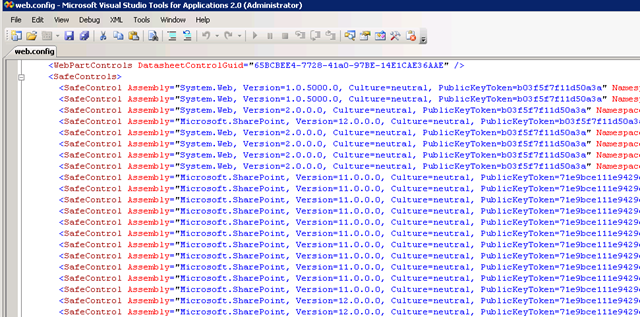
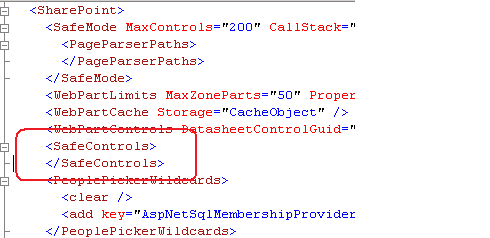
    I quickly found that others had this issue in the past, and it was the process where SharePoint checks web.config to process all of the controls marked as safe. If you have never seen this, it is the section of your SharePoint web application configuration file that looks like this:

    image 

    This particular version of the error is commonly seen when people deploy multiple servers in their SharePoint farm, and use a different file path for the INETPUB folder. In my case, this was a single server. So, although I knew I was on the right track, I knew this wasn’t the issue.

    My next thought was to run the site in full trust mode, to see if that would make the site work. This is usually a setting that makes me mad when developers ask for it because it tells me they have been slack. I changed the entry

    <trust level="WSS_Minimal" originUrl="" />

    to

    <trust level="Full" originUrl="" />

    But to no avail. Whatever was causing this was not affected by code access security.

    I reverted back to WSS_Minimal and decided to remove all of the SafeControl entries from the web.config file, as shown below. I knew the site would bleat about it, but was interested if the “Safe Mode” error would go away.

    image

    The result? My broken site was now less broken. It was still bitching, but now it appeared to be bitching more like what I was expecting.

    image

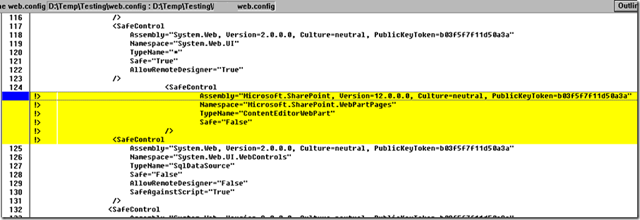
    After that, it was a matter of adding back the <safecontrol> elements and retrying the site. It didn’t take long to pinpoint the offending entry.

    <SafeControl Assembly="Microsoft.SharePoint, Version=12.0.0.0, Culture=neutral, PublicKeyToken=b03f5f7f11d50a3a" Namespace="Microsoft.SharePoint.WebPartPages" TypeName="ContentEditorWebPart" Safe="False" />

    As soon as I removed this entry the site came up fine. I even loaded up the content editor web part without this entry and it worked a treat. Therefore, how this spurious entry got there is still a mystery.

    The final mystery

    My colleague and I checked the web.config file in C:\Program Files\Common Files\Microsoft Shared\Web Server Extensions\14\CONFIG. This is the one that gets munged with other webconfig.* files when a new web application is provisioned.

    Sure enough, its modified date was July 29 (just outside the range of the SharePoint and event logs unfortunately). When we compared against a known good file from another SharePoint site, we immediately saw the offending entry.

    image

    The solution store on this SharePoint server is empty and no 3rd party stuff to my knowledge has been installed here. But clearly this file has been modified. So, we did what any self respecting SharePoint consultant would do…

    …we blamed the last guy.


    Thanks for reading

    Paul Culmsee

    www.sevensigma.com.au


    Why I’ve been quiet…

    As you may have noticed, this blog has been a bit of a dead zone lately. There are several very good reasons for this – one being that a lot of my creative energy has been going into co-writing a book – and I thought it was time to come clean on it.

    So first up, just because I get asked this all the time, the book is definitely *not* “A humble tribute to the leave form – The Book”! In fact, it’s not about SharePoint per se, but rather the deeper dark arts of team collaboration in the face of really complex or novel problems.

    It was late 2006 when my own career journey took an interesting trajectory, as I started getting into sensemaking and acquiring the skills necessary to help groups deal with really complex, wicked problems. My original intent was to reduce the chances of SharePoint project failure but in learning these skills, now find myself performing facilitation, goal alignment and sensemaking in areas miles away from IT. In the process I have been involved with projects of considerable complexity and uniqueness that make IT look pretty easy by comparison. The other fringe benefit is being able to sit in a room and listen to the wisdom of some top experts in their chosen disciplines as they work together.

    Through this work and the professional and personal learning that came with it, I now have some really good case studies that use unique (and I mean, unique) approaches to tackling complex problems. I have a keen desire to showcase these and explain why our approaches worked.

    My leanings towards sensemaking and strategic issues would be apparent to regular readers of CleverWorkarounds. It is therefore no secret that this blog is not really much of a technical SharePoint blog these days. The articles on branding, ROI, and capacity planning were written in 2007, just before the mega explosion of interest in SharePoint. This time around, there are legions of excellent bloggers who are doing a tremendous job on giving readers a leg-up onto this new beast known as SharePoint 2010.

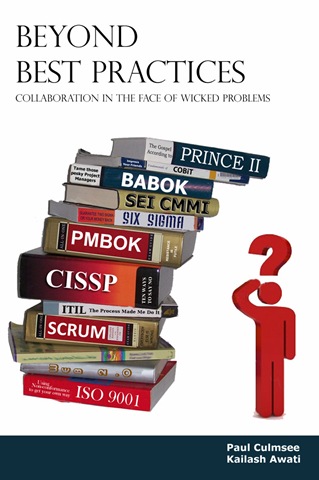
    BBP (3)

    So back to the book. Our tentative title is “Beyond Best Practices” and it’s an ambitious project, co-authored with Kailash Awati – the man behind the brilliant eight to late blog. I had been a fan of Kailash’s work for a long time now, and was always impressed at the depth of research and effort that he put into his writing. Kailash is a scarily smart guy with two PHD’s under his belt and to this day, I do not think I have ever mentioned a paper or author to him that he hasn’t read already. In fact, usually he has read it, checked out the citations and tells me to go and read three more books!

    Kailash writes with the sort of rigour that I aspire to and will never achieve, thus when the opportunity of working with him on a book came up, I knew that I absolutely had to do it and that it would be a significant undertaking indeed.

    To the left is a mock-up picture to try and convey where we are going with this book. See the guy on the right? Is he scratching his head in confusion, saluting or both? (note, this is our mockup and the real thing may look nothing like this)

    This book dives into the seedy underbelly of organisational problem solving, and does so in a way that no other book has thus far attempted. We examine why the very notion of “best practices” often makes no sense and have such a high propensity to go wrong. We challenge some mainstream ideas by shining light on some obscure, but highly topical and interesting research that some may consider radical or heretical. To counter the somewhat dry nature of some of this research (the topics are really interesting but the style in which academics write can put insomniacs to sleep), we give it a bit of the cleverworkarounds style treatment and are writing in a conversational style that loses none of the rigour, but won’t have you nodding off on page 2. If you liked my posts where I use odd metaphors like boy bands to explain SharePoint site collections, the Simpsons to explain InfoPath or death metal to explain records versus collaborative document management, then you should enjoy our journey through the world of cognitive science, memetics, scientific management and Willy Wonka (yup – Willy Wonka!).

    Rather than just bleat about what the problems with best-practices are, we will also tell you what you can do to address these issues. We back up this advice by presenting a series of practical case studies, each of which illustrates the techniques used to address the inadequacies of best practices in dealing with wicked problems. In the end, we hope to arm our readers with a bunch of tools and approaches that actually work when dealing with complex issues. Some of these case studies are world unique and I am very proud of them.

    Now at this point in the writing, this is not just an idea with an outline and a catchy title. We have been at this for about six months, and the results thus far (some 60-70,000 words) have been very, very exciting. Initially, we really had no idea whether the combination of our writing styles would work – whether we could take the degree of depth and skill of Kailash with my low-brow humour and my quest for cheap laughs (I am just as likely to use a fart joke if it helps me get a key point across)…

    … But signs so far are good so stay tuned 🙂

    Thanks for reading


    Paul Culmsee

    www.sevensigma.com.au


    SBS 2008, Hewlett Packard, WSS3, Search Server 2008 Express and a UPS – Oh the pain!

    image

    In the words of Doctor Smith from lost in space, while everyone else was in Vegas having a grand old time, I was at a client site, having to come to grips with the beast known as Windows Small Business Server 2008. I rarely work with SBS2003 and had never used SBS2008 until now.

    This was one of those engagements that is somewhat similar to those awful dreams that you have when you are trying to get to some place, but you never quite get there and your subconscious puts all sorts of strange and surreal obstacles in your path. In my case, the surreal obstacles were very real, yet some of them were really really dumb. Whatsmore, it is a very sad indictment on IT at several levels and a testament to how complexity will never be tamed with yet more complexity.

    As a result, I really fear the direction that IT in general is heading.

    So where to begin? This project was easy enough in theory. A former colleague called me up because he knew of my dim, dark past in the world of Cisco, Active Directory and SharePoint. He asked me to help put in SBS2008 for him, configuring Exchange/AD/SharePoint and migrating his environment over to it.

    “Sure”, I say, “it’ll be a snap” (famous last words)

    image

    I haven’t use the coffee or tequila ratings for a while, so I thought that this post was apt for dusting them off. If you check the Why do SharePoint Projects Fail series, you will see that I use tequila shots or coffee at times. In this case, I will use the tequila shots to demonstrate my stress levels.

    Attempt 1

    We start our sorry tale a few weeks ago, where my client had ordered Small Business Server 2008 and the media/key had not arrived by the time I was due to start. The supplier came to the rescue by sending them a copy of the media and promised to send the license key in a couple of days.

    The server was a HP Proliant DL360 G6, a seemingly nice box with some good features at a reasonable price. HP/Compaq people will be familiar with the SmartStart software and process, where instead of using the windows media, you pop in the supplied SmartStart CD and it will perform some admin tasks, before asking for the windows media, auto-magically slipstreaming drivers and semi-automating the install.

    On client machines, I never use the CD from the vendor because there is always too much bloatware crap. However on servers I generally do use the CD, because it tends to come with all the tools necessary to manage disk storage, firmware and the like. I dutifully popped in SmartStart CD, answered a few basic questions, and it asked for the windows media CD.

    Cleverworkarounds stress rating: Good so far

    Next it asked me for the Windows SBS2008 licence key. Of course, I was using media that had been lent to us from the supplier because my client’s media (and keys) had not arrived. Thus, since I did not have a license key I was unable to proceed with the install using this preferred manner. HP, in their infinite wisdom, have assumed that you always have the license key when you install via their SmartStart CD, despite Microsoft giving you 30 days to activate the product. To be fair on HP, they are hooking into Microsoft’s unattended installation framework, so perhaps the blame should be shared.

    All was not lost however. The SmartStart CD can be run after windows has been installed. It then will install all the necessary “HP bits” like graphics and system board drivers. So I booted off the Windows CD and fortunately, windows installer detected the HP storage controller and the disk array,  and proceeded to let me partition it and install.

    Cleverworkarounds stress rating: Minor annoyance, but good so far

    Small Business Server 2008 did its thing and then loaded up a post install wizard that sets the timezone, active directory domain name and the like. At a certain step when running this wizard, SBS2008 informed me that there was no network card with a driver loaded, so it could not continue. As it turns out, Microsoft’s initial SBS2008 configuration wizard simply will not proceed unless it finds a valid network card. But since this is the pre-install wizard, we are not yet at the point in the installation where we have a proper windows desktop with start menu and windows explorer. All is not lost (apparently), because SBS allows you to start device manager from within the wizard and search for the driver.

    Fair enough, I think to myself, so I pop in the HP SmartStart CD and tell device manager to search the media.

    Cleverworkarounds stress rating: Spider senses tingle that today might not turn out well

    image

    Windows device manager comes back and tells me that it cannot find any drivers.

    Why?

    Well after some examination, the SmartStart drivers are all self extracting executables and therefore device manager could not find them when I told it to. Of course, the self extracting zip files have hugely meaningful names like C453453.EXE making it really obvious to work out what driver set is the one required… not!

    Luckily, Ctrl+Alt+Del gave me task manager which allowed me to start a windows explorer session, and I was able to browse to the CD and run the autorun of the SmartStart CD manually. This loaded up HP’s fancy schamsy driver install software that produces a nice friendly report on what system software is missing and proceeds to install it all for you.

    SmartStart did its thing, finding all of the driverless hardware and installed the various drivers. A few minutes and a reboot later and SBS2008 reruns its configuration wizard and this time finds the network and allows me to complete the wizard. This triggers another thirty minutes of configuration and another reboot and we have ourselves a small business server!

    Cleverworkarounds stress rating: Spider senses subside – back on track?

    Next I did something that is a habit that has served me well over the years (until now). I reran the Smartstart CD, now with a network and internet access. This time I told the driver management utility to connect to HP.COM. It scanned HP and reported to me that most drivers on the SmartStart CD were out of date. This is unsurprising because most of the time I do server builds for any vendor, I find that about half of the drivers, BIOS and various firmwares have been replaced by newer versions since the CD was pressed.

    Since this is a brand new server build, it is a habit of mine to upgrade to the latest drivers, BIOS and firmware before going any further.

    Among the things found to be out of date was the BIOS, the firmware on the RAID Storage controller as well as the network card. The SmartStart software downloaded all of these updates, and another reboot later, all are installed happily. Another hour of patching via Windows update, and we have a ready to go SBS2008 server with WSS3, Exchange, SQL Express and WSUS all configured automatically for you.

    Cleverworkarounds stress rating: This SBS2008 stuff isn’t so bad right?

    Okay, so things were good so far, but now here is where the fun really begins.

    Windows 2008 SBS comes with a pre-installed WSS3 site called http://Companyweb. As we all know, search completely sucks in WSS3. It has a bunch of limitations and isn’t a patch on what you get with MOSS. But no problem – we have Microsoft Search Server Express now, a free upgrade which turns WSS search from complete horribleness to niceness fairly quickly.

    For those of you reading this who run WSS3 and have not installed Search Server Express, I suggest you investigate it as it does offer a significant upgrade of functionality. Search server express pretty much makes WSS3 have the same search capabilities of MOSS 2007.

    So, I proceeded to install Search Server 2008 express onto this Small Business Server 2008 box. I have installed Search Server Express quite a few times before and I have to admit, it is a tricky install at times. But given that this was a fresh Small Business Server 2008 install and not in production, as well as having successfully installed it on Small Business Server 2003 previously, I felt that I should be safe.

    I commenced the Search Server 2008 express install, and the first warning sign that my day was about to turn bad showed itself. The install of search server express only allowed me to choose the “Basic” option. The option that I wanted to use, “Advanced” was greyed out and therefore unavailable.

    Cleverworkarounds stress rating: Spider senses tingling again

    imageimage

    Knowing this server was not in production, I went ahead and allowed Search Server Express to install as per the forced basic setting. The install itself appeared to work, but it died during the SharePoint configuration wizard. It specifically crapped out on step 9, with the error message

    “Failed to create sample data. An exception of type Microsoft.SharePoint.SPException was thrown.  Additional exception information: User cannot be found”.

    “Curses!” I say, “another trip to logs folder in the 12 hive”. For the nerds, the log is pasted below.

    [SPManager] [INFO] [10/21/2009 3:38:47 PM]: Finished upgrading SPContentDatabase Name=ShareWebDb Parent=SPDatabaseServiceInstance Name=Microsoft##SSEE.
    [SPManager] [DEBUG] [10/21/2009 3:38:47 PM]: Using cached [SPContentDatabase Name=ShareWebDb Parent=SPDatabaseServiceInstance Name=Microsoft##SSEE] NeedsUpgrade value: False.
    [SharedResourceProviderSequence] [DEBUG] [10/21/2009 3:38:47 PM]: Unable to locate SearchDatabase. Exception thrown was: System.Data.SqlClient.SqlException: Cannot open database "SharedServices_DB_ed3872ca-06b1-44c5-8ede-5a81b52265f9" requested by the login. The login failed.
    Login failed for user ‘NT AUTHORITY\NETWORK SERVICE’.
       at System.Data.SqlClient.SqlInternalConnection.OnError(SqlException exception, Boolean breakConnection)
       at System.Data.SqlClient.TdsParser.ThrowExceptionAndWarning(TdsParserStateObject stateObj)
       at System.Data.SqlClient.TdsParser.Run(RunBehavior runBehavior, SqlCommand cmdHandler, SqlDataReader dataStream, BulkCopySimpleResultSet bulkCopyHandler, TdsParserStateObject stateObj)
       at System.Data.SqlClient.SqlInternalConnectionTds.CompleteLogin(Boolean enlistOK)

    The long and short of this error takes a little while to explain. First we need to explain the historical difference between SQL Server Express edition and SQL Server Embedded edition (also known as the Windows internal database). From wikipedia:

    SQL Server 2005 Embedded Edition (SSEE): SQL Server 2005 Embedded Edition is a specially configured named instance of the SQL Server Express database engine which can be accessed only by certain Windows Services.

    SQL Server Express Edition: SQL Server Express Edition is a scaled down, free edition of SQL Server, which includes the core database engine. While there are no limitations on the number of databases or users supported, it is limited to using one processor, 1 GB memory and 4 GB database files.

    Why does this matter? Well Microsoft, being the wise chaps that they are, decided that when you perform a SharePoint installation using the “basic” option, different editions of SharePoint use different editions of SQL Server! Mark Walsh explains it here:

    • When you use the "Basic" install option during MOSS 2007 installation it will install and use SQL Server 2005 Express Edition and you have a 4GB database size limit.
    • When you use the "Basic" install option during WSS 3.0 installation it DOES NOT use SQL Express, it uses SQL Server 2005 Embedded edition and it DOES NOT have a 4GB size limit.

    It happens that Small Business Server 2008 comes with WSS3 preinstalled. Annoyingly, but unsurprisingly, the Small Business Server team opted to use the BASIC installation mode. As described above, SQL Server Embedded Edition (known on Win2008 as the Windows Internal Database) is used. For reference, WSUS on Small Business Server 2008 also uses this database instance.

    BUT BUT BUT…

    Search Server 2008 Express, uses SQL Server Express edition when performing a basic install. As a result, an additional SQL Server Express instance (SERVERNAME\OFFICESERVERS) gets installed onto the Small Business 2008 server. Then, to make matters worse, the installer gets mixed up and installs some Search Server express databases into the new instance (a Shared Service Provider), but then uses the SQL Embedded Edition instance to install other databases (like the searchDB). Then later during the configuration wizard, it cannot find the databases that it needs because it searches the wrong instance!

    The net result is the error shown in the log above. I tried all sorts of things like copying the Express databases into the embedded edition, but I couldn’t disentangle this dependency issue. Some parts of SharePoint (the search server express bits no doubt) looked in the SQL Express instance and the WSS bits looked in the Embedded SQL instance. Eventually, conscious of time, I proceeded to uninstall Search Server Express.

    Cleverworkarounds stress rating: Some swear words now uttered

    imageimageimage

    Uninstalling Search Server Express was attempted and tells me that it has successfully completed and wants a reboot. Unfortunately SharePoint is now even more hosed than it was before and I tried a few things to get things back on track (psconfig to create a new farm and the like). After more frustration, and conscious of time I decided to uninstall WSS3 altogether and then reinstall it according to the SBS Repair guide for WSS3.

    This had the effect of stuffing up WSUS as well! (I assume because it shares the same Windows Internal Database instance), and after a couple of hours of trying all sorts of increasingly hacky ways of getting all of this working, I was forced to give up.

    Note: Whatever you do, do not attempt this method. At one point I tried to trick WSS3 into temporarily thinking it was not a basic mode install so get Search Server Express to prompt for Advanced mode, but it made things worse because the configuration database got confused.

    Cleverworkarounds stress rating: Installing SharePoint in basic mode is committing a crime against humanity.

    imageimageimageimage

    Attempt 2

    image

    At this point I hear Doctor Smith abusing me like the poor old robot. “You bubble-headed booby, you ludicrous lump, adlepated amateur, dottering dunderhead”.

    Since WSUS got completely screwed, as well as the Windows Internal Database through relentless uninstallation and repair attempts, I started to get nervous. Small Business Server 2008 is a very fussy beast. Essentially it can get very upset at seemingly benign changes. I felt that I had messed about so much that I could no longer guarantee the integrity of this server so I wiped clean and reinstalled.

    I installed Windows as per the previous method, and once again the install wizard stopped, asking me for a network driver. Once again I popped in the HP SmartStart CD and proceeded to run the driver install program from the SBS configuration wizard.

    This time, no network card was detected!

    What the? During attempt 1, I happily installed the necessary HP drivers using the same %$^#% SmartStart CD! Why is it not detecting now??

    Cleverworkarounds stress rating: Now thinking about how much fun everyone is having in Vegas while I am fighting this server

    imageimageimageimageimage

    After some teeth gnashing, the cause of this problem hit me as I was driving home from the site. I had upgraded the firmware of the network card during attempt 1, as well as the storage controller and system BIOS. I realised that the stupid, brain-dead HP network card drivers likely could no longer recognise its own network card with a newer firmware.

    The next day I came back refreshed, and found that indeed, there were newer network drivers at the HP site. I downloaded them and extracted them and sure enough, suddenly the network card was found and I was back in business. How dumb is that! Surely if you are going to write a driver, at the very least make it recognise the hardware irrespective of firmware!  

    Once I got past this stupid annoyance, it did not take too long for SBS2008 to be installed and ready to go. Remember that WSS3 is installed for you in basic mode, so to change it requires an uninstall of WSS and then to reinstall it in a different mode. But the problem here is SBS2008 and its fussiness about messing with configuration. In going down this path, you risk future service packs and updates breaking because things are not as expected. Additionally you would have to create companyweb manually and it raises the risk of a misconfiguration or mistake along the way.

    I logged a call with Microsoft and got a pretty good engineer (hey Ai Wa) and she was able to consistently reproduce all of my issues in the lab, but was unable to work out a supportable fix. In the meantime, I tried to force Search Server 2008 to install into advanced mode using a scripted install, using an article written by my old mate Ben Curry. Alas, I could not bend it to my will and at the time of writing this article, I had to give up on Search Server 2008 with SBS2008 for now.

    For what its worth, I know that I can make this work by installing WSS3 differently, but I planned to properly nail this issue in my lab using the out of the box installs and then publish this article, but I didn’t have the sufficient hardware to run Small Business Server 2008. It requires a lot of grunt to run! So I will revisit this issue once my new VM server arrives and post an update.

    But there is more…

    If the whole Smartstart, network driver, SBS2008 with its dodgy scripted WSS3 install, with Search Server Express dumb installation assumptions were not enough, I hit more dumb things that resulted in showing how ill equipped HP’s support is able to deal with these sorts of issues.

    The server, not surprisingly, supplied with a nice hardware RAID configuration and my client opted to buy some additional disk. When the disks arrived and were installed, we found that the RAID controller could see the disks, but we were unable to add the disks to the existing array using HP’s management tools. HP’s “friendly” support was unable to work out the issue and asked me to do things that were never going to work and insulted my intelligence. Eventually I worked out what was going on myself, via HP’s own forums. It turns out that the HP Server requires a write cache module to be able to grow an array. We had one of these installed. Upon further examination by opening up the chassis, we were missing a battery to go with the write cache module. HP were unable to determine the part number that we needed and we ended up working it out ourselves and telling our supplier.

    Then HP stuffed up the order and after following up for two weeks, it turned out they accidentally forgot to put the order through to Singapore to get the part. It seemed that once we went outside of the normal supply chain system at HP, it all broke down. After two weeks and numerous calls, they suddenly realised that the part was available in Sydney all along and it was shipped over next day!. The irony was that next day the part from Singapore arrived!

    So now we had two batteries.

    Grrrr. It shouldn’t be this hard! Why supply a write cache module and not supply the battery! Dumb Dumb Dumb!

    Cleverworkarounds stress rating: Really hating HP and Microsoft at this point.

    imageimageimageimageimageimage

    … and piece de resistance!

    Okay so we had a few frustrating struggles, but we more or less got there. But here is the absolute showstopper – the final issue that for me, really made me question this IT discipline that I have worked in for twenty years now.

    My client rang me on Monday morning to tell me the server was powered off when we arrived on site. This was unusual because the rack was UPS protected and no other devices were off. We ran HP’s diagnostic tools and no faults were reported. The UPS was a fairly recent APC model, and we installed a serial cable to the server and loaded the APC UPS Management software. The software (which looks scarily like what 16 bit apps used to look like in the early 90’s), found the UPS and showed that was all hunky dory.

    We decided to perform a battery test using the software. No sooner than I clicked OK, the server powered off with no warning or shutdown. Whoa!!

    I put in a call to APC, and was told that the UPS was not compatible with HP’s new fancy shmansy green star rating power supplies. We had to buy a new UPS because of some “sine wave” mumbo jumbo (UPS engineer talk that I really wasn’t interested in). If the UPS switched to battery, this server would think power was dodgy and do a pre-emptive shutdown. The reason that the server was powered off on the Monday morning was that the UPS has a built in self test that runs every 7 days that cannot be disabled!

    Cleverworkarounds stress rating: For %%$$ sake!.

    imageimageimageimageimageimageimageimageimageimageimageimage

    Conclusion

    Now I don’t know about you, but once a UPS cannot be “compatible” with a server, that’s it – things have gone too far. For crying out loud, a UPS supplies power. How $%#^ hard can that be? How is an organization supposed to get value out of their IT investments with this sort of crap to deal with.

    Then add in the added complexity of Blade servers, Citrix, Virtualisation, shared storage, and I truly feel that some sites are sitting on time bombs. The supposed benefits in terms of efficiency, resiliency and scalability that these technologies bring, come at an often intangible and insidious cost – sheer risk from incredible complexity. If you look at this case study of a small organisation putting in a basic server, most of the issues I have encountered are the side effects of this complexity and the lack of ability for the vendors to be able to help with it.

    As the global financial crisis has aptly demonstrated, when things are complex and no-one person can understand everything, when something bad does happen, it tends to do it in a spectacularly painful and costly way.

    Finally, before you reply to this likely immature rant and tell me I am a whiner, remember this all you Vegas people. You got to have fun and marvel at all the new (complex) SP2010 toys, while I sat on the other side of the planet in a small computer room, all bitter and twisted, sprouting obscenities to HP, Microsoft and APC dealing with this crap. When you put that into perspective, I think this article is quite balanced! 🙂

    Thanks for reading

    Paul Culmsee

    www.sevensigma.com.au


    A simple way to improve your estimating (and a cool pub trick) – Conclusion

    …and we’re back!

    Well… that was a long commercial break wasn’t it 🙂

    In case you missed part 1 of our version of the show “deal or no deal”, you missed the big cliff-hanger and you really should read part 1 first. For the rest of you, to quickly recap, I came out of the closet and admitted by secret teenybopper shame, told the world that my wife had a teenage thing for Jean Claude Van Damme, showed the effect of beer goggles and introduced the notion of cognitive bias and how it can affect judgement.

    i also demonstrated how, by altering the frame of reference, to a problem something that at first seems completely unquantifiable “how the hell do I know how many SharePoint developers drive yellow cars?”, is actually not as “impossible” as you may first think.

    At the end of the last post I left you with a $10000 dilemma. You had to make a “deal or no deal” decision about going with your estimate about SharePoint developers who own yellow cars, or to instead cast your lot with a bag of marbles with a 9 in 10 chance of winning the prize. Just to refresh your memory, here is the salient part of the pub conversation.

    • Me: Okay, so you are 90% sure that here are between 300 and 2000 SharePoint developers in the world with a yellow car?
    • Them: Yes
    • Me: So, let’s make this like the game show “deal or no deal”. If you are right and the answer is within your range, you will win $10000. BUT you have an alternative…
    • Them: Ok…
    • Me: What if I were to present you with a bag containing 9 red marbles and 1 black marble and offer you $10000 if you pull out a red marble. Pull the one black marble, and you miss out on the money. Do you want to stick to your estimate or do you want to draw a marble?

    So have you decided? Now be honest and see how you went against the 4 outcomes that I have experienced when trying this on people. Here are the possible answers in order of popularity…

    1. The person chooses to pull from the bag of marbles rather than their ranged estimate. (This is the predominant answer for all people I have tried this with – perhaps 70-75% of all responses).
    2. The person chooses to use their estimate over the bag of marbles. (perhaps 25% of people have answered with this option)
    3. Upon hearing the bag option, the person wants to change their ranged estimate. (Happened to me once)
    4. The person doesn’t care which method.. (never happened to me)

    So which is the right answer to this question?

    (drumroll) Lets tackle the possible answer in order of likelihood.

    “Take the marble! take the maaaaaarble!”

    For the 70 odd percent of you who opted to take your chances with the bag of marbles, GONG! you lose!

    Better double check your estimates in future because you have demonstrated that you are over-confident in your estimates. In other words, you are suffering from optimism bias. To explain why, think about the original question carefully. I asked originally for a ranged estimate that you were 90% confident with.

    I then presented an alternative that has a 9 out of 10 chance of success – also 90%. From a statistical point of view, you should be completely ambivalent as to which option to use. Therefore, despite being asked for a range that you were 90% confident with, the range you actually estimated is not really 90% at all. It has to be less than 90% for you to prefer a clear 9/10 probability.

    So that is why you are so stressed and busy! You keep giving crap estimates that make life harder for you! 🙂 Either that or you are too nice and when your project manager looks at you with those big, sad project manager eyes, your heart melts and you relent.

    Isn’t that cool in a nerdy way? It is very interesting to see people’s faces as the penny drops to this logic and they suddenly realise just how bad some of their past estimates have been as a result. The consolation prize is just about 4 out of 5 people do exactly the same as you and take the marbles.

    “No deal, I will stick with my estimate”

    For the smaller group who decide that their estimate is preferred, you also lose.

    In this case, the reason why should be pretty obvious. You are so paranoid about getting it wrong, that you have made an estimate that is more like 95% or even 99% confident. Why? your range is too wide for 90% because when presented with a clear 9/10 chance of success, you chose your original estimate. While that may sound like you are confident, in reality you are a bit of a wuss, because in fact you are under confident with your estimate. So grow some balls you weenie 🙂

    Honorary mention – “I want to change my estimate”

    At the Best Practice Conference in DC, I attempted this pub trick on Yoav Lurie from Synteractive, who is much more of a business and strategic thinker than us IT nerds. His response I think, deserves an honorary mention for being the closest to winning the game. In this example, I asked him to estimate in feet, the wingspan of a Boeing 747. I knew instantly that he was a good estimator because of the logic he used to come to a range.

    “Hmm, well an aircraft seat is maybe one and a half feet, and there will be 10 seats in the cabin, with two passages that are probably two feet in width…so that ads up to…”

    What do you notice about what Yoav did? Straight away, he related the wingspan of an aircraft (a clear unknown), to something he could make a reasonable estimate of (the width of an aircraft seat). After all, we have all sat in an aircraft seat in sardine (economy) class and know how cramped it is. He knew there were three rows of seats and related this to the width of the cabin, which he then related to the size of the wing. Deducing that the wing might be 4 to 6 times the width of the cabin, he then was able to make a very good ranged estimate of the overall wingspan of the plane.

    I was very impressed at his estimate and how he arrived at it, but I still got him 🙂

    As soon as I presented him with the bag of marbles alternative, without missing a beat he said “I want to change my estimate”. It took only a split second of presenting a clear 90% probability made Yoav realise that his estimate was not 90% and he was still a little overconfident.

    That being said, Yoav’s method of relating something known to help frame the reference to something unknown is the only time anyone has used any sort of rigour in forming an estimate and very impressive for the pub setting 🙂

    The right answer

    Okay, so as you may have guessed by now, the right answer is to shrug your shoulders and say “I don’t care” or wave your hand at me and say “pfft, whatever”. (This is one of the few times saying you couldn’t care less is the right answer). In doing so, you have placed equal weight upon the choices, based on the assumption that both are 90% probabilities.

    Neat pub trick huh? It certainly gets people thinking.

    How to calibrate yourself

    Douglas Hubbard talks about “calibrated estimates” in his books and has an appendix of calibration questions, that are designed to help you perceive and account for cognitive bias in your estimating.

    What you should take away from this exercise is that when asked to estimate on something you are uncertain about, make your initial estimate. Then, pretend you are in the game show and you have to pick between this estimate and the marble. If you feel that you would take the marble over your estimate, increase the width of your range until you feel that it doesn’t matter which option you pick.

    Conversely, if you are one of the wimps who are under confident, then reduce the width of your range, until you feel that you have no particular preference of your estimate vs. the marbles.

    In the same way that reframing a problem led from something being unquantifiable to something that indeed had a upper and lower range, by reframing the estimate against a unambiguous probability such as a bag of 10 marbles with 9 red, helps you to account for cognitive bias in your estimates.

    Conclusion

    So to reiterate my key points to this post

    1. Many things that seem unquantifiable are easier to quantify than you think, once you think in terms of ranged estimates and probability.
    2. Your bad taste in fashion and music when you were a teenager still manifests itself today and it is called cognitive bias.
    3. There are easy methods that you can use to calibrate yourself better so that your estimating radar is more finely tuned.

    Most importantly of all however, you learned that my wife liked Jean Claude Van Damme in the 80’s and you know that I am in big trouble when she reads this! 😛

    Thanks for reading

    Paul


    A simple way to improve your estimating (and a cool pub trick) – Part 1

    Okay I’ll admit it, I used to really suck as a time and effort estimator. I happen to have a business partner who is much better at it than me (hey Peter), and every time I sought a second opinion from him on my estimates, he would almost always make a much less optimistic assessment then me. Of course, Peter was almost always right too, dammit.

    So, why was Peter much more accurate with his estimates?

    The answer to this question, all one has to do is think back to their teenage years, where they went through that awkward stage where you look back and cringe at the posters that were on your wall and your choice of fashion. For many, this period demonstrates some utterly appalling choices of taste. Mine are particularly cringe-worthy, given that these days I am a bit of a metalhead. My favourite song at the time was Respectable by Mel and Kim. I thought that Karate Kid II was the best film of all time (and that the girl in it was hot). Mind you, my wife has an even more shameful secret. She had a crush on Jean Claude Van Damme! Mwahahahah 🙂

    These are examples of a phenomenon I like to call “Teenybopper bias” 🙂

    Now, there is a point in telling you about my wife’s secret shame and it isn’t to see her reaction when she reads this (okay, well maybe a teenie bit). These examples of “what the hell was I thinking” are a form of cognitive bias that took place at the time the opinion was formed. In terms of teenybopper bias, the root of the bias is likely the same hormones that caused your face to break out with acne and hair to grow in funny places. Another very common cognitive bias that afflicts people whether young or old is good old “beer goggle” bias illustrated below.

    There are many, many forms of cognitive bias documented, such as optimism bias, anchoring, hindsight bias and the recency effect to name a few. Now let’s take the final image above and pretend we asked someone at the pub for an estimate on a project at 8pm, 10pm and 1am. I’d be willing to bet that the estimate gets more optimistic on a par with how optimistic the perception of the people in the image above become.

    Overcoming cognitive bias

    Kailash writes about the risk that cognitive bias can play in project failure, particularly in the perception of risks.

    overcoming biases requires an understanding of the thought processes through which humans make decisions in the face of uncertainty.  Of particular interest is  the role of  intuition and rational thought in forming judgements, and the common mechanisms that underlie judgement-related cognitive biases.   A knowledge and awareness of these mechanisms  might help project managers in consciously countering the operation of cognitive biases in their own decision making.

    The essential difference between Peter and myself in our estimating, is that Peter happens to have a much more finely tuned radar to optimism bias in particular. Douglas Hubbard of Applied Information Economics fame, writes about the effect of cognitive bias extensively in his two books and offers a simple, yet highly useful method to quickly improve the quality of estimates which I will explain with an example below.

    The great thing about learning about your cognitive biases and the methods for mitigating them, is that you can use it in the pub too. While I don’t recommend this method for picking up members of the opposite sex, it’s a pretty cool icebreaker.

    Thus, I will demonstrate how to improve your estimating accuracy by a mythical pub conversation. Imagine you are onto your third beer…

    • Me: “How many SharePoint developers worldwide own a yellow car?
    • Them: “What the…I haven’t the faintest idea!”
    • Me: “Well, I can understand that, so let’s do an estimate. Give me a range that the answer could fall in, that you are 90% confident with.”
    • Them: “I still can’t give you an estimate, I can’t possibly know something like that.”
    • Me: “Well, could there be a million SharePoint developers who like yellow cars?”
    • “Them: “Don’t be ridiculous, there would be nowhere near a million SharePoint developers – period.”
    • Me: “So you do have an upper bound then, less than a million. Remember this is not about the exact answer, I want a range that you would be 90% confident with.”
    • Them: “Okay I get it. I think it is somewhere between three hundred and two thousand.

    Note that at this point, we have already made the initial breakthrough. At first the person found it impossible to make an estimate, yet when I related it to something they did have a fair idea of (the thought of a million people), they made some mental associations and realised they did have some idea of limits after all. Thus, by presenting a better frame of reference that they could use to approach the problem, they were able to move from “I have no idea” to a wide range of possible values.

    The width of the range reflects the uncertainty that someone has about the answer. The more the uncertainty, the wider the range. Some project mangers hate being given a ranged value because it really mucks up their task or project work breakdowns. As a result, they always want the “ball park” or something that is a single value. I completely understand why this happens, but what these people forget is that an estimation is uncertain by definition. The obvious way to express uncertainty is with a range of values! So asking someone for an estimation and then complaining that it is not accurate enough actually makes no sense. A manager might not like the “width” of the range, but you can’t force someone to reduce their uncertainty just because it doesn’t fit the plan. Unless you provide them with the means to reduce this uncertainty, you cannot and should not try and artificially reduce this range through pressure and coercion.

    But despite my observation of the flawed logic of dealing with uncertainty in estimating, a ranged estimate alone is not enough yet. We still have not accounted for the sorts of cognitive bias that I described earlier in the article. So without further adieu, I present a simplified version of Hubbards ‘calibration’ techniques that account for bias. Let’s continue the bar conversation.

    • Me: Okay, so you are 90% sure that here are between 300 and 2000 SharePoint developers in the world with a yellow car?
    • Them: Yes
    • Me: So, let’s make this like the game show “deal or no deal”. If you are right and the answer is within your range, you will win $10000. BUT you have an alternative…
    • Them: Ok…
    • Me: What if I were to present you with a bag containing 9 red marbles and 1 black marble and offer you $10000 if you pull out a red marble. Pull the one black marble, and you miss out on the money. Do you want to stick to your estimate or do you want to draw a marble?


    I’d like readers to think about this before continuing with this article. Make a ranged estimate of the number of SharePoint developers worldwide who drive a yellow car, and then decide whether you want to stick to your estimate or take your chances with the marbles.


    (Cue game show music where you have 10 seconds to decide with a little ping sound at the end.)

    The suspense is now killing you I am sure. Want to know the correct answer?

    Find out after this short commercial break (game show speak for wait till part 2 of this series 🙂 )


    Thanks for reading


    Paul Culmsee

    www.sevensigma.com.au


    Perth SharePoint Users Group wrap

    Today I presented a session at the Perth SharePoint Users Group. I was a little unsure whether my non-technically focussed content would be of interest to the geeks but the turnout was terrific and the feedback has been brilliant. (The 3 copies I gave away of Dux’s excellent “SharePoint for Project Management” book may have sweetened the deal – hehe )

    My sincere thanks to new user group president Sezai Komur for giving me the opportunity to present this material as it was the first time it has seen the light of day in Perth.

    If you want to check out the slide deck from the session, you will find it below. Expanded information that builds on this content can be found at the Seven Sigma site, as well as here at CleverWorkarounds.

    Thanks for reading

    Paul Culmsee

    www.sevensigma.com.au


    « Previous PageNext Page »

    Today is: Wednesday 3 June 2026 -