Back to Cleverworkarounds mainpage
 

BPC 09 August Wrap-up

It’s been quite some time since I have blogged, and the months of July/August were really pretty full-on professionally. High work demands and preparation for the Best Practices Conference meant that blogging and any sort of public work really took a back-seat.

So now that it is over and I am sitting here in an airport lounge reflecting, I have one word to say about the BPC 09 in DC that I just attended.

Segways rock!

image

You have not lived until you have ridden a segway – and I mean the new ones where you lean to control it. Even better than riding a segway is to ride it through DC, a city that blew me away with its amazing campus-like vibe. Never before has a city really pushed my buttons like this place. As you can see above, Ruven Gotz, Andrew Woodward and I visited some of the amazing DC sights and this photo in particular of Capitol Hill behind us, looking out toward the Lincoln memorial is something I’ll never forget. One thing is for sure, I am definitely coming back here for at least 2-3 weeks with the family just to absorb everything – sooner rather than later.

These best-practices events are really the conference where the material goes beyond the tech-stuff and caters additionally for an audience of consultants, business analysts, project managers and CIO’s. Some sessions are completely strategic, yet some delve deep into the guts of tech. In short, there is something for everyone.

Since the San Diego event back in Feb 09, my fellow kindred spirits, Ruven Gotz, Andrew Woodward, Dux Sy and I have been collaborating to bring our respective messages together and put a cohesiveness around what we have to say. This conference was the first peek of the fruit of that collaborative effort and as far as audience feedback went, it went down really well. In my last session of the conference I had a little Jerry Springer moment, when describing a particular slide that was a part of all of our respective talks, when I asked the audience to describe the slide and they all answered in perfect unison – hehe the message was heard 🙂

I presented 3 sessions, one on my own, and two co-presented with Ruven Gotz and Peter Serzo respectively. Ruven and I have been unhappy with the current (mis)understanding of governance around SharePoint and the culmination of our efforts over the last new months was a talk called “Governance – the other 90%”, although next time I will rename it to “Zen and the art of SharePoint Governance”. This was an umbrella talk to introduce our concepts and thinking, and then it was followed up later in the conference by talks by Ruven, myself and Andrew Woodward. Andrew took out the best overall speaker award too for the conference and we are all super-excited by the fruits of this collaboration so far, and I *know* that bigger and better things are to come from it.

For what its worth, if you want to be “one with SharePoint governance”, remember the key takeaway – beer is the best governance tool you’ve got. 🙂

The session with Peter Serzo was also such fun – we hit upon the idea of doing a Zoolander themed talk to introduce SQL Reporting Services to people who had not seen it. SSRS is one of those tools and technologies where even some well known SharePoint practitioners have not used it. With a title of “Reporting Services for the Really Really Good Looking”, we attracted a good turnout and managed to create and publish a report in 5 minutes, explain the architecture by getting members of the audience to stand up, wear aprons and “model” the various components and show how with no code, information workers could include drill down reports as well as personalised reports via parameters and filter web parts. The very awesome Brett Lonsdale (the guru behind BDC Meta Man), interrupted proceedings, claiming that the BDC was a better option and there was only one way to settle it – he and I had to do a BDC vs SSRS “walk off” which I *of course*, won easily :-).

Brett was a great sport, and I think for a minute audience members actually thought he was serious 🙂

(Now here comes the gushing love people..)

Also this time around, I’ve gotten to know more people and the rare opportunity to hook up again and spend some quality time with various friends was really the thing that makes the 36hr transit from Perth worth it. From the BBQ at Dux Sy’s house, to some great dialogue with Ben Curry of Mindsharp, Judy Cowan of Microsoft, Evan Burfield and the Synteractive people and my SamePage amigo’s (Dux, Ruven and Andrew Woodward). Ben Curry is an out and out genius, and our CV’s seem to read from the same script and I wish I had more opportunity to work with him. Evan Burfield is so scary smart that he automatically become my hero with his amazing understanding of stuff that I am interested in, yet only scratching the surface of the surface 🙂

Special callout to Laura Rogers (aka @wonderlaura). I had to look up what a muse was after she told me I was hers (I am a little sheltered over in Perth 🙂 ). Love her work – in fact, it is *her* work at endusersharepoint.com that inspired me to get back into more end-user content and try this whole screencasting thing. Laura, we are going to have to do something on EUSP together if you’d be up for it – it was a lot of fun hanging out and I think Peter Serzo would be up for something fun as well.

To the people who sat around the bar/restaurant/lobby table and supplied great laughs and great conversation. Zlatan Dzinic is utterly brilliant but is genetically programmed to be unable to whisper in someone else’s session 🙂 ). Mike Ferarra from SharePointReviews.com, Dan Usher, Lori Gowin, Ben Curry for messing with my head constantly, Paul Kolasky (the self-confessed poster boy for wicked problems who Laura eventually discovered *is* harmless 🙂 ) and special mention to Paul Stork – who was labelled as “that nerd who always has to jump ahead” during the Zoolander session.

Final thanks – Peter Serzo and his wife, Stacey. Peter is the most “Australian Amercian” who I have ever met. I think he must have been an Aussie in a former life. He is a tireless worker who’s imagination and inventiveness always sets off sparks of inspiration for me. I am going to try and find a way to get him over to Perth for a local training workshop or user group thing – they’d love his sense of humour.

Sorry if I missed anybody, I apologise. Also, please send me any photos, as many were taken, but I really was quite unsure about who’s camera was clicking at the time 🙂

Thanks for reading

Paul Culmsee

www.sevensigma.com.au


Troubleshooting SPSearch and good practices for moving large files

Every so often I get back into geek mode and roll up the sleeves and get my SharePoint hands dirty. Not so long ago I was assisting a small WSS3 based organisation with a major disk subsystem upgrade (iSCSI SAN) and locally attached storage upgrade, driven by content database growth and a need to convert some sites to site collections. By the end of it all, we had a much better set-up with a much better performing disk subsystem, but I was hit by two problems. One was WSS Search being broken and needing a fix and the other was the appallingly slow speed of copying large files around.

So, let’s talk about fixing broken search and then talk about copying large files.

1. When SPSearch breaks…

The SharePoint install in question was a WSS3 site with SP1, and Search Server 2008 had not been installed. The partition that contained the indexes (F:\) had to be moved to another partition (G:), so to achieve this I used the command

stsadm –o spsearch indexlocation G:\DATA\INDEX

Now, 99.9% of the time this will happily do its thing. But today was the 0.01% of the time when it decided to be difficult. Upon executing this command, I received an RPC error. Unfortunately for me, I was out of time, so I decided to completely re-provision search and start all over again.

It didn’t matter whether I tried this in Central Administration->Operations->Services on Server, or via the command line below. Both methods would not work.

stsadm -o spsearch -action stop

On each attempt, search would get stuck on unprovisioning (stopping) with a sequence of events in the event log (eventID 2457, 2429 and 2428).

===========================================================================================
Event Source: Windows SharePoint Services 3 Search 
Event Category: Gatherer 
Event ID: 2457 
Description: 

The plug-in manager <SPSearch.Indexer.1> cannot be initialized. 
Context: Application 'Search index file on the search server' 

Details: 
The system cannot find the path specified. (0x80070003) 

===========================================================================================  
Event Source: Windows SharePoint Services 3 Search 
Event Category: Gatherer 
Event ID: 2429 
Description: 

The plug-in in <SPSearch.Indexer.1> cannot be initialized. 
Context: Application '93a1818d-a5ec-40e1-82d2-ffd8081e3b6e', Catalog 'Search' 

Details: 
The specified object cannot be found. Specify the name of an existing object. (0x80040d06) 

===========================================================================================
Event Source: Windows SharePoint Services 3 Search 
Event Category: Gatherer 
Event ID: 2428 
Description: 

The gatherer object cannot be initialized. 
Context: Application 'Search index file on the search server', Catalog 'Search' 

Details: 
The specified object cannot be found. Specify the name of an existing object. (0x80040d06) 


So, as you can see I was stuck. I couldn’t not clear the existing configuration and the search service would never actually stop. In the end, I started to wonder whether the problem was that my failed attempt to change the index partition had perhaps not reapplied permissions to the new location. To be sure I reapplied permissions using the following STSADM command

psconfig -cmd secureresources

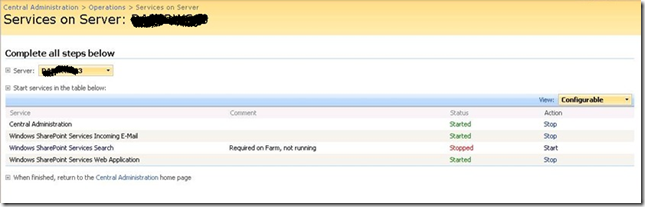
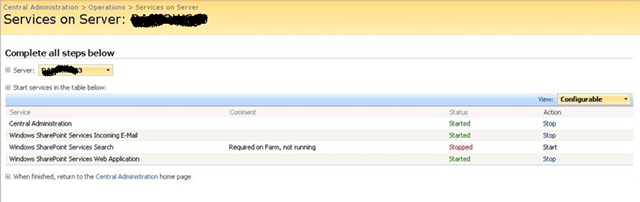
This seemed to do the trick. Re-executing the stsadm spsearch stop command finally did not come up with an error and the service was listed as stopped.
image

Once stopped, we repartitioned the disks accordingly and now all I had to do was start the damn thing 🙂

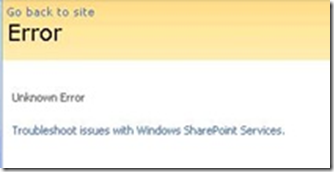
Through the Central Administration GUI I clicked Start and re-entered all of the configuration settings, including service accounts and the new index location (G:\DATA\INDEX). After a short time, I received the ever helpful “Unknown Error” error message.
image

Rather than change debug settings in web.config, I simply checked the SharePoint logs and the event viewer. Now, I had a new event in the logs.

Event Type: Warning 
Event Source: Windows SharePoint Services 3 Search 
Event Category: Gatherer 
Event ID: 10035 
Description: 
Could not import the registry hive into the registry because it does not exist in the configuration database. 
Context: Application '93a1818d-a5ec-40e1-82d2-ffd8081e3b6e' 

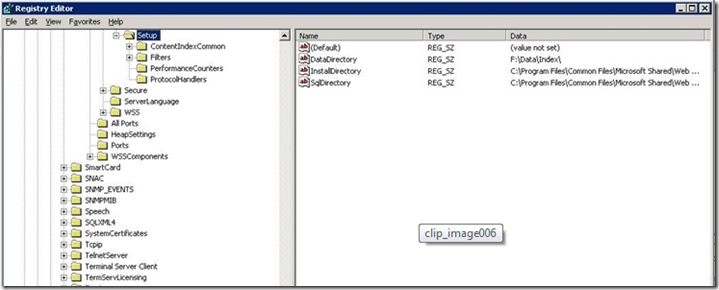
Hmm… It suggests a registry issue, so I checked the registry.
image


Although the error message really made no sense to me, checking the registry turned out to be the key to solving this mystery. If you look carefully in the above screenshot, note that the registry key DataDirectory was set to “F:\DATA\INDEX”.

I was surprised at this, because I had re-provisioned the SPSearch to use the new location (G:\DATA\INDEX). I would have thought that changing the default index location would alter the value of this key. A delve into the ULS logs showed events like this.

STSADM.EXE (0x0B38) 0x0830 Search Server Common MS Search Administration 95k1 High WSS Search index move: Changing index location from ‘F:\data\index’ to ‘G:\data\index’.

STSADM.EXE (0x0B38) 0x0830 Search Server Common MS Search Administration 95k2 High WSS Search index move: Index location changed to ‘G:\data\index’.

STSADM.EXE (0x0B38) 0x0830 Search Server Common MS Search Administration 0 High CopyIndexFiles: Source directory ‘F:\data\index\93a1818d-a5ec-40e1-82d2-ffd8081e3b6e’ not found for application ’93a1818d-a5ec-40e1-82d2-ffd8081e3b6e’.

STSADM.EXE (0x0F10) 0x1558 Windows SharePoint Services Topology 8xqz Medium Updating SPPersistedObject SPSearchServiceInstance Parent=SPServer Name=DAPERWS03. Version: 218342 Ensure: 0, HashCode: 54267293, Id: 305c06d7-ec6d-465a-98be-1eafe64d8752, Stack: at Microsoft.SharePoint.Administration.SPPersistedObject.Update() at Microsoft.SharePoint.Administration.SPServiceInstance.Update() at Microsoft.SharePoint.Search.Administration.SPSearchServiceInstance.Update() at Microsoft.Search.Administration.CommandLine.ActionParameter.Run(StringBuilder& output) at Microsoft.SharePoint.Search.Administration.CommandLine.SPSearch.Execute() at Microsoft.Search.Administration.CommandLine.CommandBase.Run(String command, StringDictionary keyValues, String& output) at Microsoft.SharePoint.StsAdmin.SPStsAdmin.RunOperation(SPGlobalAdmin globalAdmin, String st…

mssearch.exe (0x1654) 0x1694 Search Server Common IDXPIPlugin 0 Monitorable CTripoliPiMgr::InitializeNew – _CopyNoiseFiles returned 0x80070003 – File:d:\office\source\search\ytrip\search\tripoliplugin\tripolipimgr.cxx Line:519

mssearch.exe (0x1654) 0x1694 Search Server Common Exceptions 0 Monitorable <Exception><HR>0x80070003</HR><eip>0000000001D4127F</eip><module>d:\office\source\search\ytrip\search\tripoliplugin\tripolipimgr.cxx</module><line>520</line></Exception>

Note the second last line above (marked bold and italic). It showed that a function called CopyNoiseFiles returned a code of 0x8007003. This code happens to be “The system cannot find the path specified,” so it appears something is missing.

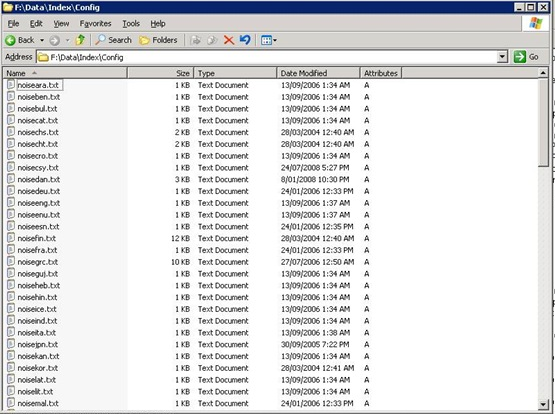
It then dawned on me. Perhaps the SharePoint installer puts some files into the initially configured index location and despite moving the index to another location, SharePoint still looks to this original location for some necessary files. To test this, I loaded up a blank Windows 2003 VM and installed SharePoint SP1 *without* running the configuration wizard. When I looked in the location of the index files, sure enough – there are some files as shown below.
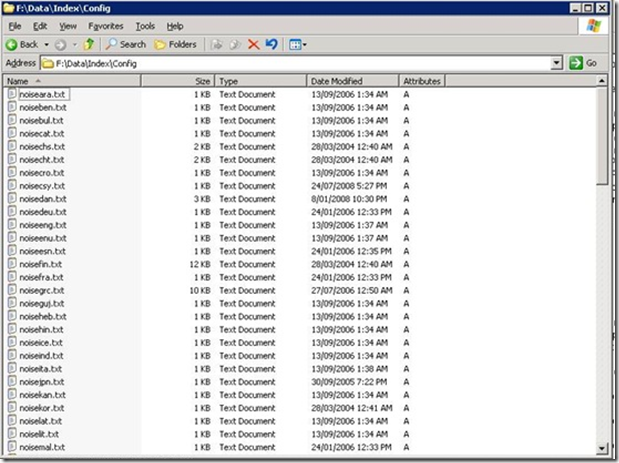
image

It turned out that during our disk reconfiguration, the path of F:\DATA\INDEX no longer existed. So I recreated the path specified in the registry (F:\DATA\INDEX) and copied the contents of the CONFIG folder from my fresh VM install. I then started the search service from Central Administration and… bingo! Search finally started successfully…Wohoo!

Now that I had search successfully provisioned, I re-ran the command to change the index location to G:\DATA\INDEX and then started a full crawl.

C:\>stsadm -o spsearch -indexlocation G:\DATA\INDEX

Operation completed successfully.

C:\>stsadm -o spsearch -action fullcrawlstart

Operation completed successfully.

I then checked the event logs and now it seems we are cooking with gas!

Event Type: Information 
Event Source: Windows SharePoint Services 3 Search 
Event Category: Gatherer 
Event ID: 10045 
Description: 

Successfully imported the application configuration snapshot into the registry. 
Context: Application '93a1818d-a5ec-40e1-82d2-ffd8081e3b6e' 

Event Type: Information 
Event Source: Windows SharePoint Services 3 Search 
Event Category: Gatherer 
Event ID: 10044 
Description: 

Successfully stored the application configuration registry snapshot in the database. 
Context: Application 'Serve search queries over help content' 

As a final check, I re-examined the registry and noted that the DataDirectory key had not changed to reflect G:\. Bear that in mind when moving your index to another location. The original path may still be referred to in the configuration.

2. There are RAID cards and there are RAID cards

Since part of the upgrade work was to improve disk performance, we had to detach databases and move them around while we upgraded the disk infrastructure and repartitioned existing disk arrays. The server had an on-board Intel RAID controller with two arrays configured. One was a two-disk RAID 0 SCSI and the other was a three-disk RAID 5 SATA array. The performance of the RAID 5 SATA had always been crap – even crappier than you would expect from onboard RAID 5. When I say crap, I am talking around 35 megabytes per second transfer rate – even on the two-disk SCSI RAID 0 array.

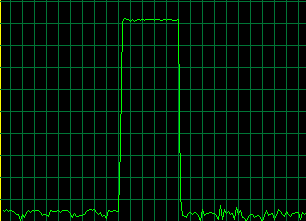
Now, 35MB/sec isn’t great, but not completely intolerable. But, what made this much, much worse however, was the extreme slowness in copying large files (ie >4GB). When trying to copy files like this to the array, the throughput dropped to as low as 2MBs.

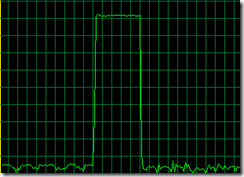
No matter whether it was Windows Explorer drag and drop or a command line utility like ROBOCOPY, the behaviour was the same. Throughput would be terrific for around 60 seconds, and then it would drop as shown below.
image

My client called the server vendor and was advised to purchase 4 SCSI disks to replace the SATA’s. Apparently the poor SATA performance was actually because SCSI and SATA were mixed on the same RAID bard and bus. That was a no-no.

Sounded plausible, but of course, after replacing the RAID 5 with the SCSI disks, there was no significant improvement in disk throughput at all. The performance of large files still reflected the pattern illustrated in the screenshot above.

Monitoring disk queue length on the new RAID array showed that disk queues were off the planet in terms of within normal boundaries. Now, I know that some people view disk queue length as a bit of an urban myth in terms of disk performance, but copying the same files to the iSCSI SAN yielded a throughput rate of around 95MBs and the disk queue value rarely spiked above 2.

Damn! My client wasn’t impressed with his well known server vendor! Not only does the onboard RAID card have average to crappy performance to begin with, RAID 5 with large files makes it positively useless.

Fun with buffers

To me, this smelt like a buffer type of issue. Imagine you are pouring sand into a bucket and the bucket has a hole in it. If you pour sand into the bucket at a faster rate than the hole allows sand to pour out, then eventually you will overflow the bucket. I suspected this sort of thing was happening here. The periods of high throughput were when the bucket was empty and the sand filled it fast. Then the bucket filled up and things slowed to a crawl while all of that sand passed through the metaphorical hole in the bottom. Once the bucket emptied, there was another all-too-brief burst of throughput as it filled quickly again.

I soon found a terrific article from EPS Windows Server Performance Team that explain what was going on very clearly.

Most file copy utilities like Robocopy or Xcopy call API functions that try and improve performance by keeping data in a buffer. The idea is that files that are changed or accessed frequently can be pulled from the buffer, thereby improving performance and responsiveness. But there is a trade-off. Adding this cache layer introduces an overhead in creating this buffer in the first place. If you are never going to access to copy this file again, adding it to the buffer is actually a bad idea.

Now imagine a huge file. Not only do you have the buffer overhead, but you now are also filling the buffer (and forcing it to be flushed), over and over again.

With a large file, you are actually better off avoiding the buffer altogether and doing a raw file copy. Any large file on a slow RAID card will still take time, but it’s a heck of a lot quicker than when combined with the buffering overhead.

Raw file copy methods

In the aforementioned article from the Microsoft EPS Server performance team, they suggest ESEUTIL as an alternative method. I hope they don’t mind me quoting them…

For copying files around the network that are very large, my copy utility of choice is ESEUTIL which is one of the database utilities provided with Exchange.  To get ESEUTIL working on a non-Exchange server, you just need to copy the ESEUTIL.EXE and ESE.DLL from your Exchange server to a folder on your client machine.  It’s that easy.  There are x86 & x64 versions of ESEUTIL, so make sure you use the right version for your operating system.  The syntax for ESEUTIL is very simple: eseutil /y <srcfile> /d <destfile>.  Of course, since we’re using command line syntax – we can use ESEUTIL in batch files or scripts.  ESEUTIL is dependent on the Visual C++ Runtime Library which is available as a redistributable package

I found an alternative to this, however, that proved its worth to me. It is called Teracopy and we tried the free edition to see what difference it would make in terms of copy times. As it happens, the difference was significant and the time taken to transfer large files around was reduced by a factor of 5. Teracopy also produced a nice running summary of the copy thoughput in MB/sec.The product definitely proved its worth and at a whopping $15 bucks, is not going to break the bank.

So, if you are doing any sort of large file copies and your underlying disk subsystem is not overly fast, then I recommend taking a look at this product. Believe me, it will save you a heap of time.

3. Test your throughput

A final note about this saga. Anyone who deals with SQL Server will have likely read articles about best practice disk configuration in terms of splitting data/logs/backups to different disk arrays to maximise throughput. This client had done this, but since Teracopy gave us nice throughput stats, we took the opportunity to test the read/write performance of all disk subsystems and it turned out that putting ALL data onto the SAN array had significantly better performance than using any of the onboard arrays.

This meant that the by-the-book configuration was hamstrung by a poorly performing onboard RAID controller and even if the idea of using separate disks/spindles seemed logical, the cold hard facts of direct throughput testing proved otherwise.

After reconfiguring the environment to leverage this fact, the difference in response time of WSS, when performing bulk uploads was immediately noticeable.

The moral of the story?

If you are a smaller organisation and can’t afford the high end server gear like Compaq/IBM, then take the time to run throughput tests before you go to production. The results may surprise you.

Thanks for reading

Paul Culmsee

www.sevensigma.com.au



It’s going to be quiet around here (again)

banner604x75-speaker (3)

Just a quick note to say that it’s Best Practices Conference season again and this means I am a very busy boy. No doubt many other presenters are too because this is a conference that takes a disproportionally large amount of time to prepare and deliver compared to most conferences. As a result, blogging takes a back seat when preparing for such an event.

Why is this?

Well, for a start, we all don’t just get up there and rattle off a bunch of “oh, isn’t this cool” product features (that’s for Vegas ;-). On the contrary, the Best Practice Conferences are all about the real-life world of IT trying to empower business through tough, competitive and fast-moving times. To deliver at such a conference, you need to be at your best, and with top-notch, tried and tested solutions to what are often people as much as they are technical challenges.

Best Practices is about quality, resilience and adaptability in the face of constant change and competing priorities. The Best Practices Conference is where you’ll find great ideas, activities and techniques to apply in your organisation. You will come away with many new kung-fu skills, allowing you to:

  • Sort through the best solutions to any task
  • Reach consistent, confident decisions at every level
  • Break the cycle of avoidance, disagreement and subpar results
  • Eliminate design, deployment, organisational and administrative confusion
  • Enhance communication, collaboration and efficiency while lowering costs
  • Avoid technological errors, misconceptions and pitfalls
  • Leverage the hard-won experience of industry leaders
  • Gain early competitive advantages
  • Replace disorder with clarity, direction and confidence
  • Last time I was at a BPC, I met some brilliant people and we are now working together in a collaborative and commercial sense. We are all back again, and this time have decided to align all of our sessions and topics in such a way that we may offer a great end-to-end advice. If you attend this conference, look out for a group of related sessions by myself, Dux, Ruven and Andrew.

    My first topic, co-presenting with Ruven Gotz is called “Governance, the other 90%”. This, in a way, serves as an umbrella session for our other talks. In this particular session, Ruven and I have found a way to frame governance in a manner that seems to resonate with people and demystify the topic in a manner that we have not seen elsewhere. From the synopsis

    This session dissects the broader challenges of SharePoint governance, far beyond service delivery and assurance. It demystifies the grey fog of "people" issues and highlights the real factors that will make or break a SharePoint project.

    The next session in this series of talks is called “Wicked problems and SharePoint – The one best practice to rule them all”. Presumably regular readers of this blog will have a fair idea of what I am going to talk about 🙂

    Andrew Woodward is up next with his “Agile SharePoint Development – Is it Wicked?” session. This session continues the examination of why traditional approaches to SharePoint projects often result in failures or delivery of solutions that attain only a fraction of what is possible. This session looks at how adoption of agile development techniques helps deal with the wicked problems presented in SharePoint projects. We look at the thinking behind and trends in agile development and at the challenges companies face when adopting agile development.

    Next in the series is “7 Ways to Leverage SharePoint for Project Management Success” by Dux Sy. In this presentation, Dux provides a practical approach to using SharePoint to address the challenges of inefficient communication among stakeholders, poor document management practices and undefined project collaboration standards.

    Ruven then takes the stage with his “Content Types and Site Columns – Working with stakeholders to build the taxonomy” session. This session is centred around stakeholder understanding of the concepts of metadata, a process that is iterative in nature. Ruven will introduce various tools and methods that have proven to be successful for explaining these concepts and then organizing an information architecture.

    There are of course, a whole raft of brilliant speakers from all over the world converging for this talk and this promises to be the best BPC yet

    Hope to see you there!

    Thanks for reading


    Paul Culmsee

    www.sevensigma.com.au



    Notes from the New Zealand SharePoint Community Conference

    Ah, lots of beers, staying out ‘til 3am, taking an aspirin at 7am, breaking my 3 week coffee embargo…

    Oh yeah – and there is this SharePoint conference on as well! 😉

    image

    In case you have been living under a rock, a bunch of us have been at the New Zealand SharePoint Community Conference for the last two days. This has been a fantastic experience for me for several reasons:

    1. I come from Perth, an isolated city of around 1.8 million people. New Zealand cities are a bit smaller than this, but nevertheless, the sort of scale of what is “enterprise” versus small to medium is much closer here to my reality. When I talk to people, I have a real affinity for the challenges they face and the resources that they have available.
    2. Many of the speakers were locals, from local organisations that have put SharePoint in. They had the opportunity to present via the “voice of the customer” session track. This was terrific and important because this was SharePoint reality TV. While I pontificate about concepts like “Wicked problems”, you get to see detailed case studies on the challenges faced by organisations, successes, missteps and lessons learned. I absolutely love these sessions, because it’s wonderful to see the various methods used to drive buy-in and success and how varied they were. As I said in my recent governance post, provided you drive buy-in and help your organisation get from a present state to a desirable future state, you are “governing”.
    3. Being Australian, my laptop plugs into the power outlets with no adapters
    4. My travel time was much less than Joel (A leisurely 11 hour transit versus 25+).

    This event has been brilliantly organised and Chan, Mark and Debbie have put in a monumental effort and my heartfelt congratulations to them for its success. The turnout has been terrific as well. The mix of attendees was nice and varied too. Many, many business oriented people and many more who were technically inclined.

    My talk was on the concept of wicked problems, why SharePoint falls victim and the approaches that have worked for me to manage them. Feedback was great, hugely appreciated, and it was immensely gratifying to find people saying things like “You know, I had always felt this way and could never put my finger on it until your session”. That was exactly my intent and I’m glad that some attendees liked it.

    It was brilliant to find like minded people who had travelled a similar path too. Erica Toelle – remember her name. Her bright future in the SharePoint community is assured. Lulu Pachuau – reads the same sort of books as me and had a really engaging conversation at the speakers dinner. She was a revelation in her presentation and I hope that her angle on design methods and information architecture gains traction around the world. We need more like her.

    Joel was in excellent form with his keynote, and gets better and better. Brilliant slide deck, wonderful metaphors and expertly presented (and my project manager baby made an appearance! Wohoo!)

    I participated in an experts panel and dodged some smelly sea urchin juice that Joel spilled when they made him eat one. (Two seconds later and he would have dripped it all over me – ewwww). But the reality of the expert panel is that I’d rather have the people who presented the case-studies up there and me sit in the audience. As I said before, I sat in on almost all of the “voice of the customer” sessions. I love to listen to the real life, down in the trenches, grass-roots implementation strategies and I learnt a tremendous amount from them and find so many areas that I can do much better on. I was super impressed by Pete Sayers at the South Taranaki District Council tackle the minefield of collaboration and records management, and the standout was the “Key success factors for implementing MOSS2007 as an ECM – Telecom’s solution” by Helen Rayner, Ruth Miles and Nadine Burnett.

    The conference highlight for me was Erica’s session. “SharePoint User Adoption: Fostering Shared Understanding throughout your Company”. Comprehensive, yet simple. Full of practical steps and templates to use and above all, thought provoking, practical and very wise. Erica has identified a big gap in the SharePoint realm of competencies and has some great answers to fill it.

    On a more cultural note, the Te Papa Museum was great fun, and Wellington is a great city with a wonderful vibe about it. Tomorrow its a full-day “Lord of the Rings” tour and then I am homeward bound.

    Overall this was a brilliant event, and I look forward to coming back – potentially to some user group sessions if can be pulled off!

    Thanks for reading


    Paul Culmsee

    www.sevensigma.com.au


    The secret to understanding governance

    I’m very tempted to start this post like a dodgy wealth-guru infomercial. You know the ones with lots of imagery of people living the dream of financial freedom. I am thinking a montage of a resort, a large yacht anchored in a topical bay, carving up the water with a jet-ski and then a shot of me standing next to my Ferrari, champagne in hand, with Megan Fox on my arm. My message would be that for a “small” fee of $10,000, you too could learn the secrets to your financial freedom in an intimate, exclusive but “intensive” weekend workshop. Just you and the 15,000 other people that pack into the convention hall 🙂

    Alas, we both know that this is never going to happen but this post may have a little of that feeling to it. I have titled it “The secret to understanding governance”, because I think there is a way to understand governance that will help you, your colleagues and your team members significantly. Like all good “wealth guru” infomercials, I’m going to give you some hints and I’m kind of hoping that you will then be interested in attending a workshop to find out the rest.

    The one difference between the wealth guru and me, though, is that I will never have Megan Fox hanging off my arm, and I am actually going to tell you something useful in this post.

    So, what is this big “secret”, anyway?

    Definitions definitions definitions

    One thing that we all tend to get suckered into doing at times is feeling the urge to define “stuff”. Academics do it all the time. I’ve read countless papers where the authors start out with a ten page examination of all the past definitions of their given topic, before proceeding to tell you why those definitions are inadequate in some way, followed by their own revised definitions. They spend the rest of their essays justifying why their definitions are more correct than their predecessors.

    Defining stuff is a time consuming and tiring exercise. Since we live in a world of constant change there will always be new influences which shape and frame perceptions. Therefore, the definition that you spent so much effort on coming up with is redefined by the next academic or blogger who follows the path that you took. Sometimes a whole new word is invented, or an existing word is suddenly used in a new context and the whole cycle starts all over again.

    I once explained the philosophical and process aspects of Agile/Scrum to a seriously experienced project manager. This was a fellow who was the PM when skyscrapers were erected. He listened carefully to my explanation, sat back and said “I’ve been doing that for 30 years. There’s nothing new there”. I also found a similar observation in “The Small Business Guerrilla Guide to Six Sigma” by Jay Arthur.

    Over the years, I’ve had a chance to learn and study just about every “brand name” systematic improvement methodology. Guess what…they are all pretty much the same. To appear different, consultants have changed:
    – the name to Six Sigma (from Total Quality Management)
    – the acronyms to confuse the unwary (PDCA to DMAIC)
    – the number of tools required for success
    – the number of steps in the process (5 to 14 steps)
    but…
    – the key tools are the same
    – the process for using the tools is the same
    – and the results are identical assuming you can figure out how to use the wide range of tools and processes

    In my opinion, defining things to the nth degree is a zero sum game. Often you confuse the issue more than you clarify it because in your attempts to explain something, you incorporate new words that you then have to explain.

    Some ROI Wisdom

    Several years ago I was attending a job interview for a promotion and the topic of return on investment came up. I had made the point that most things could be quantified and one of the interviewers fired back “Well tell me how you measure quality?”

    That was a curveball that I wasn’t expecting, and I didn’t have an answer (and never got the job either).

    Some time later, I read a terrific book by Douglas Hubbard on measurement and return on investment called “How To Measure Anything”. It armed me with some new kung-fu skills and also gave me the perfect comeback answer that I sorely needed during that interview. The question “How do you measure quality?” actually makes very little sense to ask. The reason is quite simple. “Quality is not what you measure. It is the effect it has on something that you measure”.

    It is very easy to illustrate the logic behind this important point. Undertaking a quality initiative costs time, money and resources. You are only spending that money and investing those resources because you believe that undertaking this quality initiative will make a positive difference in some way. Otherwise, why bother? If you do not believe that it will make a positive difference, why throw money away?

    So, if asked “How do you measure quality?”, you can answer by asking questions back, along the lines of:

    • “What does improved quality look like to you?”
    • “What is the effect of quality?”
    • “How do you know your quality initiative is working?”

    The answers to these questions tend to start with “increased this” or “decreased that”. It now should be abundantly clear why asking “How do you measure quality?” actually makes no sense. In fact it is completely the wrong question to ask. Instead, by re-framing the question slightly, you suddenly have answers that can be quantified using the techniques that I detailed in my “Learn to speak to your CFO” series and provided in my free SharePoint ROI modelling spreadsheet.

    This same logic applies to other words that are better understood by examining their effect, rather than trying to (re)define them. Examples:

    • Security
    • Flexibility
    • Collaboration
    • Resilience
    • Wellbeing

    All of these share the same characteristic as “governance” in that they are easily understood by the effect they have, but harder to define in a universal way.

    The secret to understanding governance

    The really silly thing about all this is that I did a talk on SharePoint ROI at the Best Practice Conference in Feb 09. In that talk, I explained the above chain of logic and made the point that the way to find measurable success factors with anything that seems “unquantifiable” is to ask the “what will it look like if we do this?” type question. I used this logic to come up with measurable key performance indicators that enabled me to simulate the future financial return (internal rate of return and net present value) of a large SharePoint investment for a mid sized organisation (slide deck and spreadsheet can be downloaded here).

    But despite writing several articles and speaking on this topic, the ROI stuff was one of several clouds of “stuff” that was floating around my brain. SharePoint governance was also floating in one of those clouds too, as well as broader governance in a planning and sustainability context. It took a casual comment from Bjørn Furuknap that suddenly gave me one of those wonderful bolts of inspiration and clarify, where these disparate clouds of thought suddenly coalesced and I made a significant breakthrough in my understanding.

    Define “governance” in any way you want. I really don’t care – so long as you understand the difference it makes *for you* and you ask the same question of your other stakeholders and participants. Put aside the need to define governance for a while, and instead view “governance” as a means to attain a desirable future state. Agree with each-other on what that state is going to look like. Now tell me the differences between where you are now and that desirable future state.

    By asking the question this way, you not only stimulate much more meaningful debate, you will have a much better understanding of everybody else’s frame of reference and the emphasis that they place on various aspects of that difference. The “definition” of governance that you are trying to find will start to suggest itself through those differences between the current and desired state. At the end of the day, that is what really matters.

    Instead of reading a methodology like COBiT or ITIL, or following what people like me, Joel, Robert Bogue, Andrew Woodward, Dux Sy and Ruven Gotz say, look at your own needs as an individual, a team and then an organisation. Determine where you want to be, include IT and non IT views and then start to think about what you need to do to get to your desired state.

    Congratulations, you’re now officially “governing”. Wasn’t that hard, was it? 🙂

    Best practices versus worst practices

    This same “secret” to understanding governance also provides the answer to why experts disagree on what is a “best practice”. I sometimes will read a “best practice” and think to myself “No way, that would never work”. Yet, although it doesn’t work for me, I rarely come away thinking the person making the recommendation is actually wrong. When you understand that the “best practice” made a positive difference, and it moved the organisation further along the road from the undesired present state toward the desired future state, then it is perfectly clear why one man’s best practice is another man’s worst practice. No matter what you did, you moved forward – and that is a good thing.

    Furthermore, if you agree with the notion that the “best” solution to a problem is the one that has the most shared commitment among participants to seeing it through, then I argue that a perceived “worst practice” with deep commitment and buy-in among stakeholders will deliver a better solution than a “best practice” with poor buy-in and commitment among stakeholders.

    Want to argue that point with me? (I’ve got more ammo than this!) Then you can spend 3 days doing that if you want!

    …for a small fee 🙂

    My intent with this post was to try and lift some of the fog and confusion that surrounds this nebulous thing called governance by suggesting that defining it to the nth degree is not the way forward. “Best and worst” practices? Both are commonly context and culture dependant. Instead, your (multidisciplinary) team needs to agree on and understand your desired future state and where you are now. By starting with the end in mind you will be able to collectively determine what processes, tools and methods to use to get to that place.

    The philosophical approaches that I have described in this article are just the tip of the iceberg in relation to the work that I have been doing with Andrew Woodward, Dux Sy and Ruven Gotz for the planned “Governance Mentoring Workshop”, to run for 3 days prior to the August Best Practices Conference. This workshop will be unlike any other SharePoint governance training that is currently in existence and much of the material is completely original and not borrowed from any of the traditional SharePoint governance material that exists today.

    Finally, to go back to infomercial mode…

    This offer is for a limited time only. Act now! If you’re not completely satisfied, we offer a full “return to base” warranty 🙂

    Act Now!

    This offer is strictly limited!

    Act Now!

    Pick up the phone and take the first step toward the new life that is waiting for you!

    Act Now!

    Thanks for reading

    Paul Culmsee


    SPD workflows: “ERROR: request not found in the TrackedRequests”

    I’ve written this post to document a dumbass thing that I did and the error that it caused. Hopefully it might help someone googling in desperation sometime…

    The popularity of the “Tribute to the humble leave form” series over at SharePoint Magazine, has meant that we actually get a few gigs implementing – surprise, surprise – InfoPath leave forms with SharePoint Designer workflows! This was actually quite unexpected, as I wrote that series as a joke and for end-user training purposes.

    Now, I fully realise that many people don’t like tools like SharePoint Designer in the hands of mere mortals, but I personally think it is a terrific means to encourage buy-in and user evangelism and I encourage its sustainable use. Although “real developers” may disagree with me here, SPD workflows enable quick results without the embarrassing aftermath of premature code compilation (which always leads to frustration, right girls? 😀 ).

    Anyhow enough sexual innuendo – here is my error with my lessons learned

    The symptoms

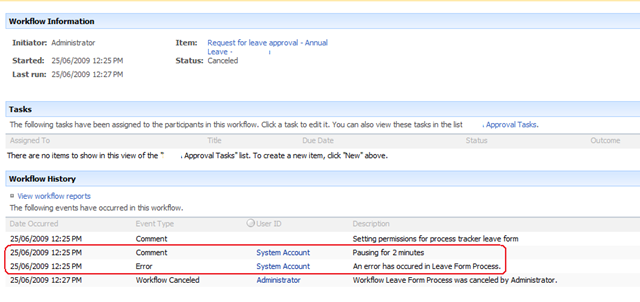
    Recently, a happily running leave form workflow ground to a halt with an error as shown below. What the screenshot below shows is that the workflow died right after a “Pause for duration” workflow action. (Note the “pausing for 2 minutes” line, just before the actual workflow error).

    image

    Now, the interesting thing here is that the pause action never happened. The workflow bombed out straight away and there was no pause at all. Yet, the fact that the pause action logged to the history list meant that it attempted to do so. It seemed that the pause action ran for long enough to log that it was about to pause, but died when actually trying to.

    The pause action occurred in step 2 of my workflow, but it is worthwhile showing you the first workflow step first.

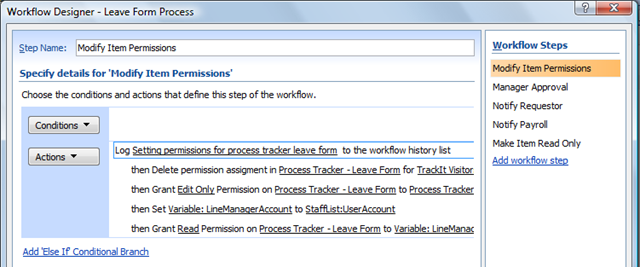
    Below is a screenshot of step 1 of the workflow. This first step is called “Modify Item Permissions” and we are using the codeplex custom workflow actions to modify permissions of the submitted leave form, ensuring that only the requestor of the leave (and their boss) can see or modify the form.

    image

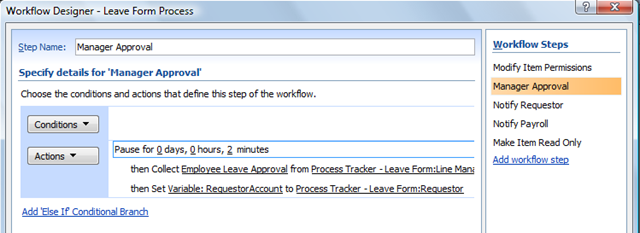
    The step in the workflow, called “Manager Approval”, shows where we pause for 2 minutes. The reason we pause is to get around another workflow error that I will explain at the end of the post. After the pause action was completed and the workflow recommenced, it performed a “Collect data from user” task as shown below. This created a task for the requestors manager to approve the leave request.

    image

    We know that the “Collect data from user” action never ran, because the “Employee Leave Approval” task never actually got created in the task list. Thus, we know the error occurred at the pause action. Or, did it?

    This error occurred consistently whether the workflow was manually started or auto-triggered. Checked all the usual suspects – timber jobs ok, permissions unchanged and working well, etc. Scanning the ULS logs at this time showed an interesting error with a much less interesting stack trace (that I have pasted at the end of the post for readability).

    “Unexpected    ERROR: request not found in the TrackedRequests. We might be creating and closing webs on different threads”

    Hmm, what is TrackedRequests and why is a request not found? Googling that error message wasn’t much help at all. Although it is quite common, nothing matched my particular context. But then I received a lucky break. When I cancelled the running workflow that was in this error state, I received a new error that made it quite easy to work out what was going on.

    WinWF Internal Error, terminating workflow Id# 02334a17-3211-4d30-902f-bf34e20354c6    
    Unexpected    System.Workflow.Runtime.Hosting.PersistenceException: Object reference not set to an instance of an object. —> System.NullReferenceException: Object reference not set to an instance of an object.     at DP.Sharepoint.Workflow.Common.RemoveListItemPermissionEntry(SPListItem item, String principalName, Boolean breakRoleInheritance)    

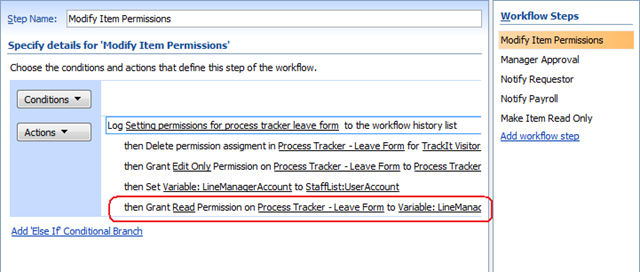
    It was this error that gave it away. For a start, the method being called was DP.Sharepoint.Workflow.Common.RemoveListItemPermissionEntry and the exception was a null reference. RemoveListItemPermissionEntry sounded suspiciously like the permission based workflow actions of the “Modify Item Permissions” step as highlighted below.

    image

    But wait… the workflow never failed at this line at all. It actually failed at the first action of the next step (“Manager Approval”)  with the “request not found in the TrackedRequests” error. Interesting, eh?

    Let’s put aside the issue of what step and what action the workflow failed on for a moment, and examine the second error message more closely. If you examine the “Modify Item Permissions” action highlighted above, can you think of any reason that I would get a null reference exception?

    Ah! What happens if the previous action called “Set Variable”, set a blank or null value? I suspect that the “Grant permissions on an item” workflow action will attempt to change permissions of the item to a blank or null user. The result? That workflow action will die with a null reference exception – precisely what the error states.

    When I checked the source of the variable “LineManagerAccount”, it was looking up a contact list for the manager of the requestor. Sure enough, it did turn out that that column was blank for some users. Thus, a simple exercise in input validation combined with a small correction to that list item and the problem was solved.

    Further questions and further information

    I could stop this post there I suppose and perhaps someone, sometime might find this post and think “Wohoo!”. But this problem raised a couple of issues, as well as made it clear to me that I had been stupid in how I designed this one. Let’s tackle them one by one.

    1. When did it die again?

    Clearly the error that caused all of this, occurred at the last action of the “Modify Item Permissions” step. We know this because the step before was where the lookup to the contact list happened, and this is where the null value came from that caused the exception. But then why did the workflow not stop at this point? Why did it continue onward and attempt to move to the “Manager Approval” steps and die on the “Pause for duration” action?

    Whether this is default behaviour of SPD workflows or a logic fault in the exception handling code in the codeplex-based “Grant Permission on an Item” action, this makes life hard to troubleshoot because the error message never made sense. I only found out the true root cause when I terminated the workflow manually and got lucky because the offending exception suddenly appeared.

    So, the conclusion to draw? If your SPD workflow dies with “ERROR: request not found in the TrackedRequests” in the logs, it may be that the real cause of the problem is a previous workflow step and not the step where the workflow actually stopped.

    2. Paul is a dumbass

    Okay, so let’s talk about lessons learnt. Some people reading this may wonder why I never used Active Directory or the user profile store to store manager details for a user and to do the lookup from there. The answer is that this contact list approach simply made sense for this client and this is actually not the dumb thing that I did. The dumb thing that I did was to forget that all of the necessary business logic and data validation steps could have been performed in the InfoPath form itself.

    Remember that InfoPath forms can have data connections to all sorts of sources such as SharePoint lists, web services and relational databases. (I am not going into detail on how to do that here because I have already covered it in quite a lot in part 5 of the “Leave Form Tribute” series). We can have a published InfoPath form connect to any SharePoint list or library across the entire farm to look up business logic details, such as an approver. This is something that SharePoint Designer workflows cannot do out of the box – it can only lookup from the site where the workflow has been created.

    But, more important than that, we can easily use InfoPath rules and data validation functionality to ensure that the values are not null before submitting.

    What this all means is that your SPD workflows end up being simpler and easier to maintain because InfoPath is providing all of the data to the workflow as well as the validation of the data. Therefore, the workflow now doesn’t have to do the lookup work and have unnecessary steps and actions.

    For these reasons I think that, if you can, grab all of the data you need for a business process using the InfoPath form using hidden fields. Then publish the form and ensure these hidden fields are published as site columns.

    For this particular purpose, I think that InfoPath is a lesser evil than SharePoint Designer workflows.

    3. What are the pause actions there for anyway?

    Finally, I promised I’d explain why I had a pause action in the workflow. This is to get around a race condition with workflows that produces an intermittent error message:

    “This task is currently locked by a running workflow and cannot be edited”

    I’ve seen this occur in several situations and it pretty much boils down to some workflow actions being synchronous and subsequent actions starting before the previous action properly completed. Consider this example.

    One workflow creates or updates an item in a list, say a task list. But the task list also has a workflow attached to it. This means that the first workflow creates the task item and then moves onto the next step. Meanwhile, a new workflow has been triggered for that new task list item. This secondary workflow refers to information stored in the main item which causes the race condition.  If the information in the main item is not committed before this workflow attempts to use it, you’ll get null values when the main item is a new item.  When working with SPD workflows, these null values will show up as ????. 

    To resolve the race condition, I had to ensure that the main item was committed before the secondary workflow was started by pausing the workflow.  Why does pausing the workflow cause the changes to be committed?  According to the MSDN article “How Windows SharePoint Services Processes Workflow Activities” http://msdn.microsoft.com/en-us/library/ms442249.aspx

    Windows SharePoint Services runs the workflow until it reaches a point where it cannot proceed because it is waiting for some event to occur: for example, a user must designate a task as completed. Only at this "commit point" does Windows SharePoint Services commit the changes made in the previous Windows SharePoint Services-specific workflow activities…

    The not-so-clever workaround is to pause the workflow in between actions. When you add a pause, the workflow “cannot proceed because it is waiting for some event to occur” and therefore makes it a commit point. Not pretty – but works.

    I hope that you find this article of use in your SharePoint Designer workflow troubleshooting endeavours. Below, I have pasted the complete stack traces (for the search engines).

    Thanks for reading

    Paul Culmsee

    06/25/2009 12:25:20.46 w3wp.exe (0x0BA8) 0x16F8 Windows SharePoint Services General 0 Unexpected ERROR: request not found in the TrackedRequests. We might be creating and closing webs on different threads. ThreadId = 1, Free call stack = at Microsoft.SharePoint.SPRequestManager.Release(SPRequest request) at Microsoft.SharePoint.SPWeb.Invalidate() at Microsoft.SharePoint.SPWeb.Close() at Microsoft.SharePoint.SPSite.Close() at Microsoft.SharePoint.SPSite.Dispose() at Microsoft.SharePoint.Workflow.SPWorkflowManager.<>c__DisplayClass1.<StartWorkflow>b__0() at Microsoft.SharePoint.SPSecurity.CodeToRunElevatedWrapper(Object state) at Microsoft.SharePoint.SPSecurity.<>c__DisplayClass4.<RunWithElevatedPrivileges>b__2() at Microsoft.SharePoint.Utilities.SecurityContext.RunAsProcess(CodeToRunElevated secureCode) at Microsoft.SharePoint.SPSecurity.RunWithEl…

    06/25/2009 12:25:20.46* w3wp.exe (0x0BA8) 0x16F8 Windows SharePoint Services General 0 Unexpected …evatedPrivileges(WaitCallback secureCode, Object param) at Microsoft.SharePoint.SPSecurity.RunWithElevatedPrivileges(CodeToRunElevated secureCode) at Microsoft.SharePoint.Workflow.SPWorkflowManager.StartWorkflow(SPListItem item, SPWorkflowAssociation association, SPWorkflowEvent startEvent, Boolean bAutoStart, Boolean bCreateOnly) at Microsoft.SharePoint.Workflow.SPWorkflowManager.StartWorkflow(SPListItem item, SPWorkflowAssociation association, String eventData, Boolean isAutoStart) at Microsoft.SharePoint.Workflow.SPWorkflowManager.StartWorkflow(SPListItem item, SPWorkflowAssociation association, String eventData) at Microsoft.SharePoint.WebControls.SPWorkflowDataSourceView.Insert(IDictionary values) at Microsoft.SharePoint.WebControls.SPWorkflowDataSourceView.Ins…

    06/25/2009 12:25:20.46* w3wp.exe (0x0BA8) 0x16F8 Windows SharePoint Services General 0 Unexpected …ert(IDictionary values, DataSourceViewOperationCallback callback) at Microsoft.SharePoint.WebPartPages.DataFormWebPart.FlatCommit() at Microsoft.SharePoint.WebPartPages.DataFormWebPart.PerformCommit() at Microsoft.SharePoint.WebPartPages.DataFormWebPart.HandleOnSave(Object sender, EventArgs e) at Microsoft.SharePoint.WebPartPages.DataFormWebPart.RaisePostBackEvent(String eventArgument) at System.Web.UI.Page.RaisePostBackEvent(IPostBackEventHandler sourceControl, String eventArgument) at System.Web.UI.Page.RaisePostBackEvent(NameValueCollection postData) at System.Web.UI.Page.ProcessRequestMain(Boolean includeStagesBeforeAsyncPoint, Boolean includeStagesAfterAsyncPoint) at System.Web.UI.Page.ProcessRequest(Boolean includeStagesBeforeAsyncPoint, Boolean includ…

    06/25/2009 12:25:20.46* w3wp.exe (0x0BA8) 0x16F8 Windows SharePoint Services General 0 Unexpected …eStagesAfterAsyncPoint) at System.Web.UI.Page.ProcessRequest() at System.Web.UI.Page.ProcessRequestWithNoAssert(HttpContext context) at System.Web.UI.Page.ProcessRequest(HttpContext context) at System.Web.HttpApplication.CallHandlerExecutionStep.System.Web.HttpApplication.IExecutionStep.Execute() at System.Web.HttpApplication.ExecuteStep(IExecutionStep step, Boolean& completedSynchronously) at System.Web.HttpApplication.ApplicationStepManager.ResumeSteps(Exception error) at System.Web.HttpApplication.System.Web.IHttpAsyncHandler.BeginProcessRequest(HttpContext context, AsyncCallback cb, Object extraData) at System.Web.HttpRuntime.ProcessRequestInternal(HttpWorkerRequest wr) at System.Web.HttpRuntime.ProcessRequestNoDemand(HttpWorkerRequest wr) at Sys…

    06/25/2009 12:25:20.46* w3wp.exe (0x0BA8) 0x16F8 Windows SharePoint Services General 0 Unexpected …tem.Web.Hosting.ISAPIRuntime.ProcessRequest(IntPtr ecb, Int32 iWRType) , Allocation call stack (if present) at Microsoft.SharePoint.Library.SPRequest..ctor() at Microsoft.SharePoint.SPGlobal.CreateSPRequestAndSetIdentity(Boolean bNotGlobalAdminCode, String strUrl, Boolean bNotAddToContext, Byte[] UserToken, String userName, Boolean bIgnoreTokenTimeout, Boolean bAsAnonymous) at Microsoft.SharePoint.SPWeb.InitializeSPRequest() at Microsoft.SharePoint.SPWeb.EnsureSPRequest() at Microsoft.SharePoint.SPWeb.get_Request() at Microsoft.SharePoint.SPWeb.InitWebPublic() at Microsoft.SharePoint.SPWeb.get_ServerRelativeUrl() at Microsoft.SharePoint.SPWeb.get_Url() at Microsoft.SharePoint.SPUser.InitMember() at Microsoft.SharePoint.SPUser..ctor(SPWeb web, ISecura…

    06/25/2009 12:25:20.46* w3wp.exe (0x0BA8) 0x16F8 Windows SharePoint Services General 0 Unexpected …bleObject scope, String strIdentifier, Object[,] arrUsersData, UInt32 index, Int32 iByParamId, String strByParamSID, String strByParamEmail, SPUserCollectionType userCollectionType, Boolean isSiteAuditor) at Microsoft.SharePoint.SPUser..ctor(SPWeb web, ISecurableObject scope, String strIdentifier, Object[,] arrUsersData, UInt32 index, Int32 iByParamId, String strByParamSID, String strByParamEmail, SPUserCollectionType userCollectionType) at Microsoft.SharePoint.SPUserCollection.GetByIDNoThrow(Int32 id) at Microsoft.SharePoint.SPSite.get_SystemAccount() at Microsoft.SharePoint.WorkflowActions.Helper.ResolveUserField(WorkflowContext context, Object fvalue) at Microsoft.SharePoint.WorkflowActions.Helper.LookupUser(WorkflowContext context, Guid listId, Int32 listItem, Strin…

    06/25/2009 12:25:20.46* w3wp.exe (0x0BA8) 0x16F8 Windows SharePoint Services General 0 Unexpected …g fieldName) at Microsoft.SharePoint.WorkflowActions.Helper.LookupUser(WorkflowContext context, String listIdOrName, Int32 listItem, String fieldName) at Microsoft.SharePoint.WorkflowActions.LookupActivity.Execute(ActivityExecutionContext provider) at System.Workflow.ComponentModel.ActivityExecutor`1.Execute(T activity, ActivityExecutionContext executionContext) at System.Workflow.ComponentModel.ActivityExecutor`1.Execute(Activity activity, ActivityExecutionContext executionContext) at System.Workflow.ComponentModel.ActivityExecutorOperation.Run(IWorkflowCoreRuntime workflowCoreRuntime) at System.Workflow.Runtime.Scheduler.Run() at System.Workflow.Runtime.WorkflowExecutor.RunScheduler() at System.Workflow.Runtime.WorkflowExecutor.RunSome(Object ignored) …

    06/25/2009 12:25:20.46* w3wp.exe (0x0BA8) 0x16F8 Windows SharePoint Services General 0 Unexpected …at System.Workflow.Runtime.Hosting.DefaultWorkflowSchedulerService.WorkItem.Invoke(WorkflowSchedulerService service) at System.Workflow.Runtime.Hosting.DefaultWorkflowSchedulerService.QueueWorkerProcess(Object state) at System.Threading._ThreadPoolWaitCallback.WaitCallback_Context(Object state) at System.Threading.ExecutionContext.runTryCode(Object userData) at System.Runtime.CompilerServices.RuntimeHelpers.ExecuteCodeWithGuaranteedCleanup(TryCode code, CleanupCode backoutCode, Object userData) at System.Threading.ExecutionContext.RunInternal(ExecutionContext executionContext, ContextCallback callback, Object state) at System.Threading.ExecutionContext.Run(ExecutionContext executionContext, ContextCallback callback, Object state) at System.Threading._ThreadPoolW…

    06/25/2009 12:25:20.46* w3wp.exe (0x0BA8) 0x16F8 Windows SharePoint Services General 0 Unexpected …aitCallback.PerformWaitCallbackInternal(_ThreadPoolWaitCallback tpWaitCallBack) at System.Threading._ThreadPoolWaitCallback.PerformWaitCallback(Object state)


    06/25/2009 12:27:16.49 w3wp.exe (0x0BA8) 0x1CB4 Windows SharePoint Services Workflow Infrastructure 88xr Unexpected WinWF Internal Error, terminating workflow Id# 02334a17-3211-4d30-902f-bf34e20354c6

    06/25/2009 12:27:16.49 w3wp.exe (0x0BA8) 0x1CB4 Windows SharePoint Services Workflow Infrastructure 98d4 Unexpected System.Workflow.Runtime.Hosting.PersistenceException: Object reference not set to an instance of an object. —> System.NullReferenceException: Object reference not set to an instance of an object. at DP.Sharepoint.Workflow.Common.RemoveListItemPermissionEntry(SPListItem item, String principalName, Boolean breakRoleInheritance) at DP.Sharepoint.Workflow.PermissionsService.<>c__DisplayClass1.<ProcessGrantRequest>b__0() at Microsoft.SharePoint.SPSecurity.CodeToRunElevatedWrapper(Object state) at Microsoft.SharePoint.SPSecurity.<>c__DisplayClass4.<RunWithElevatedPrivileges>b__2() at Microsoft.SharePoint.Utilities.SecurityContext.RunAsProcess(CodeToRunElevated secureCode) at Microsoft.SharePoint.SPSecurity.RunWithElevatedPrivileges(WaitCallback secureCode, Object param)…

    06/25/2009 12:27:16.49* w3wp.exe (0x0BA8) 0x1CB4 Windows SharePoint Services Workflow Infrastructure 98d4 Unexpected … at Microsoft.SharePoint.SPSecurity.RunWithElevatedPrivileges(CodeToRunElevated secureCode) at DP.Sharepoint.Workflow.PermissionsService.ProcessGrantRequest(PermissionRequest pr) at DP.Sharepoint.Workflow.PermissionsService.Commit(Transaction transaction, ICollection items) at System.Workflow.Runtime.WorkBatch.PendingWorkCollection.Commit(Transaction transaction) at System.Workflow.Runtime.WorkBatch.Commit(Transaction transaction) at System.Workflow.Runtime.VolatileResourceManager.Commit() at System.Workflow.Runtime.WorkflowExecutor.DoResourceManagerCommit() at System.Workflow.Runtime.Hosting.WorkflowCommitWorkBatchService.CommitWorkBatch(CommitWorkBatchCallback commitWorkBatchCallback) at System.Workflow.Runtime.Hosting.DefaultWorkflowCommitWorkBatchSer…

    06/25/2009 12:27:16.49* w3wp.exe (0x0BA8) 0x1CB4 Windows SharePoint Services Workflow Infrastructure 98d4 Unexpected …vice.CommitWorkBatch(CommitWorkBatchCallback commitWorkBatchCallback) at System.Workflow.Runtime.WorkflowExecutor.CommitTransaction(Activity activityContext) at System.Workflow.Runtime.WorkflowExecutor.Persist(Activity dynamicActivity, Boolean unlock, Boolean needsCompensation) — End of inner exception stack trace — at System.Workflow.Runtime.WorkflowExecutor.Persist(Activity dynamicActivity, Boolean unlock, Boolean needsCompensation) at System.Workflow.Runtime.WorkflowExecutor.ProtectedPersist(Boolean unlock)


    Who wants to spend 3 days with me and the gang?

    A quick bit of background. My last 2 trips to the USA were particularly fruitful in meeting many like-minded SharePoint pros, all of which are well known and highly regarded. Some close friendships were made and what was really cool was that some people I met, despite having very different skills and experience (and physical locations!), seemed to connect on a level that gave us the desire and impetus to to work together very closely idealistically and commercially. More on that soon enough… 🙂

    So who are the members of this global group of SharePoint mystery men?

    • Andrew (Agile Boy) Woodward – Agile extraordinaire. So damn agile in fact that blink and you’d never know he was there. Able to demolish long SharePoint projects into bite sized chunks in a single bound
    • Ruven (Magneto) Gotz. Mind mapping maestro with the ability to bend information architecture to his will, and able to know what you want before you even have formed the question
    • Dux (Mr Myagi) Sy. A sensei project Manager who will teach you the wax-on/wax-off approach to successful SharePoint delivery. He might even get you to paint his fence if you are lucky

    and me (aka Dr Wicked) round it off – pushing the boundaries of pop-culture metaphors for cheap laughs and the odd bit of work on shared understanding, ROI and SharePoint governance.

    So why does any of this matter?

    image

    It just so happens that all four of us are soon to be in the same place at the same time. This is actually a frustratingly rare occasion, given that Andrew is in the UK, I am in Western Australia, Dux is in DC and Ruven is in Toronto. But in August, we will all be presenting at the SharePoint Best Practices Conference in DC. We are all tremendously honoured to be presenters at this event and this time around, we have been collaborating together to try and really deliver some great sessions that capture the essence of our common philosophical approaches.

    It takes me around 30 hours of transit to get to the east coast, and Andrew also has to travel a fair distance too. Therefore when these sorts of opportunities present themselves, we like to make the most of it – and we are *not* just talking beer! (ok well that’s not strictly true – beer is a significant motivation :-D)

    Accordingly, we are planning a special “SharePoint Governance Mentoring” workshop that will run over a period of 3 days (August 19-21, 2009), prior to the conference itself. It will be a unique, one-off event and numbers will be strictly limited. We think that our combined skills cover the broad spectrum of the SharePoint universe very well, with a particularly strong governance underpinning. Participants will be able to delve into topics such as how to manage a SharePoint project, practical techniques in gathering requirements, achieving shared understanding and buy-in, information architecture, team dynamics and the root causes of organisational chaos that make SharePoint an attractive proposition in the first place. We will also cover making a great business case and understanding return on investment, how to approach application development on the SharePoint platform and above all, learning what governance is really all about, and applying the right sort of governance at the right time. 

    Additionally, plenty of time will be allocated for participants to discuss their SharePoint challenges in an open forum, so if you bring your SharePoint baggage, we will lend a sympathetic ear and then arm you with some new kung-fu skills to take back to your organisation.

    Does this event sound like your cup of tea? If so, we need to hear from you! We will publish the workshop details and outline in mid-July but we need to gauge interest now. The cost for this three day event will be $1750 per attendee, although anyone who is registered for SharePoint Best Practices Conference will be entitled to a 10% discount.

    So if this sounds good to you, then please register your interest at Dux’s site below:

    http://sp.meetdux.com/workshop_interest.aspx

    Thanks for reading (and we hope to see you there!)

    Paul Culmsee

    www.sevensigma.com.au


    Core Principles for User Engagement – a must read …er… explore!

    I listened to Steve Smith talk about user engagement on the SharePoint Pod Show today and found myself nodding in strong agreement with many points that he made. So while in that mood of stakeholder engagement and how to achieve it, twitter made me aware of a really terrific Debategraph map on the topic of “Core Principles of Public Engagements” and think it is mandatory learning material for any SharePoint architect/collaboration consultant/business analyst/business improvement specialists/<insert title here>.

    The map above, came from a collaborative effort called the “Public Engagement Principals Project”. This is a recent project (February 2009) and the aim was to “create clarity in our field about what we consider to be the fundamental components of quality public engagement”. The outcome of this project are seven recommendations that reflect the common beliefs and understandings of those working in the fields of public engagement, conflict resolution, and collaboration.

    1. Careful Planning and Preparation
    Through adequate and inclusive planning, ensure that the design, organization, and convening of the process serve both a clearly defined purpose and the needs of the participants.

    2. Inclusion and Demographic Diversity
    Equitably incorporate diverse people, voices, ideas, and information to lay the groundwork for quality outcomes and democratic legitimacy.

    3. Collaboration and Shared Purpose
    Support and encourage participants, government and community institutions, and others to work together to advance the common good.

    4. Openness and Learning
    Help all involved listen to each other, explore new ideas unconstrained by predetermined outcomes, learn and apply information in ways that generate new options, and rigorously evaluate public engagement activities for effectiveness.

    5. Transparency and Trust
    Be clear and open about the process, and provide a public record of the organizers, sponsors, outcomes, and range of views and ideas expressed.

    6. Impact and Action
    Ensure each participatory effort has real potential to make a difference, and that participants are aware of that potential.

    7. Sustained Engagement and Participatory Culture
    Promote a culture of participation with programs and institutions that support ongoing quality public engagement.

    Despite the fact this map is all about public engagement, this material is absolutely the best advice you could ever get for dealing with user engagement in your SharePoint endeavours. If you have any interest whatsoever in the mystical arts of getting true understanding and buy-in among your organisational stakeholder group, then this map (and its underlying documents), is for you.

    Also, be sure to use the Debategraph toolbar to explore the detailed information in the root node. There is a lot of supplementary information in this map that you can easily access by clicking on the “Show detailed text and comments” icon (highlighted below).

    image 

    If you are using the Seven Sigma Web Part for Debategraph, the Map ID is 16220 and you can incorporate this map into your broader governance site. I’ll be linking this map into my SharePoint governance map later as I think it complements, and expands upon the information contained there.

    I think these seven principles make a terrific starting point for developing your own guiding principles around user-engagement as part of your governance efforts.

    Finally, if you want more detailed information about how this map came to be, then consult the links below


    Thanks for reading

    Paul Culmsee


    SharePoint book review – Seamless Teamwork by Michael Sampson

    Hi all

    Some time back a publisher sent me a self-help SharePoint book pitched at end users. I figured that I don’t really represent an end user and the best way to review it would be to make Mrs Cleverworkarounds review the book. I mean, after all, getting the spouse to bring home the bacon is part of my quest to eventually be a kept man! However, my grand plan ran aground after a while – she got around halfway through the book and came back and said “It’s easy to follow and all, but I don’t understand *why* I am doing these things.”

    As a result, I never published the review of that particular book.

    If you are wondering what the point behind that little anecdote is, then read on. 

    “Seamless Teamwork” by Michael Sampson is a book that I knew I had to review – from when I first heard about it and read one of the chapters at its web site. Its subtitle is “Using Microsoft SharePoint Technologies to Collaborate, Innovate and Drive Business in New Ways” and as expected, this is a book that looks at SharePoint through a different lens to most of the technical books that I review (with the exception of Dux’s great project management book).

    In fact Dux’s book is actually a great frame of reference when reading this book because both authors have adopted a similar approach. Rather than focussing on the technology, both books focus on a specific problem domain and explain how to leverage the technology through the exploration of that problem. In doing so, they avoid the pitfalls of “end user” SharePoint books that lack coherence like the one that my wife was dissatisfied with. Why? Because there is a clear outcome to achieve by the end of the book.

    Here is the funny thing, though. Both authors approach the subject matter from the perspective of a new project that needs to be successfully implemented, yet Michael actually uses SharePoint in a very different manner to how Dux does in his book. Does that mean one of them is wrong? Not at all. In fact it really hit home to me that if you can achieve *true* buy-in and shared commitment to a particular solution, then the technology aspects can be implemented in a number of different ways. Michael actually makes this very clear in his preface when he says

    In a book of this nature, it is impossible to cover every eventuality, every situation, and every approach. What I hope you get out of it is a vision of how you can apply the capabilities of SharePoint to the work of your team, rather than a prescription of what you need to do at each and every point of a teaming process. Embrace the ideas that work for you and ignore the ones that don’t.

    This book explores SharePoint through the “fly on the wall” view of “Project Delta” where an up and coming MBA holding brown-noser named Roger has kissed enough butts to be handed a high profile project to drive growth in the overseas market for his company. (Okay, so I am embellishing the back-story just a teensy bit). Through Roger’s eyes, we discover why email based collaboration is not sufficient for project collaboration, along with some teamwork theory, cleverly interwoven around the storyline. "Project collaboration” is broken down into more specific outcomes and explored individually, illustrating what capabilities of SharePoint are suited to these outcomes.

    • Collaborating
    • Finding
    • Accessing
    • Using for decision making
    • Enforcing structure
    • Publishing and managing

    .. and that was just chapter 1!

    Chapter 2 introduces the project management model used by Roger and the intrepid heroes of Project Delta. I like this chapter because he offers enough meat to theory nuts like me, while balancing useful and relevant SharePoint content. First up, five project phases are defined and explained, namely:

    • Creating a shared vision
    • Understanding the options
    • Analysing the options
    • Making a decision
    • Concluding the project

    This particular choice of wording has no references or footnotes and googling the exact terms leads me straight to Michael’s book so I presume that he is applying his own world view here. Next, we focus on getting the right people involved in the project. Roger has to identify the people with the right mix of skills, background and experiences to participate and this provides a nice dovetail to introduce SharePoint user profiles and “My sites”. As well as explaining the concepts and workings of this SharePoint feature, practical tips are offered to get the best out of it as well. The chapter concludes with a project team identified, assembled and ready to rock and roll.

    Chapter 3 now focuses on the different audiences involved in a project, namely the project team, the project sponsors and stakeholders and “everyone else”. SharePoint team sites are introduced by examining the information needs of each of these groups and illustrating that one size does not fit all. The chapter walks through creating a site for each of these groups using a site and subsite hierarchy and the permissions required. Blank site templates are used (something I also tend to start with) and then some “projecty type” out of the box lists are created, as well as the ubiquitous wiki library and a blog site. Finally, some out of the box web parts are added to the mix.

    All in all, a great example of a practical project oriented site that one could use or build upon.

    Chapter 4 expands on these sites by switching focus from creation to actual use of the site. Michael writes about the “Seamless Teamwork Approach” to project collaboration and then uses this as a platform to explain alerting, RSS, basic usage of the lists, wiki and blog. The key theme of this chapter is the section about “teamworking protocol” – in other words, team members need to agree on the general approach to how they will work together. The most important point  in this chapter deserves its own entire chapter.

    It is expected – and absolutely beneficial – that people have disagreements and differences of opinion about key matters in the project. If everyone thinks the same, a team would not be necessary. However the key is that we will not allow disagreements to derail the progress of the project, because we agree to listen carefully and resolve our disagreements through candid dialogue and debate.

    Chapter 5 through 9 now examines each of the five project phases  that were outlined in chapter 2.

    Chapter 5 is all about creating a shared vision. We examine the different types of vision (again from my research this view of vision seems to be Michael’s ideas and not based on any of the methodologies or academic stuff that I have read). We cover planning for engagement with stakeholders using a wiki, before the actual engagement process itself. Once again, this chapter is a deft mix of the product, the process and the rationale behind the approach. This chapter does not stick strictly with SharePoint either as we have the scenario of a PowerPoint presentation being viewed over a live meeting session for geographically dispersed stakeholders.

    Chapter 5 also delves a little into some of the factors that cause the “chaos” that derails projects. The importance of timely notification of changing constraints or circumstances is covered by reviewing how the RSS and email notifications (tasks list connected to Outlook) are used. Finally, for some odd reason, Michael devotes two pages to placating those annoying mac users who, no matter that the problem is, has already tried to convince everyone that buying a mac is the solution…hehehe!

    Chapter 6 is all about identifying options and starts out by examining how to effectively brainstorm using the SharePoint wiki (and confluence gets a mention also). OneNote is also covered and I found the shared OneNote notebook idea quite interesting as I have not tried that myself. This chapter is heavy on guidance and decorum around how brainstorming should be approached to get the most out of it. The chapter concludes with consolidating and synthesising the ideas.

    Chapter 7 is all about analysing the options from the collated list. The key question here is “what could we realistically do?” This chapter is the first one to introduce the notion of a custom list. In the example, a custom list is used to track further analysis on each option. I loved the little governance interlude here, where Roger, being the angel user that he is, contacts Gareth, the ever friendly and helpful SharePoint support person to get advice on the best way to structure the custom list. (What sort of utopian fantasy world are you painting here Michael? :-D). Seriously though, this is actually quite an advanced chapter in terms of SharePoint conceptual stuff, given that document based content types are also introduced here too and various permutations of mixing and matching document libraries, wikis and the perennial folder vs metadata debate. Thankfully, Michael did not poo-poo folders outright and instead gives one of the best write-ups I’ve seen on the pros and cons of folders vs metadata. He also covers site columns and how they can be scoped. This is great stuff.

    The final section from this chapter is on meetings, with participants are either in the same location or separate locations. There are different types of meetings for different purposes and advice is offered on how best to run these meetings and when and what technology is appropriate to augment them. Microsoft’s free conferencing tool, “SharedView” is covered (something I never knew existed until I read this book – duh, Paul!) SharePoint meeting workspaces and Groove 2007 are covered also. The technology detail covered in this section is matched by great, practical advice on how best to use the tools, given the circumstances.

    Chapter 8 is entitled “Making a decision.” Now our intrepid Roger has come to the crunch and gets a recommendation made, circulated and signed off. Here we use SharePoint surveys to do the task, but in reality, this chapter is not about SharePoint at all. The meat of this chapter is around the processes needed and advice on decorum in particular situations. There is a smattering of wiki and a good section introducing workflows in context of the feedback process, but fundamentally, the value of this chapter is in the non SharePoint material.

    Chapter 9 is all about concluding the project. Roger’s butt kissing and pandering to stakeholders’ whims are finally at an end with confirmation that the final recommendation on project Delta has been accepted by senior management. Tasks include updating participants “My sites” with the project details as well as any skills learned, a blog post about the project in my-site, and the essential, but unpopular task of cleaning up all the loose ends of the projects from a compliance, archival and retention point of view. Some final housekeeping and we are done!

    My favourite chapter of the book is actually not in the book at all. It is a separate chapter available from the Seamless Teamwork website and is all about SharePoint governance. I highly recommend this chapter, as it one of the best write-ups that I have seen on the topic so far. 

    Overall this is a terrific book, yet there are sections where advice is given that I would personally not take. Some things I flat out disagree with. But I need to fair here. I am currently surrounded by a dozen books on team dynamics, facilitation, soft systems methodology and risk management so I am not the intended audience for this book. Just because I have different philosophical approaches to some aspects does not detract from this book at all. In fact, it comes with the territory of a book like this and this is why I think it is such a great read. I personally find it quite easy to write technically oriented articles, but to delve into ‘soft’ topics like team dynamics, project chaos, developing shared vision and the like is actually much more subjective and I think, ambitious and difficult to write well.

    If I was to make a broad comparison with Dux’s book, which is about the closest thing to a comparison out there, I would say that Dux covered more SharePoint feature areas than Michael and stuck fairly close to the project management body of knowledge. Michael on the other hand, delved deeper into some of the softer topics around how teams can deliver great projects. Apples and oranges really, and I think that both books compliment each-other exceptionally well.

    The other commonality with Dux’s book is that readers with a technical audience who skip the preface will probably not like this book or consider it too light on in terms of low level SharePoint coverage. Michael is very clear in his preface here. This book is for users, information workers and project team members who want to make the best use of SharePoint for their team. To this end, Michael has completely nailed what he set out to do and should be commended for delivering the goods.

    It is great to see SharePoint books coming out that delve deeper into the mechanics of team collaboration, before diving straight into product features and capabilities. Previous books have tended to gloss over the non technical side of team collaboration and this book fills the gap nicely.


    Thanks for reading


    Paul Culmsee

    www.sevensigma.com.au 
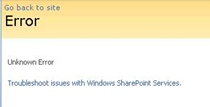


    SharePoint Governance – Debategraph style

    Quick note: This is another of the sort of posts where I cannot help but feel that some readers will wonder what I have been smoking. It is not essential, but reading the “one best practice” series will provide a lot of background to this post.

    imageOn the grand scale of world problems, your average messed up SharePoint project would not be considered particularly “wicked”. If you compare a haywire SharePoint project to the truly *global* wicked problems, such as global warming, the Israeli/Palestinian conflict and Tom Cruise, then it kind of makes you realise just how good we SharePoint architects, developers and engineers have it. I mean, hey, if a bunch of nerds can’t make little ol’ SharePoint a success, what hope do we have for the big issues like making Tom Cruise less of a tool?

    I know some people who have left SharePoint architecture work because of all the “people crap”. If you think “people crap” is bad in IT, imagine trying to mediate between the myriad of stakeholders involved in, say, cuts to carbon dioxide emissions. That is a world of hurt that is so huge that it pains my brain just to imagine it.

    Last year when I was learning the dark Jedi arts of dialogue mapping I got to know David Price, one of my fellow students who operated in that world of hurt. David is a very smart man indeed, with a Ph.D in organisational learning and environmental policy. His career has included public policy consultancy, TV documentary production, academic research and mediation.

    It was during that training course that David introduced me to a joint venture that he started with another scarily smart man named Peter Baldwin. Peter is an Australian who had a 15 year career in national politics, including six years as a federal minister in the Australian government. Unlike many Australian pollies, his background was engineering. After leaving politics, with a keen interest in how the web could “raise the quality of debate about public policy issues,” he cranked out visual studio and got down to some coding.

    The “baby” from this collaboration between David and Peter is a unique tool called Debategraph and it is a very interesting tool indeed.

    image

    DebateGraph was conceived as a tool to improve the quality of public debate on contentious or complex issues. Public debate, in general, is usually pretty awful. David and Peter explain why this is the case pretty comprehensively below.

    Public debates tend to be complex; with multiple data sources and perspectives and conflicting demands and values. In complex debates, the volume of information and arguments can seem like an overwhelming obstacle to someone, trying to develop a comprehensive understanding of the essential arguments advanced by all sides.

    Public debate is all too often characterized by repetitive contributions, digressions, argumentative fallacies, rhetorical flourishes, manipulative framing, obfuscation and personal attacks that result in a high noise-to-signal ratio and confusion rather than clarity.

    Conventional media reporting of public policy debates often struggles with the challenge of conveying nuanced, reasoned positions in a compressed linear form, when simple heated oppositions deliver a more dramatic and rewarding effect.

    This, in turn, makes it harder for established public figures to think tentatively and creatively in public about new policy approaches and to acknowledge strengths and common ground in opponents’ positions.

    We are talking about wicked problems here a lot of the time since public policy debates by definition respond to problems or questions where the general public are stakeholders. This means that there are a lot of varied stakeholders with even more varied world views and frames of reference. By creating a tool to improve the quality of a public policy discussion, DebateGraph is a tool that helps to deal with wicked problems themselves. What is interesting about DebateGraph is that like the IBIS based issue mapping that I practice, it is a visual, map based approach, yet it was developed independently from Conklin, Compendium or anything else in the space.

    image

    DebateGraph is a free online service. It allows the global community to collaboratively build maps of complex debates that accurately present all sides of the debate from a neutral standpoint, free of repetitive clutter and ‘noise’. Like a wiki, all aspects of the debate maps, both their content and structure, are continuously open to revision, refinement, comment, and evaluation by anyone who wants to join the community of thought. Each map is a cumulative work in progress.

    Readers and editors of the maps can explore the top-level structure of debates and delve into specific strands or sub-structures of a debate. What interested me was the fact that the debate maps can be embedded into other websites; with changes made to the map on one site updating immediately across every site on which it appears.

    DebateGraph also has RSS and email alerting like SharePoint, as well as a unique rating system where users can specify how much they relate to, or believe in a particular argument. The map then self reconfigures based on what arguments are considered the strongest. In effect, the map becomes a multi-dimensional poll or decision making tool.

    “Although consensus can emerge from such a process, not least because it promotes the discovery of previously unidentified options, our hope is as much that the people who continue to disagree will do so on the basis of an enriched understanding of the reasons for their disagreement and having had the chance to test each other’s reasoning to the fullest.”

    How DebateGraph works

    Using DebateGraph is pretty easy, given that you can embed it into other web sites as I have done here in this post. From the hundreds of maps that I can choose, I’ve decided to embed the map of the global financial crisis for you to explore. Click on the bubbles below and move them around. You will find that like bubble-wrap, you will spend your first few minutes immersing yourself in moving nodes around and navigating here and there. Go ahead and have a play – I’m patient – I’ll wait for you 🙂

    Right! I’m guessing around seven minutes have passed. Now that you’ve had a play, click on the first arrow, below the map and above the bottom toolbar. This will take you back to the top level financial crisis map. Let’s take a closer look at what is going on here.

    Attached to this “Global Financial Crisis” map is several root questions covering the cause, consequences, triggers and response to this problem. If you hover your mouse over any of the nodes, you will find a more detailed view of the question. Hover your mouse over the arrows between nodes, and you will find that the questions “arise from” the central “global financial crisis” node.

    Also, note the thickness of the arrows between nodes. The width represents the importance placed on this node by the community of users that have developed this map.

    The node colours are important too. Click on the “Long term causes of the financial crisis?” node above, and it will break out to a sub-map. Here the nodes are blue, rather than orange as shown below. The difference in colour is because these nodes are possible responses to the question “Long term causes of the financial crisis?” Once again, the width of the arrows indicate the community’s view of the validity of the responses. Now let’s look at a response that would potentially be divisive. One of the potential answers to the long term causes of the current crisis is “Natural financial dynamics of the baby boom generation.” So, it’s all the baby boomers fault, is it? 😉

    image

    Clicking on the “Natural financial dynamics of the baby boom generation” and we see a map with a few different coloured nodes. This is because there are some supporting and opposing arguments to this idea. The green nodes support the idea and the red nodes oppose the idea. This is the essence of the pro and con type arguments used when you create IBIS maps.

    image

    There are also some other nodes where the direction of the arrow is the opposite to the ones we have examined so far. These are links to other maps, and if you highlight the outward arrows, you can see that our current map relates to nodes in completely separate maps.

    This highlights a really important point about DebateGraph. It links related issues into a “web” of argumentation allowing readers to fully explore the myriad of interlocking issues that make up complex problems without “drowning” in information overload.

    Contributing to debates

    If you feel strongly on a particular subject then you are free to contribute to the debate. All DebateGraph maps have a toolbar that allows you to perform more advanced activities.

    image

    From left to right, the icons perform the following tasks

    • Open the DebateGraph home page
    • Show detailed text and comments for the currently selected item
    • Add comments to the selected item
    • Open this map in mapper (map edit) view
    • Edit this map in mapper (map edit) view
    • Search all DebateGraph maps for a given term
    • Share this map view or embed it in your own site
    • View the map in full screen mode
    • Key and explanatory notes for maps

    SharePoint Governance?

    Andrew Woodward suggested that I should create a DebateGraph map for us all to collectively explore how we could save Tom Cruise from complete agonising lameness. I chose not to do this for three reasons.

    1. Tom Cruise cannot be saved
    2. Tom Cruise’s lawyers would sue my ass
    3. There are more important topics to explore

    Let’s instead talk about a pet topic of mine: SharePoint governance.

    Governance in SharePoint is pretty misunderstood. There are many definitions of governance and they are all equally right, when judged through the lens of the person defining it. I have my own interpretation of governance (which is, of course, the definitive and completely correct one! – hehe). Maybe we should debate the issue?

    Joel talks about a SharePoint governance plan needing to be a ‘living’ document and in fact he states this explicitly in the sample governance plan that he did for Microsoft. I agree wholeheartedly on this notion. The reality is that documents like MSWord documents are not overly conducive to this ideal. The paradox is that the bigger and more comprehensive the governance plan is initially, the harder it can be to maintain and manage over time, and therefore, the greater the likelihood that it can go out of date or fall into disrepair over time.

    As a result, it occurred to me some time back that a DebateGraph map is the sort of “living” document that a governance plan really aspires to be. So, I roped in a couple of friends, most notably Andrew Jolly and Ruven Gotz, and together we experimented with DebateGraph to explore our own questions and ideas on the topic of SharePoint governance. The result is the map below which you can explore.

    Seven Sigma web part for DebateGraph

    It then occurred to me that others could benefit from this experimental exploration of the topic of SharePoint governance. This gave me the idea that having a “SharePoint governance web part” that could be added to any enterprise SharePoint portal would be a really great way to augment internal governance efforts. Additionally, one of my clients is responsible for conservation and sustainability at a local level in the community. They loved the DebateGraph debates around environmental, social and economic sustainability and this web part idea would work equally well for them.

    Accordingly, my company, Seven Sigma, has just released a free webpart for SharePoint that allows you to embed DebateGraph debate maps into your SharePoint sites and tune their display to fit into enterprise SharePoint portals. The default debate is the SharePoint Governance debate shown above, but you can view any of the many Debategraph maps via the web part properties.

    I have recorded a couple of webcasts, covering the installation and usage of the web part which can be viewed below. Otherwise, click here to download this free web part from the Seven Sigma web site.

    dginstall  dgusage

    Conclusion

    This new web part and the SharePoint governance debate, are essentially an experiment in trying to tackle collaboration a novel way. Like any wiki, to make it truly “living”, the maps need contributions from people who have something to offer on the topic. I fully accept that this initiative is not going to be everybody’s cup of tea, but I hope that it might get people to think about the sort of possibilities presented by this sort of wiki based display. The fact that all of the issues, ideas and argumentation can so easily be made available to a wide audience via a simple web part I think is unique.

    Thus, if you would like to contribute to this SharePoint governance debate sign up to Debategraph and we will add you to the governance debate.

    I think that DebateGraph, and applications like it, may well represent the next step in the evolution of collaborative applications. While Twitter and Facebook have found interesting ways to bring people together, those applications aren’t exactly going to provide you with the sort of ‘container’ required to tackle really wicked problems. I foresee a lot of development in this sub-genre of collaborative applications in the future.

    In other words, watch this space!

    Thanks for reading

    Paul Culmsee

    www.sevensigma.com.au
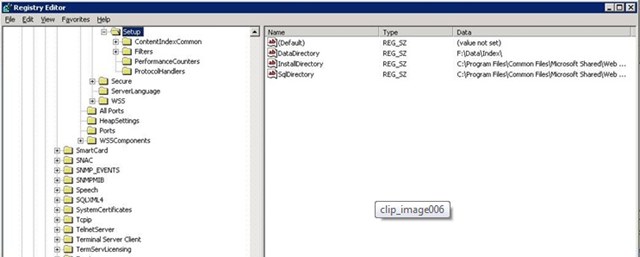


    « Previous PageNext Page »

    Today is: Sunday 8 March 2026 -