Back to Cleverworkarounds mainpage
 

More SharePoint Branding – Customisation using Javascript – Part 5

Hello and welcome to part 5 of another epic CleverWorkArounds blog post.

If you think I write a lot on my blog, you should see my documentation and training material! I seem to be rare insofar as I actually like to write documentation and can churn out reasonable quality pretty fast. So if you need your scary SharePoint farm/infrastructure audited and fully documented, you know who to call! 🙂

Anyhow, here is the current state of play.

  • Part 1 of this series looked at how we can use JavaScript to deal with the common request of hiding form elements from the user in lists and document libraries. We looked at a Microsoft documented method, then a better, more flexible method.
  • Part 2 wrapped this JavaScript code into a web part which has been loaded into the SharePoint web part gallery.
  • Part 3 then examined the trials and tribulations of getting this new web part added to certain SharePoint pages (NewForm.aspx, EditForm.aspx and DispForm.aspx), and then with a few simple edits, use this web part to hide form fields as desired. Finally, I demonstrated the power of combining this with SharePoint Audiences targeting functionality to make the hiding/unhiding of form elements personalised to particular groups of users.
  • Part 4 introduced Visual Studio and STSDEV. I created a project to perform the same functionality in part 3, but not requiring any JavaScript knowledge or experience. By the end of part 4 I had a STSDEV project that compiled with no errors.

And now we are onto Part 5 where we turn our attention to the packaging and deployment of our web part. As you are about to see, STSDEV makes this a very quick and painless experience. If you aren’t convinced of the merits of STSDEV and the SharePoint solution framework by the time you finish this article, then I don’t know what will convince you.

[Quick Navigation: Part 1, Part 2, Part 3, Part 4 and Part 6]

Continue reading “More SharePoint Branding – Customisation using Javascript – Part 5”


More SharePoint Branding – Customisation using JavaScript – Part 4

Hi there. As I write this post, the media are telling me that the stock market is stuffed, the US economy is going to the dogs and banks are writing down billions from sub-prime excess. I dare not check my online broker, road traffic this morning was abysmal, I was late, brought in the wrong laptop and left an important DVD at home.

Could it get any worse? Who knows, but it sounds like the sort of day to re-visit JavaScript and get frustrated with writing a web part for the first time.

So to recap on our journey thus far..

  • Part 1 of this series looked at how we can use JavaScript to deal with the common request of hiding form elements from the user in lists and document libraries. It looked at a Microsoft documented method, then a better, more flexible method.
  • Part 2 wrapped this JavaScript code into a web part which has been loaded into the SharePoint web part gallery.
  • Part 3 then examined the trials and tribulations of getting this new web part added to certain SharePoint pages (NewForm.aspx, EditForm.aspx and DispForm.aspx), and then with a few simple edits, use this web part to hide form fields as desired. Finally, I demonstrated the power of combining this with SharePoint Audiences targeting functionality to make the hiding/unhiding of form elements personalised to particular groups of users.

All in all a pretty clever workaround so far if I say so myself. 🙂

My original goals for this JavaScript was to find an effective, easily repeatable way to customise SharePoint form pages by hiding fields or form elements when we need to. Specifically:

  • Allow hidden fields based on identity/audience
  • Avoid use of SharePoint Designer
  • Avoid customisations to the form pages that unghosted the pages from the site definition

We achieved these goals in part three, but was I satisfied? No. The quest for more clever workarounds always goes on!

[Quick Navigation: Part 1, Part 2, Part 3, Part 5 and Part 6]

Continue reading “More SharePoint Branding – Customisation using JavaScript – Part 4”


Passed 70-630 today

Tags: Offbeat,SharePoint @ 2:27 pm

Just sat the 70-630 exam – “Microsoft Office SharePoint Server 2007, Configuring” with absolutely no study. Yesterday morning (Thursday 28/2) one of my integration partners asked me to sit the exam for their certified partner requirements. I looked online and the only exam in Perth was today (29/2).

Was it hard? No, not really, but I’ll have worked non stop on MOSS07 since May 06 and fortunately, writing these long-winded blog articles has come in handy as I scored 911 which I was well pleased with. So, I’m thinking I should go and sit the WSS version (70-631) this coming Tuesday 🙂

Anyhow, what a crappy certification name. “Microsoft Certified Technology Specialist: SharePoint Server 2007, Configuring”, how’s that supposed to squeeze onto the business card?  MCTS-SS07C? Sheesh!

Am I any more cooler now?  I seriously doubt it 🙂

Paul


More SharePoint Branding – Customisation using JavaScript Part 3


Hey there. Welcome to part 3 of my series on SharePoint customisation using JavaScript and web parts.

So here is the lowdown so far. We are trying to find an effective, repeatable way to easily customise SharePoint form pages, so that we can hide fields or form elements when we need to. The goals were to:

  • Allow hidden fields based on identity
  • Avoid use of SharePoint Designer
  • Avoid customisations to the form pages that unghosted the pages from the site definition

So how have we progressed thus far?.

  • Part 1 of this series looked at how we can use JavaScript to deal with the common request of hiding form elements from the user in lists and document libraries.
  • Part 2 wrapped this JavaScript code into a web part which has been loaded into the SharePoint web part gallery.

So let’s knock the rest of this over and pick up right from we left off…

CleverWorkArounds Coffee requirement of this post depends on how much you hate JavaScript.

Metrosexual web developer    image

Socially inept technical guy    imageimageimage

[Quick Navigation: Part 1, Part 2, Part 4, Part 5 and Part 6]

Continue reading “More SharePoint Branding – Customisation using JavaScript Part 3”


More SharePoint Branding – Customisation using JavaScript Part 2

Hi again.

JavaScript sucks! There I said it. Despite me hating it as a programming language, I can’t deny that in SharePoint, it does have its uses.

CleverWorkArounds Coffee requirement of this post depends on how much you hate JavaScript.

Metrosexual web developer    image
Socially inept technical guy    imageimageimage
Luddite IT manager                   imageimageimageimageimageimageimageimageimage 
(sorry … why are you here anyway?)

[Quick Navigation: Part 1, Part 3, Part 4, Part 5 and Part 6]

To quickly recap the first post of this series, we looked at how we can use JavaScript to deal with the common request of hiding form elements from the user in lists and document libraries. The technique demonstrated can be used for columns, buttons and whatever else you want. The method once debugged, is fairly easy to implement with SharePoint designer with and some cut and paste.

But there are several problems with the method that prevent it from getting a better CleverWorkaround rating than “Meh”. They include:

  • One size fits all, fields are hidden for all visitors irrespective of need.
  • You need to modify the page in SharePoint designer via cut and paste of JavaScript code
  • You need to modify auto-generated pages
  • You need to modify a page from its site definition
  • Insecure, relying on client side to hide content/controls is not a secure solution

Continue reading “More SharePoint Branding – Customisation using JavaScript Part 2”


SharePoint – helping me become a ‘kept man’

Tags: Offbeat @ 7:01 am

I don’t know about you, but I’ve always had a running joke with my darling wife that one day she will be so successful that she will be able to ‘keep’ me. I’d not have to work and instead, spend my days doing whatever kept men do to stay kept. I’m not actually sure what they do, but I’m sure it involves a jet ski! At the very least, being a kept man *surely* means you get to have breakfast in bed every morning and a foot rub? I could get used to that!

*ducks for cover*

Anyway, my darling wife said to me one day “So what is this SharePoint thing you have been going on about lately?”. She’s been in her chosen profession (light years away from IT) for all of her working life and looking for a change of scene. Although computer literate, the closest thing we have ever come to ‘talking shop’, is when she used to test me when I was studying for a certification by reading sample exam questions.

So I showed her the collaborative side of SharePoint. We created a few lists with custom columns, version control, infopath and SPD workflows. She liked what she saw and said something along the lines of “oh we could sure use this at work”.

I’d just upgraded my notebook to a new model, but somehow she got the upgraded one and I was stuck with the old crappy one. Not quite sure how that happened, but hey, I’m on a quest to become kept here, if it costs me the fancier notebook, then so be it!

So I put a SharePoint VM on her notebook, and we played out some scenarios.

Fast forward a few days. She has:

  • created a variety of related lists to hold various nuggets of information
  • created document libraries, that looks up the aforementioned lists
  • created and published various forms via infopath with lookups to the above lists 
  • created all of the views required for the above
  • created web part pages containing dashboards of connected lists/libraries
  • coded several SPD workflows to reduce the amount of data entry required and automatically fill information to lists

and as an added bonus:

  • Demonstrated her work to all her colleagues and friends (and her way of explaining the product is much better than mine)
  • Doesn’t mind me “talking shop” once in a while and participates in people/process conversations
  • I take her notebook to demonstrations and use her work for the demo as it is better than mine! (particularly her infopath skills)

Sensing the opportunity for moving a step forward in my quest to become kept, I said to her, “you know, you are now very, very employable”, but alas, she dismissed the suggestion, believing that everyone out there in corporate land knows this stuff. Therefore (for now), she is still in her part-time job.

Damn!  Round 1 lost, but I’m not done yet! The quest to become kept will go on!

At least there is one consolation to this little story. When I am doing pre-sales work I can say “it’s so easy my wife does it, and she’s not in IT at all”, and I’m telling the god honest truth! I’ve had a couple of clients say to me, “does she want a job”?, but she doesn’t believe it! 🙂

So If you, like me, share the dream to become a kept man, go and show your wife SharePoint! You never know your luck…


Selling MOSS (The moral of the story)

I hope that you had a bit of fun with my first “choose your own adventure” story. (Do yourself a favour and read that first!)

Writing that one was most fun. Did you suddenly think of the names of current and former colleagues as you read it? 🙂

Anyway, now it is time for you to sit on my virtual knee and listen to the moral of that story because believe it or not, I actually had a really important point to get across.

Continue reading “Selling MOSS (The moral of the story)”


SharePoint for Cisco FanBoys (final housekeeping) – Part 6

Hey there!

Sorry it has taken me a while to get back to the Cisco articles. The “choose your own adventure” post took longer than I thought it would and I also was side tracked blogging about annoying programming issues with XML and Javascript.

This is the last of the Cisco fanboy series of articles and really its more a tidying up of loose ends. To call this last article a Cisco fanboy article is a bit of a stretch actually, since we are now moving to a broader level of governance and accountability, and is therefore not really about Cisco, so I’ll start a new series more appropriately titled and continue from where this article leaves off. 

I started the series with the intent of starting with a seemingly innocuous scenario (Cisco TFTP backups), demonstrating how SharePoint can be leveraged as an okay point solution. I then tried to slowly expand the scope to the broader issues of complex infrastructure management management, while sticking to a Cisco/IP network oriented theme in an attempt to get technical thinkers (like Cisco guys) to think beyond nuts and bolts. This also demonstrated how thinking past ‘the point solution’ can being more substantive benefits. 

Continue reading “SharePoint for Cisco FanBoys (final housekeeping) – Part 6”


Selling MOSS – A Choose Your Own Adventure Story

Tags: Offbeat,planning,Risk,SharePoint @ 10:58 am

(start the working week with a laugh)

I was writing a post and adding my usual dose of sarcasm and piss taking of IT department stereotypes. As I wrote it, the piss taking became larger than the topic itself (which was about the risks of IT departments trying to sell SharePoint to the rest of the business). So I’ve now largely abandoned my original topic and am just writing this post for the fun of it.

Any child of the 70’s and 80’s will have read the “Choose Your Own Adventure” stories, where you are presented with a choice and according to the decision made you then turn to the directed page.

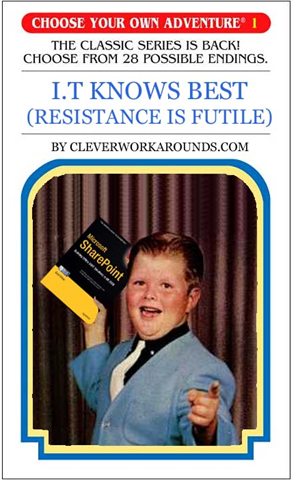
Here I present the world’s first SharePoint Choose Your Own Adventure story. The premise of this story is that our trusty IT department has been bitten by the SharePoint bug and thinks it would be great for the organisation. The book is entitled:

“I.T Knows Best (Resistance is Futile)”

image

(ya like my 3L1T3 PH070SH0P SK1LLZ ? 🙂


Continue reading “Selling MOSS – A Choose Your Own Adventure Story”


More SharePoint Branding – Customisation using JavaScript – Part 1

Hi all

I thought with my last post that involved XSL/XSLT, I’d escape from horrid programming languages and write about more interesting topics but it wasn’t meant to be. This time round I had to delve back into the world of JavaScript – something I swore that I would never do again after a painful encounter back in 2000. (Yep, it’s taken me 8 years to face it again!)

But like everything else with SharePoint, by being a ‘specialist‘, you seem to have to use more technologies and IT disciplines than you would think possible.

As I progressed writing this article, I realised that I was delving back into branding again and toyed with the idea of making this part 8 of the branding series. But the governance topic in part 7 for me rounded off that series of posts nicely, so I will deal with this separately for now and perhaps refresh that series in the future.

Like a vast majority of my posts, this will also be a mini series.

CleverWorkArounds Coffee requirement rating (for Metrosexual web developers): image

CleverWorkArounds Coffee requirement rating (for the rest of us ): image image image

[Quick Navigation: Part 2, Part 3, Part 4, Part 5 and Part 6]

Continue reading “More SharePoint Branding – Customisation using JavaScript – Part 1”


« Previous PageNext Page »

Today is: Tuesday 10 March 2026 -