Back to Cleverworkarounds mainpage
 

Dialogue Mapping: The Ying to SharePoint Yang

I don’t know about you, but as a SharePoint practitioner, I love the fact that I do not do SharePoint full-time anymore. I’d like to take some time to explain why this is the case, and how my non IT work helps me be a better SharePoint practitioner. To do so, I will talk about a recent non IT project I worked on. Who knows? This may give you some insights into how you view and approach collaborative work.

Western Australia is BIG

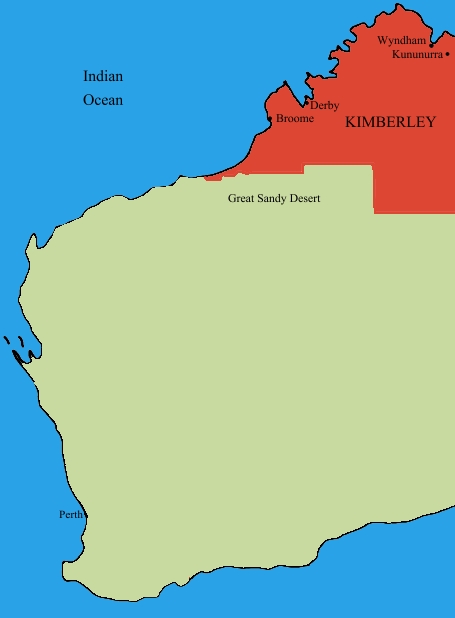
File:Kimberley region of western australia.JPGIn case you don’t know already, I live in Perth, Western Australia. You can see Perth if you squint at the map on your left and look to the south west area.

Western Australia is a bloody big land area and extremely isolated. One claim to fame about living in Perth is its distinction for being one of the most isolated cities in the world. In fact we has a population density is on par with Mongolia (this is dead-set true – I researched this fact). Of the 2.2 million people that live in the state, 1.8 million live in the Perth metropolitan area and the rest are scattered far and wide. In terms of distribution, there are no other major cities in Western Australia. The next most populated town outside of Perth is Mandurah with some 83,000 people. 

In the north of Western Australia, these towns are often separated by anywhere from a couple hundred to more than a thousand kilometres. The weather is very hot, the landscape is breathtakingly beautiful and the isolation here is hard to comprehend without visiting. The wealth of Western Australia (“GFC? What GFC?”) comes from the north of this vast state, via huge mineral deposits that China seems happy to buy from us, which in turn keep me and my colleagues busy putting in SharePoint around the place.

Now if you think Western Australia is big, get this: The Kimberley region of Western Australia (the top section marked in red) is almost as big as the entire country of Germany. For American readers, it alone is three fifths the size of Texas. For all that space, only around 45000-50000 people live there.

These wide distances create all sorts of challenges. At a most basic level, think about the cost of basic services to such a remote location with such a small population density. Cost of living is high and services like health care are always stretched and people living here have to accept that they will never be able to enjoy the same level of service enjoyed by their city slicker cousins.

Now that I have painted that picture in your mind, let me intersect that with one of Australia’s biggest wicked problems. The indigenous people’s of Australia have many social and health issues that have had a massive human cost to them. We are talking chronic alcoholism, physical and sexual abuse, depression, suicide and the whole range of mental illnesses. Families and communities tear themselves apart in a seemingly an endless negatively reinforcing cycle. Like many indigenous groups around the world, intervention approaches from earlier periods have had catastrophic long term consequences that were never considered at the time (a classic wicked problem characteristic). When you read the stories about the stolen generations, you cannot help but be deeply moved by the long term effects, the damage done and the sad legacy left behind.

Continue reading “Dialogue Mapping: The Ying to SharePoint Yang”


A different kind of SharePoint Governance Master Class in London and Dublin

The background

Over the last three years, my career trajectory had altered somewhat where I spent half my time as a SharePoint practitioner, doing all of the things that us SharePoint practitioners do, and the other half was spent in a role that I would call sensemaking. Essentially group facilitation work, on some highly complex, non IT problems. These ranged from areas such as city planning, (envisioning and community engagement) to infrastructure delivery (think freeways, schools and hospitals), to mental health, team and relationship building, performance management, board meetings and various other scenarios.

Imagine how much of a different world this is, where a group is coming together from often very different backgrounds and base positions, to come to grips with a complex set of interlocking problems and somehow try and align enough to move forward. We cannot simply throw a “SharePoint” at these problems and think it will all be better. By their very nature, we have to collaborate on them to move forward – true collaboration in all its messy, sometimes frustrating glory.

As a result of this experience, I’ve also learned many highly effective collaborative techniques and approaches that I have never seen used in my 20+ years of being an IT practitioner. Additionally, I’ve had the opportunity to work with (and still do), some highly skilled people who I learned a huge amount from. This is “standing on the shoulders of giants” stuff. As you can imagine, this new learning has had a significant effect on how Seven Sigma now diagnoses and approaches SharePoint projects and has altered the lens through which I view problem solving with SharePoint.

It also provided me the means to pinpoint a giant blind spot in the SharePoint governance material that’s out there, and what to do about it.

The first catalyst – back injury

In January this year, my family and I went on a short holiday, down to the wine country of Western Australia called the Margaret River region. On the very first day of that trip, I was at the beach, watching my kids run amok, when I totally put my back out (*sigh* such an old man). Needless to say, I could barely move for the next week or two after. My family, ever concerned for my welfare, promptly left me behind at the chalet and took off each day to sample wines, food and generally do the things that tourists do.

Left to my own devices, and not overly mobile I had little to do but ponder – and ponder I did (even more than my usual pondering – so this was an Olympic class ponder). Reflecting on all of my learning and experiences from sensemaking work, my use of it within SharePoint projects, as well as the subsequent voracious reading in a variety of topics, I came to realise that SharePoint governance is looked through a lens that clouds some of the most critical success factors. I knew exactly how to lift that fog, and had a vision for a holistic view of SharePoint governance that at the same time, simplifies it and makes it easy for people to collectively understand.

So I set to work, distilling all of this learning and experience and put it into something coherent, rigorous and accessible. After all, SharePoint is a tool that is an enabler for “improved collaboration”, and I had spent half of my time on deeply collaborative non IT scenarios where to my knowledge, no other SharePoint practitioner has done so. Since sensemaking lies in all that ‘softer’ stuff that traditionally IT is a bit weaker on, I thought I could add some dimensions to SharePoint governance in a way that could be made accessible, practical and useful.

By the end of that week I still had a sore back, but I had the core of what I wanted to do worked out, and I knew that it would be a rather large undertaking to finish it (if it ever could be finished).

The second catalyst – Beyond Best Practices

I also commenced writing a non SharePoint book on this topic area with Kailash Awati from the Eight to Late blog, called Beyond Best Practices. This book examines why most best practices don’t work and what can be done about them. The plethora of tools, systems and best practices that are generally used to tackle organisational problems rarely help and when people apply these methods, they often end up solving the wrong problem. After all, if best practices were best, then we would all follow them and projects would be delivered on time, on budget and with deliriously happy stakeholders right?

The work and research that has gone into this book has been significant. We studied the work of many people who have recognised and written about this, as well as many case studies. The problem these authors had is that these works challenged many widely accepted views, patterns and practices of various managerial disciplines. As a result these ideas have been rejected, ignored or considered outright heretical, and thus languish (largely unread) in journals. The recent emergence of anything x2.0 and a renewed focus on collaboration might seem radical or new for some, but these early authors were espousing very similar things many years ago.

The third catalyst – 3grow

Some time later in the year, 3grow asked me to develop a 4 day SharePoint 2010 Governance and Information Architecture course for Microsoft NZ’s Elite program. I agreed and used my “core” material, as well as some Beyond Best Practice ideas to develop the course. Information Architecture is a bloody tough course to write. It would be easy to cheat and just do a feature dump of every building block that SharePoint has to offer and call that Information Architecture. But that’s the science and not the art – and the science is easy to write about. From my experience, IA is not that much different to the sensemaking work that I do, so I had a very different foundation to base the entire course from.

The IA course took 450 man hours to write and produced an 800 page manual (and just about killed me in the process), but the feedback from attendees surpassed all expectations.  This motivated me to complete the vision I originally had for a better approach to SharePoint governance and this has now been completed as well (with another 200 pages and a CD full of samples and other goodies).

The result

I have distilled all of this work into a master class format, which ranges from 1 to 5 days, suited to Business Analysts, Project and Program Managers, Enterprise and Information Architects, IT Managers and those in strategic roles who have to bridge the gap between organisational aspirations and the effective delivery of SharePoint solutions. I speak the way I write, so if the cleverworkarounds writing style works for you, then you will probably enjoy the manner in which the material is presented. I like rigour, but I also like to keep people awake! 🙂

One of my pet hates is when the course manual is just a printout of the slide deck with space for notes. In this master class, the manual is a book in itself and covers additional topic areas in a deeper level of detail from the class. So you will have some nice bedtime reading after attending.

Andrew Woodward has been a long time collaborator on this work, before we formalised this collaboration with the SamePage Alliance, we had discussed running a master class session in the UK on this material. At the same time, thanks to Michael Sampson, an opportunity arose to conduct a workshop in Ireland. As a result, you have an opportunity to be a part of these events.

Dublin

Storm_long_banner

The first event is terrific as it is a free event in Dublin on November 17, hosted by Storm Technology a Microsoft Gold Partner in Dublin. As a result of the event being free, it is by invitation only and numbers are limited. This is a one day event, focussing on the SharePoint Governance blind spots and what to do about them, but also wicked problems and Dialogue Mapping, as well as learning to look at SharePoint from outside the IT lens, and translate its benefits to a wider audience (ie “Learn to speak to your CFO”).

So if you are interested in learning how to view SharePoint governance in a new light, and are tired of the governance material that rehashes the same tired old approaches that give you a mountain of work to do that still doesn’t change results, then register your interest with Rosemary at the email address in the image above ASAP and she can reserve a spot for you. We will supply a 200 page manual, as well as a CD of sample material for attendees, including a detailed governance plan.

London

SamePage-Rect-BannerMed

In London on November 22 and 23, I will be running a two day master class along side Andrew Woodward on SharePoint Governance and Information Architecture. The first day is similar to the Ireland event, where we focus on governance holistically, shattering a few misconceptions and seeing things in a different light, before switching focus to various facets of Information Architecture for SharePoint. In essence, I have taken the detail of the 4 days of the New Zealand Elite course and created a single day version (no mean feat by the way).

Participants on this course will receive a 400 page manual, chock full of SharePoint Governance and Information Architecture goodness, as well as a CD/USB of sample material such as a SharePoint governance plan, as well as IA maps of various types. Unlike Ireland, this is an open event, available to anyone, and you can find more detail and register at the eventbrite site http://spiamasterclass.eventbrite.com/. In case you are wondering, this event is non technical. Whether you have little hands on experience with SharePoint or a deep knowledge, you will find a lot of value in this event for the very reason that the blind spots I focus on are kind of universally applicable irrespective of your role.

Much of what you will learn is applicable for many projects, beyond SharePoint and you will come away with a slew of new approaches to handle complex projects in general.

So if you are in the UK or somewhere in Europe, look us up. It will be a unique event, and Andrew and I are very much looking forward to seeing you there!

Thanks for reading

Paul Culmsee

www.sevensigma.com.au


Announcing the SamePage Alliance

image

This is really great, and something that’s been a long time coming. On behalf of my partners at Seven Sigma, I’m announcing the formation of the SamePage Alliance. A strategic partnership with Seven Sigma and 21Apps, founded by Andrew Woodward, as founding members. SamePage is a commercial relationship where we will be pooling the respective talents of our organisations together and expanding our service offerings to clients.

I first met Andrew in San Diego in 2008, the SharePoint Best Practices Conference, where I was a very nervous first-time presenter, wondering if all of my wicked problem stuff would resonate with the US audience. Andrew was there, presenting on TDD and Scrum, and apart from having someone in the US I could talk about the cricket with, it was immediately clear that we had a hell of a lot in common. It was like he held a big piece to a puzzle, and I held another piece. The irony was that I never got to see his talk as, if I recall, we presented at the same time. But back then (Feb 08) I made a rather prophetic statement at the end of my report of that conference.

“I feel some future collaboration in the very near future.  Andrew Woodward will definitely be a part of it (although he doesn’t know it yet…Hehehe).”

Funny how things turn out. We have collaborated on a number of different things since then, both within the SharePoint realm and beyond it. The common interests run deep and between 21apps and Seven Sigma, there is a lot of experience there. During the SharePoint Evolutions conference, where a certain volcano prevented me attending, Andrew ran my wicked problems/SharePoint/IBIS talk for me and did a tremendous job (I watched all the tweets from Perth).

In terms of practicalities, we will be reselling each-others products and services. Seven Sigma entered the training space this year, writing the SharePoint 2010 Governance and Information Architecture course that 3Grow and Microsoft New Zealand use to certify gold partners for SharePoint prowess. Seven Sigma also developed a unique 1 and 2-day SharePoint Governance f-Laws course, with content drawn from our sensemaking work that we ran in the New Zealand and Sydney conferences. When it came to who could possibly teach Seven Sigma courseware, the obvious answer was Andrew Woodward, given our shared interests and his sterling job at Evolutions.

21apps released their first SharePoint product into the marketplace this year – 21scrum, and 21apps authors and teaches workshops and training for development teams looking to improve their quality of development around the SharePoint space.

Further to this, we will be co-developing products as well. Seven Sigma has been brewing some things in the cauldron for some time and 21apps will be part of this development effort.

In general terms, we offer great SharePoint competencies across training, governance, infrastructure, development and delivery. Our combined offerings means that we can offer:

  • Global software development and round the clock SharePoint managed services and support
  • World-unique strategic advisory services and collaborative facilitation services, incorporating goal alignment, shared visioning and performance framework development, large group facilitation, user and community engagement, enquiry by design, risk analysis, critical thinking and decision methodologies, process improvement
  • Beyond SharePoint, we can provide full enterprise architecture and analysis services over the program life cycle
  • The first output of this new arrangement is a two-day course to be run in London in mid November. Andrew will be there too, and we will cover my SharePoint Governance f-Laws course as well as material from the recent Information Architecture course in New Zealand. If you have SharePoint competencies and find yourself having to bridge the gap between organisational aspirations and SharePoint as the enabler to that aspiration, then this session is for you.

    You can find out more about this event and register at the 21apps site.

    Looking forward to seeing you all there!

    www.samepage.co

    www.21apps.co.uk

    www.sevensigma.com.au


    Share2010 – A new kind of SharePoint conference

    Having spoken at the odd SharePoint event over the last three years or so, I’ve always lamented on the lack of a purely business focused SharePoint conference. Whilst the conferences I attend do cater for non technology oriented topics – particularly the best practice conferences, there is usually an equal or greater proportion of content aimed at the nerdier aspects of SharePoint.

    Sadly though, nerds don’t often sign the cheques. Those who do sign them, are rarely interested in deploying SharePoint via Powershell, or why sandboxed solutions are a good thing or not. They are looking for the ways and means to take SharePoint (the enabler) and work out what the hell SharePoint is enabling and to work out if it has done so properly.

    Some time back, via a reference from Kristian Kalsing, I received a call from the organisers of the forthcoming Share2010 in Sydney, asking for feedback on what I would like to see in a good business focused SharePoint conference. In speaking to Steve from Eventful Management and his team, it was clear that something unique was in the making here.

    Fast forward several months and after a whole lot of market research and round-table discussions from SharePoint customers (including a couple of our clients), we have a conference that puts many critical topics close to my heart, front and centre, namely governance, user engagement and adaption, business process automation and workflow; information architecture; collaboration; document and records management; resourcing and support; social networking; ROI; security and so on.

    I am honoured that I was also asked to participate as a speaker at this conference, along side the likes of Dux Sy, Erica Toelle, Andrew Jolly and Michael Sampson. You will find that speakers from this group have one thing in common: Their focus on the softer areas of SharePoint. There are also speakers from some of Australia’s leading organisations (and some international ones too), who will share their trials, tribulations and lessons learned. This is real problem/real solution type stuff and I am seriously looking forward to being part of it.

    I’ll be involved in the initial festivities on the Sunday evening, conducting a special interest kickoff session called SharePoint Governance Home Truths. This session aims to present a lot of my work in a more relaxed, entertaining manner and hopefully, set a good tone for the rest of the event.

    I will also be running a special event on Wednesday called “Microsoft SharePoint Governance f-Laws: Handy Hints for Those Who Question Business as Usual”. I am really excited about this. Developing the content for this session has been a labour of love for me since November last year – and is a kind of magnum opus of everything I have learned in my IT and non IT work. I have been very fortunate to work on some very large and complex non IT projects and worked with some amazingly talented people in the areas of project management, cognitive science, facilitation and community engagement. I can absolutely guarantee you that there will be many aspects to this session that would not have been seen before in one place in this distilled form. I am super excited about delivering this in full at Share2010 – there simply could not be a better conference for this type of workshop.

    By the way, I used elements of this material in the SharePoint 2010 Governance and Information Architecture course that was developed for the Microsoft NZ/3Grow Elite Program. The feedback from that course speaks for itself.

    The outcomes to expect for attendee of this session are:

    • Understand the SharePoint governance lens beyond an IT service delivery focus
    • Develop your ‘wicked problem’ radar and apply appropriate governance practices, tools and techniques accordingly
    • Learn how to align SharePoint projects to broad organisational goals, avoid chasing platitudes and ensure that the problem being solved is the right problem
    • Understand the relationship between governance and assurance, why both are needed and how they affect innovation
    • Understand the underlying, often hidden forces of organisational chaos that underpins projects like SharePoint

    There is a large amount of content and activities in this session that has never graced CleverworkArounds. In fact, if I ever get around to posting some of the content, I could blog for months. But more importantly than the content, you will have a lot of practical tools to leverage as well. Attendees to my session will receive a CD containing end-to-end governance artefacts ranging from IBIS maps, goal alignment and performance framework outputs, envisioning workshop sample outputs, Information Architecture mind-maps, BPMN diagrams, wireframes, user engagement tools, ROI calculations and more.

    As it happens, I collaborated on a lot of this stuff with Erica Toelle, so it is terrific that she is speaking at the event and her “Don’t reinvent the wheel” talk should not be missed, as well as her Tuesday keynote. If I ask her nicely, she might just pop a few of her goodies onto the CD as well!

    You can register here, for this unique event, and let’s hope that there are many more to come. There is opportunity for one on one meetings with speakers like myself as part of the deal.

    Thanks for reading


    Paul Culmsee

    www.sevensigma.com.au


    SharePoint Saturday Perth Wrap and SP2010 BOOTCAMPS!

    Well, the event that I never thought would ever happen in Perth happened, and not only did it happen, it had more interest than expected and some people unfortunately missed out. Jeremy, as a result, had to take many upset phone calls. It seems that for Perth, once a few people got wind of SharePoint Saturday, everyone wanted in.

    There were great sessions, great giveaways and I think overall, tremendous value for this free event. Seven Sigma sponsored the showbags, which we managed to fill with some awesome goodies, thanks to the generosity of Brett Lonsdale at Lightningtools, Michael Sampson, Bjoern Furuknap, Dux Sy, Combined Knowledge and the good folks at Colligo. If you attended the event, please show your support to these guys – they really went above and beyond. Mrs Cleverworkarounds, on the other hand, never wants to see or hear the word “showbag” ever again! 

    For me personally, I enjoyed meeting Michael Noel. I think he and I were the only non devs at SharePint (okay well maybe Joshua Haebets too 🙂 ). Speaking of which, Joshua and Milan Goss were also great to meet too, and I’m sure that there might be projects in the future we will see each other on.

    Seven Sigma also donated a seat on the first SharePoint 2010 week-long bootcamp to be held in Perth. As a background: I met Steve Smith in New Zealand last year and we got on very well. Recently, we asked him if he would consider Perth to run his 2010 bootcamps and he has agreed! This is a great outcome for Perth, having beat out Sydney and Melbourne for being the first to run them as this will be the first time the courses have been offered to the general public in Australia.

    Steve Smith and Gary Yeoman will be flying in from the UK especially for this event, so it is not to be missed. Both Steve and Gary are internationally renowned for the quality of their training and the courseware itself is the very same material that Microsoft itself uses to train their own staff on SharePoint 2010. All you eastern states people reading this?  It’s about time you went west anyway, so come and check out Perth’s beer while you are here!

    SharePoint 2010 Beta Developer Track     4 days

    • Delivered by Gary Yeoman
    • Date:  27th April  -  30th April 2010
    • Cost: $3000 (+GST)

    This course guides you through essential 2010 elements, from pre-requisites to system integration, giving you the skills to work confidently and leverage full value from new technology.

    Please note: Due to our ANZAC public holiday this course is a 4 day course from 08:30 – 6:00pm. One additional session is added per day to make up for the Monday public holiday.

    SharePoint 2010 Beta Administrator Track    5 days

    • Delivered by Steve Smith – MVP
    • Date: 10th May – 14th May 2010
    • Cost: $3000 (+GST)

    Step-by -step understanding is the key to successful implementation and deployment of SharePoint 2010. This 15-module course will guide you through each critical stage, giving you exactly the skills you need to leverage full value from the latest SharePoint technology.

    Book now at Seven Sigma’s website:

    http://www.sevensigma.com.au/2010/02/07/first-ever-sharepoint-2010-training-courses-2/

    For more info visit: www.combined-knowledge.com.au

    or contact: training@sevensigma.com.au


    The practice of Dialogue Mapping – Part 4

    Three weeks ago my plasma TV broke, freeing the family from the magic spell of hi-def television. My family took the loss in different ways. My four year old was devastated at the lack of Nintendo Wii, and constantly whined about being bored. My ten year old is a bookworm anyway, and continued to be one. I suddenly found mountains of time to write, churning out three Dialogue Mapping articles that I had been meaning to write for ages.

    Today the repair man came and fixed the TV. I expect that the glow of the plasma screen will once again induce that zombie-like state, where my work-rate is dependant on what show happens to be on at the time (NCIS as I write this). Luckily, this is the last article of this particular series on Dialogue Mapping for now and I might have enough active brain cells to hang on long enough to squeeze this article out.

    This article builds on the last section of part three that was entitled “Nurture the holding environment”. In that section, I introduced the concept of the “holding environment” and I offered a basic example (the bus trip that was conducted prior to the Dialogue Mapping session). This concept is so fundamental and important to the success of Dialogue Mapping and projects more broadly that I want to do it proper justice here in part four.

    The paradox of individuality

    Put a bunch of right-brained geeks in a room to solve a problem and you will probably find that they get on relatively well. Put a bunch of creative left-brained marketing people in a room to solve a problem and you might expect the same thing. The solutions offered, when compared to each other, are likely to be quite different and will also likely be sub-optimal. For a truly good solution, we need diversity in perspectives and, although this pains me to say, marketing people are therefore actually needed. This creates a bit of a problem though with the paradox of individuality because, as geeks, we all know the notion of marketing people being needed goes against everything we stand for.

    I first read about the paradox of individuality in a book called Team Talk: The Power of Language in Team Dynamics and it was described as follows:

    The only way for a group to become a group is for individuals to express their individuality, yet the only way for individuals is to become fully individuated is to accept and develop more fully, their connections to the group.

    What? Geeks and marketing people accepting each other as equals? Unifying the laws of physics will come sooner and this is a classic example of what Conklin calls “social complexity”. Of course, social complexity goes much deeper than geeks vs. marketing people, but one of the effects of social complexity is a distinct lack of direct communication between parties. This is because conflict is not fun and avoidance is a natural reaction to situations that are not fun.

    The idea of the “holding environment” is best summed up with the image below. Here, you can see that we have an area set aside for kids to play in a safe, controlled environment.

    image

    A holding environment for an organisation or a team is actually not that dissimilar to the example above. You are attempting to create a state where participants can step out of their comfort zones, but at the same time, are shielded from counter productive tensions that cause paralysis, chaos and pullback.

    For this reason I maintain that beer is one of the best holding environments available and it forms a key part of my professional skill set 😉

    As I stated in part 1 of this series, Dialogue Mapping is a very useful holding environment on its own, but it can be augmented with other things as well and you should always be on the lookout for complimentary tools and techniques. In the following sections, I will outline where Dialogue Mapping has augmented another method, or where we have augmented Dialogue Mapping itself with another method.

    Information gathering for 40+ people

    There are practical limits to how many people should be involved in a standard Dialogue Mapping session. Mind you, there are practical limits for how many people should attend a meeting too and that limit seems to be any more than one person :-).

    By “standard”, I mean the sort of session illustrated below. The exact number that test the limits of Dialogue Mapping varies because it really depends on the wickedness of the problem being discussed and the past history of the group. For example, one of the teams I map for consists of around fifteen to eighteen members. They are working on a particularly wicked problem, yet I can work with this group alone quite easily. This is because over time, the group has worked out their decorum for the Dialogue Mapping sessions that work for all concerned. I also know everybody on a first name basis and some of the group have become personal friends of mine outside of work. In short, people are comfortable with each other and the process, and despite things getting heated people know that it is not personal. This is a simple, yet effective, example of a working holding environment.

    image

    A while back, my client invited representatives from academia, charities as well as various public sector government departments, to a half day workshop on the topic of social sustainability as part of a significant redevelopment project. There were approximately 40-45 attendees who were there for the first time. There was no way we would be able to cover off the required topics using a standard Dialogue Mapping set-up. With so many people, it would be hard for all attendees to have a say in the allotted time, let alone set up the room to handle that number of people for the process.

    The way we got around this issue was to run a pre-workshop session among a much smaller group, to create a series of “seed maps” for each of the sub-areas of social sustainability. By the end of this process, we had around a dozen maps on various subtopics with a few questions, ideas, pros and cons. These maps were not complete at all, but that was not the aim. Instead they were well formed IBIS argumentations.

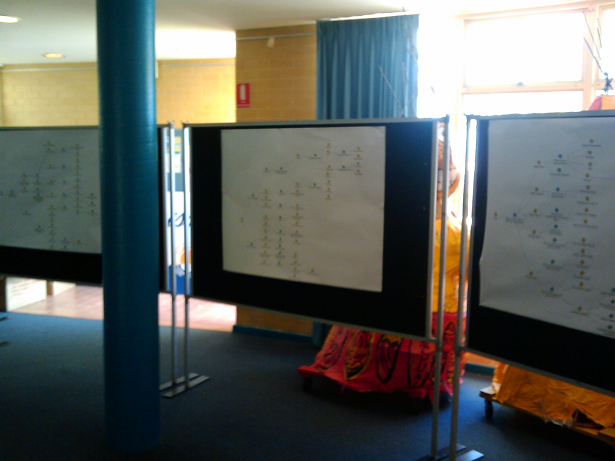
    We then printed each of these maps out at large size. Initially each map was pinned to display boards, and when the attendees arrived they spent time wandering from map to map, examining the argumentation while mingling with other attendees. Below is a photo showing some of the seed maps prior to the attendees arriving.

    image

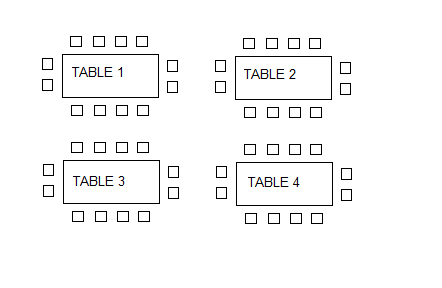
    Below is a diagram representing the table arrangement for the workshop. We started with a half hour overview and introduction as to the purpose of the workshop and why they had been invited. At this point, we removed four of the maps from the display boards above, and put a map on each table. We explained to the group that each table had a unique map on it and each map was on a particular topic. At this point attendees had the opportunity to move to a table where the topic was of most relevance or interest to them.

    image

    Each table contained copious amounts of marker pens. I then took the stage and explained the basics of IBIS grammar to the attendees and explained to them that we wanted them to start adding ideas to the existing maps. I did not belabour the grammar, nor did I expect them to suddenly know how to do IBIS properly, but what I made clear, was that I was going to walk from table to table and interrupt if I felt the additions to the map made no sense or were ambiguous in some way.

    The group had just under an hour to work on each map and at the end of the hour, we removed the updated paper maps and replaced them with the next four from the display boards. The process was then repeated and I walked from table to table, asking for clarification or calling out implied questions on parts of the maps that made no sense to me. Interestingly, IBIS novices seemed to have little problems with the usage of ideas, pros and cons, but they would forget to make the underlying question explicit. I would ask them what was the question being answered by a particular idea and would write the question into the map and redraw the lines.

    After the third iteration of this process we were done. The last half an hour was a “Where to from here?” session and an opportunity for the group to provide feedback to the organisers of the workshop.

    After the workshop was completed, I took all of the updated paper maps and added the additional rationales into the seed maps in Compendium. The process was surprisingly quick because the majority of the additional argumentations that were added were actually pretty good IBIS form. I think that having existing argumentations on the seed maps made it easier for attendees to add rationales that looked similar to what was there already. It wasn’t perfect IBIS by any means, but it was not a difficult task for me to refactor the additional information without losing any of the intent behind the rationales.

    For the record, additional workshops were conducted, but these reverted to standard Dialogue Mapping workshops with a subset of the attendees who had specialised skills and knowledge in the topic area. But what this particular process demonstrated was that with a little planning a single Dialogue Mapper could still manage to capture quality rationales from a very large group in a short space of time.

    Dialogue Mapping with a facilitator

    Dialogue mapping for a large group can be augmented with a facilitator and I have done this a few times. For a large group, this can be very helpful because the mapper can concentrate on capturing the dialogue and less on directing the meeting. Equally though, a facilitator can actually make the process more difficult. The key to a facilitator situation working is when the facilitator either knows IBIS or has been present in a number of Dialogue Mapping workshops and understands how the process works. This is because the facilitator is usually facing the group like the mapper, asking probing questions, directing the course of conversation and therefore is not looking at the map or listening in terms of IBIS translation of the dialogue. As a Dialogue Mapper, it is important for participants to verify what you have captured is correct, and if the facilitators are not following the map, they can easily get in the way of this verification process.

    Facilitators can also get you into trouble at times because they can sometimes be conditioned to traditional meeting decorum where topics are allocated at particular times with an agenda that can preclude deeper exploration of a topic. Dialogue Mapping is a rich enough container to allow a group that deeper exploration, but this is not something that some facilitators are used to. One prime example that sticks out in my mind to this day was a workshop where we had a lot of options to explore. Conscious of the agenda, in an attempt to make the process more efficient, the facilitator asked the group whether any of the options had any “fatal flaws” that enabled that option to be quickly discounted. It soon became apparent (in a negative way) that one person’s “fatal flaw” was diametrically opposed to another person’s “fatal flaw”. This attempt to shortcut deliberations backfired badly and resulted in this line of question being completely abandoned.

    This is a great example of the importance of nurturing the holding environment (lesson nine from part 3). After this “fatal flaws” episode, I deliberately stopped mapping while the group resolved the fatal flaw issue and resolved to try a different approach. This subsequent approach proved to be much more successful and we never deviated from it after that. “No fatal flaws” became a bit of a mantra among this group.

    A key to working with a facilitator is to remember the lesson on confidence and assertiveness from part 3. Just because a facilitator is directing the meeting and influencing the direction of the conversation, it doesn’t mean that the mapper is purely a scribe. Work out a system with the facilitator where, if you raise your hand or signal in some way, you are not ready to move on straight away. Another technique that I have used in a large group situation was to assign someone else the traffic warden role, where if I am having trouble keeping up with the various conversations, and my eyes are on the map, they can call the group to order.

    Dialogue Mapping, in tandem with another Dialogue Mapper ,can work very well and I have done many times with my colleagues at Seven Sigma. In this situation, you are both thinking in the IBIS grammar and both of you are mentally unpacking the conversation, although only one of you is actually performing the mapping. We have used this technique with particularly good results in SharePoint requirement gathering workshops, where one of us asks the questions and the other performs the mapping.

    Dialogue Mapping and Debategraph

    Compendium is one of several tools that can be used to create and render argument grammar like IBIS. For me, Compendium is the absolute best for Dialogue Mapping. Being a desktop application, I do not need internet access and once you are proficient with it, Compendium is very fast. This is of course, the biggest factor for Dialogue Mapping live. You do not want to be hindered by the limitations of the software tool that you are using.

    I noticed that some CleverworkArounds readers created IBIS maps in Visio and were also using mind mapping tools after I published the “One best practice” series. But the problem is, although you can technically make an IBIS map, those tools would never work in a live session because of how slow it would be to add rationales to the map. Seriously guys, it might be technically possibly but do not attempt to use those tools live.

    One size does not fit all and this is especially true of sense making tools. There are actually two main audiences for maps like this. Those who create the maps and those who consume the maps. The key point is that the ultimate audience for any map is quite often not the group creating the map in the first place. The whole point of capturing rationale is to make visible the process that a group went through when working on a problem, which ultimately shows why a particular decision was made or why a course of action was taken. Those who want to review the rationales are a very different audience to those who made the decision and wish to demonstrate justification. Just because the tool works well for the problem solving process, does not automatically assume that the tool is then best suited to the communication of that rationale to a wider audience.

    Compendium maps work brilliantly well during the Dialogue Mapping process and from a broader communication point of view, work exceptionally well when detailed maps are printed onto large sized paper. But as a communication and distribution tool, Compendium is weaker than some of the alternatives. Compendium maps do not translate overly well to the web at this point, and asking all interested parties to install compendium is out of the question. For the sake of article length, I will not go into detail why this is, but to appease the Compendium fanbois, this is direct feedback from my clients and not just my opinionated rant.

    For communicating the rationale that has come from Dialogue Mapping sessions to a wider audience, Debategraph is ideal. Unlike Compendium, Debategraph is a cloud based argument visualisation tool, designed to leverage the freeform updating capabilities of a wiki, along with the rigor of an argument grammar much like IBIS. Debategraph does not use a top down or left to right visualisation method. Instead each node is at the centre of the screen and surrounding issues, ideas, pros and cons surround the node, requiring the user to click nodes to explore further argumentation.

    The beauty of Debategraph is the combination of its argument navigation, along with the streaming view of related content as shown below. My clients absolutely love the stream view because it is so simple for people to explore and work with. The ability to embed a map at any point in the debate on any web site is also pretty handy and I have pasted a sample map below to illustrate this. Click a node on the left pane (the “*” means there are sub arguments) and the content in the right window will change, based on which argument node is currently being examined.

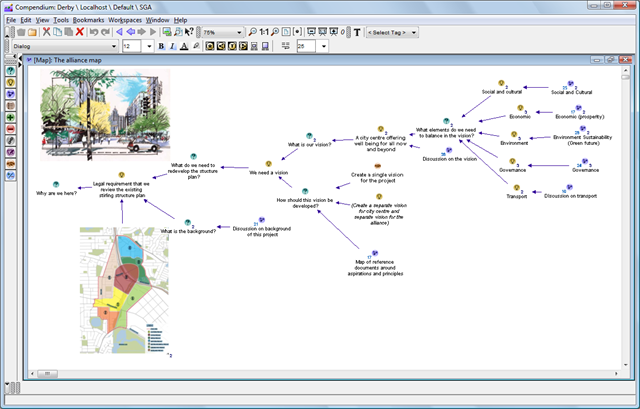
    Compare this to Compendium maps, where additional rich content like images, documents and the like are treated as additional nodes in the map. As you can see in the example below, it is possible to integrate rich content into the map very easily, but that rich content is linked in the same manner as the argumentation itself. Debategraph on the other hard, separates the argumentation from the supporting content and I think that this works much better and supports a richer form of argument based content delivery.

    image

    But once again, use the best tool that fits the purpose. From a dialogue and rationales collection point of view, Debategraph is an excellent way for a bunch of geographically dispersed people to debate a particular issue because the map will refactor on the fly as people self-contribute to it. But I personally would not use Debategraph for the Dialogue Mapping process, because it is not as fast as compendium and it is not as easy to view the map in full context as shown above. The over-arching point with all of this is that if the rationale has been captured in the first place, there are many ways to make creative use of it.

    Note: To be fair on the Compendium makers there are many excellent examples of Compendium being used for some pretty impressive things. I am talking here specifically about online collaboration and communication to a wider audience.

    Conclusion

    This series of posts has examined the practical aspects of Dialogue Mapping, explored some of the techniques that I have used to augment it. Although I do not intend to write any more articles on this topic right now, the series is by no means complete. This is an ongoing learning process for all practitioners of this craft and I am sure that other Dialogue Mappers have tried different techniques than those that I have covered. (Some interesting things are happening on the SharePoint integration front too, which should enrich this experience even further, but that is a whole separate topic 🙂 )

    But one final request. If you have used techniques such as these to enrich the experience for participants, then I’d love to hear from you. Even if it is not for Dialogue Mapping, any technique that is inclusive and augments the holding environment, please drop me a line or leave a comment.

    Thanks for reading

    Paul Culmsee

    www.sevensigma.com.au


    The practice of Dialogue Mapping – Part 3

    Hi there and welcome to part 3 of my series on the practice of Dialogue Mapping in the real-world. To recap, in part 1, I provided a brief overview of Dialogue Mapping and in part 2, I described a common real world usage scenario that we perform fairly often as SharePoint consultants.

    The rest of this series will change tack a little. In this article I am going to describe a very different Dialogue Mapping scenario to you. This was a huge challenge and a large leap from what I described in part 2. There were some wonderful lessons learned from this work which I will cover off here.

    The most “wicked” problems are not technical

    My first Dialogue Mapping gig where I was not a subject matter expert also happened to be a real baptism of fire. Here was a problem that I had no understanding of, no discipline knowledge and no sense of background history of the project, the dynamics of the group, nor any idea of the positions of stakeholders on the problem.

    By this time my IBIS fluency was pretty much down and I felt very confident with the usage of Compendium. I had not yet travelled to the USA yet to train under Jeff Conklin directly, but I carried his book around with me, and had read it many times over. I had performed Dialogue Mapping many times, however until this point all the projects or subjects that I was involved in I knew a lot about. This time I felt very vulnerable. Your domain knowledge is a form of armour, and it was unsettling to know that you’re going in stark naked. I was intimidated, yet excited at the same time.

    So imagine this scenario. There was myself, a facilitator, and *fifteen* strangers sitting across from me. This was double the group numbers of the typical IT scenarios I had previously mapped. I remember emailing Jeff for advice when I heard that there would be so many and I recall him saying that 15 was a lot of people for a newbie. What was I in for! 🙂

    Little did I know at the time that this group had been meeting for quite some time before that, but were really struggling on a complex urban planning issue. When I say complex, I mean complex in a social way, rather than technical. Interestingly, the issue was not a technically complicated issue at all. Anybody could have sat in the room and understood most of the dialogue (not necessarily the full context but you would not be completely blinded by science). What made this particular issue complex was the fact that the group members came from several different organisations, representing some quite diametrically opposing viewpoints. In part 2, I wrote about how it was hard enough just to get one IT department to come to the party and that was just one department of a single organisation – sheesh! If you have complained about organisational silos and think it is hard enough to get some degree of consensus within the realm of one organisation, imagine it when over a dozen representatives from different organisations are involved, organisations that straddle the full spectrum of public and private sectors, as well as the community.

    There were simply so many stakeholders and interconnected issues that it was very hard to not get bogged down into tangents, repetition and frustration. Now, imagine eighteen months of this environment and the stressful social complexity impacts.

    This is a long-term project that I am still involved with, so I will not be taking you through the specific details of this project just yet. Rest assured though, it has been such a great experience that I will write about it in detail in the future. For now, I will focus on lessons learnt so that others aspiring to perform this craft can learn from my own experiences.

    People often tell you the best way to learn is to dive right in, and Dialogue Mapping is no exception. No sooner than I had put up a “what should we do…” type root question, it didn’t take long for debate to get … shall we say … rigorous! So I will go over some of the key lessons that I learnt from this experience thus far.

    Lesson One: Confidence and assertiveness

    The first thing that I had to contend with was not being in control of the conversation to the same extent as before. As previously stated, with SharePoint workshops I tend to direct the flow of the workshop as a mapper and as a subject matter expert. But this scenario was very different. I didn’t know the topic area at all and therefore some of the terms and acronyms made no sense to me. Also being new and unused to the decorum of the group, I erred on what I thought was politeness, rather than annoy the group by being direct and at times, interrupting them.

    This, in my opinion, is a mistake and does a disservice to the other participants. It is also probably the most common thing a newbie mapper will experience when starting out, especially with a new group. As a result, the mapping in this first workshop ebbed and flowed. There were a few times where I was mapping the conversation really well, and the participants really engaged with the argumentation as it unfolded on the screen before them. Participants gestured to the map and asked me to add additional arguments and issues to what had already been built there. I could literally hear some of the initially sceptical, suddenly have that magic moment where they see it working. But at other times, during, say a particularly contentious issue, the conversation would fly at a rapid rate of knots. With so many people in the room, many wanted to have their say on these topics. This led to:

    1. Side conversations started up
    2. Some participants looked away from the map, and started debating directly to each other

    As soon as one of these happened, and especially with the latter, I, as the Mapper, had no hope of following the conversation. As you might expect, I would lose focus and the quality of what was captured suffered (hence lots of idea nodes with no connections to anything). The focussing power of the map would be diminished and the wheels would start to fall off.

    So remember this above all else. No matter what you do, you must be confident and assertive from the very start to keep the group focussed on the map. Don’t be afraid to interrupt someone to clarify a point, or pause them before they go too fast. If someone else starts to interject, interject back and make it clear that you will get to them as soon as you have finished capturing what someone else has said.

    Here is the other critical thing: You must be consistent. It is the first ten to twenty minutes that will set the tone for the rest of the session. This is where people will implicitly learn the decorum of a Dialogue Mapping session and know what to expect. Your actions as a mapper, during this period, is critical to the overall quality of the session. Start it well and it will generally end well.

    Jeff Conklin, of course, offers advice for this in his wonderful book on how to dealing with this. But of course, in the heat of dialogue, all of that advice goes straight out the window as you struggle to keep up with the rapid fire dialogue heading your way. Reading about how one should dialogue map is one thing, doing it is another. This is why I call Dialogue Mapping a craft and leads me to my second lesson learned.

    Lesson Two: Remember that one guitar lesson you had? (Be realistic)

    I think just about everybody at one point has had romantic notions of being a rock guitarist, banging out the blues like Clapton or blistering solos like Kirk Hammett or Brian May. A surprisingly large number of people have actually bought a guitar at some stage in their lives and have tried to live the dream. Most give it up once they find that the gap between their ability to play a G chord and their dream of playing the solo to Hotel California stretches to the moon and back. Inevitably, many guitars ends up collecting dust in the attic, along with the home gym set and many other items that were bought from late night infomercials.

    You will hit this with Dialogue Mapping. Remember that wicked problems breed social complexity. Some problems may have some stakeholders with diametrically opposed views and discussion can be quite heated. The romantic notion of your group suddenly solving their wicked problem from your wonderful dialogue mapping has to be viewed with the reality that you still have to learn the G chord and audience can be fickle.

    Thus, as far as audiences go, don’t go playing a stadium gig until you feel that you can handle sitting in the corner of a local bar or the school disco. In other words, start small and work your way up. A small, successful meeting will help you develop your style, confidence and then empower you to take on larger groups.

    As Ali-G would say, keep it real.

    Lesson Three: Stick to your domain of knowledge (at first)

    This is a logical extension of lesson two, and also a tricky one because it can be just as much of a worst practice as a best one. This I suspect is probably a lesson on where Jeff Conklin or other dialogue mappers may disagree with me. One of the transitions that you have to make as a mapper is to move from what I would call Issue Mapping to real Dialogue Mapping. Just because you are doing mapping in front of a group, doesn’t actually mean you are necessarily “dialogue” mapping. Dialogue Mapping is often called “Issue Mapping with facilitation”, and when you work within your domain of expertise and you are a mapper as well as participant. Therefore you are not an impartial facilitator. This is the situation I described in part 2 and discovered very quickly, that pure dialogue mapping was much harder and mentally tougher.

    But in terms of developing your skills, you will have good results when you are working in an area that you know well. You don’t have to worry about the meaning of acronyms and half of the questions you have likely heard before anyway. Remember though, that in a way it is kind of cheating because you are in effect, using the craft to get people to confront questions that you want answered. But it is an important stepping stone and will help you master lesson 4.

    Lesson Four: IBIS grammar in the reptile brain

    IBIS is the grammar that you use to map discourse. When mapping rapid-fire contributions from a group of people, they do not want to sit and wait for you to mull over whether their statement was an idea followed by a pro or an inferred question with an idea. If you find yourself having to do this, it is like trying to play a song on guitar and having to consciously think about how to play that G chord. Just think about how much you’d enjoy a Metallica concert if James Hetfield stopped every minute or so on a hard bit of a song and said “Wait, wait.. I’ve done this before… ok, hang on…oops, sorry”. This translation needs to burn itself into your reptile brain so that the process is as automatic as possible. To do this, you need to initially not worry about getting up in front of a group. As Conklin suggests in his book, listen to interviews on the radio or take an article, pull out its main points and create an IBIS map for it. There are a zillion ways to do this.

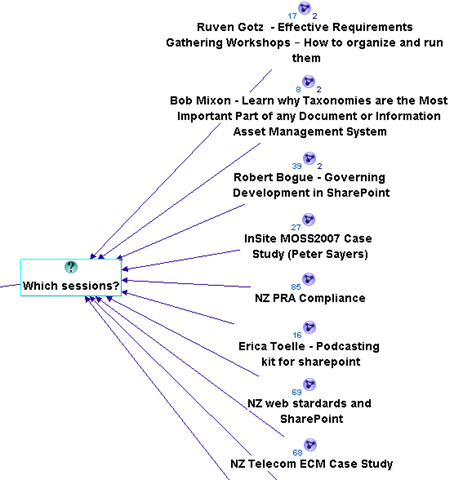
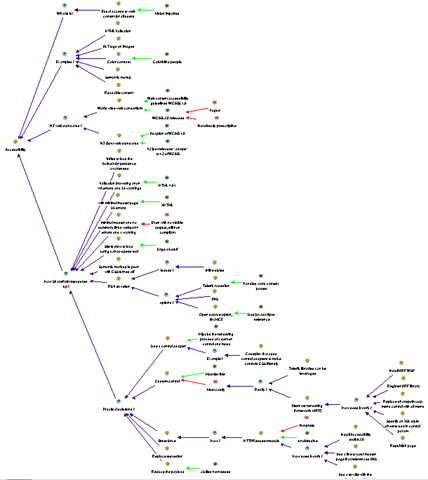
    For all of you SharePoint people, a really excellent, highly relevant way of practice that I use, is to sit in the audience of a presentation at SharePoint Saturday or a conference and issue map the presentation. Below is a sample of some of the sessions where I have done this and the image after that demonstrates how much rationale I captured in the “NZ Web Standards and SharePoint” session.
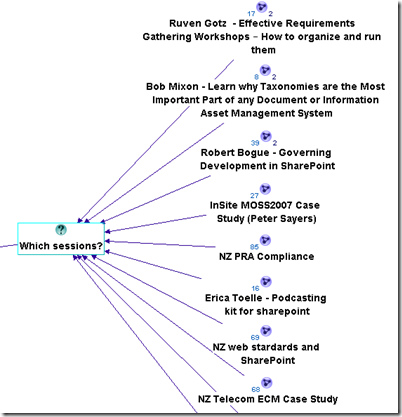
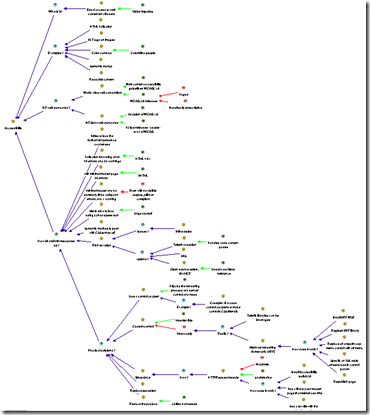
    image   image

    Another great way to learn is to send one of your maps to an IBIS practitioner and let them pull it to bits. Even those of us who have done this for a while need that constant reinforcement and feedback. Like any grammar, different things can be written in different ways and one person’s IBIS will not always look like someone else’s. (There is another blog post in the works that will show this in a funny way). At various times I have sent maps to Conklin for constructive feedback (and then ducked for cover! – hehe)

    Finally, if you are serious about this and like what you are reading, then do what I did – the 5 week Issue Mapping webinar based workshops that Jeff Conklin runs, or if you are in Australia and want something local, then contact me for a half or full-day in-house Issue Mapping intro workshop. Both will not teach you to dialogue map, but by the end of them you will dream in IBIS 🙂

    Lesson Five: IBIS translation in the reptile brain

    Once the language of IBIS is familiar to you, you can take any argumentation and form a consistent IBIS map. You then have to learn how to listen very carefully because that is half the art. Now you have to take prose and pontification by participants and somehow unpack the points made, articulate them into a summary, and form an IBIS based model in your head, and then commit it to the map.

    This can be hard – very hard, and it is nigh on impossible to do without applying what I told you in lesson one. A dialogue mapper is not superhuman and does not have photographic memory. The skill you are developing here is one where you pick out the IBIS elements of some dialogue quickly, as well as knowing when to interject to make sure you do not miss anything.

    A great example of this working is when someone has stated something, and although I cannot remember all points, I know that there was a question and three ideas offered. I might pause the conversation before it goes too far and say something like “Ah, that was important and I need to get this right. I heard you say three things there. You questioned the idea of X, and you offered an answer with 3 pros. One was Y, and what were the other two again?”

    Conklin explains meeting discourse and question types in his book and the aforementioned workshop in a lot of detail. But once again, to apply it to a real-world situation can only be done by practice (and more practice). The absolute best way to do this is to watch an experienced dialogue mapper perform this and look at how they handle the situation, which brings me onto lesson six.

    Lesson Six: Observe

    One of the most enjoyable training experiences of my career was to travel to the picturesque town of Annapolis and learn dialogue mapping from Jeff Conklin himself. Up until then, I had been practicing the craft, but after those two days, I returned as a much better practitioner.

    The single most important part of the time spent there was when we, the students, dialogue mapped each other as we discussed a real-world issue. We each sat in the hot seat for fifteen minutes or so, trying to map the discussion. We were all being completely evil, deliberately starting side conversations, interrupting and interjecting, playing the role of the dominant type A style participant, jumping all over the place and, overall, just being as difficult as we could.

    Unsurprisingly, we all sucked big time trying to dialogue map this. However, when Conklin took the floor, we then saw how exactly Dialogue Mapping was done and what twenty years of practice does. He effortlessly brushed off our attempts to trip him up by observing all of the lessons that I have thus far described, but also with some subtle tricks that we didn’t even notice until he told us afterwards.

    After Conklin had wiped the floor with us, so to speak, we all got to have another crack at it, with the benefit of observation and hindsight. This time the difference was significant in our performance and the way that we each handled the “mob”.

    Moral? The very best thing you can do is to be involved in a Dialogue Mapping session where it has been done well. Watch carefully what the mapper is doing and how they are conducting themselves and the process.

    Lesson Seven: It will make you tired

    If you think of all the various things that you have to do simultaneously (for examples listening, understanding, mapping, and managing the group) during Dialogue Mapping, it is amazing that anyone with a Y chromosome can manage it, given that men usually cannot multitask at all. (Case in point: If sport is on the radio and my wife is speaking to me, one of them has to be switched off…Sorry honey 🙂 ).

    When you are first learning this craft and you are going to be up in front of a group, plan for only an hour or so. While you have to think quite consciously about things, it will exhaust you even more. Once things become more automatic, you can go for longer. From my own experience, the limit for Dialogue Mapping a big group on a really wicked topic would be about four hours at the absolute maximum. (Usually by then the participants also need to take a break and sleep on it anyway).

    Some sessions can be intense, and you, as a mapper, need to be switched on for that entire time. You are listening carefully to every person speak because you are trying to form it into IBIS. So unlike everybody else who can sit there and look interested, yet be mentally switched off, you have to be interested by definition.

    One thing about this is that, while you are in the zone, you don’t need coffee. When mapping, you have enough endorphins racing around your system to keep quite alert, but as soon as there is a break, you can find that you will feel quite tired at times, and a well timed coffee can be very handy (real coffee, of course – none of that instant junk!)

    The one thing that compensates for what Dialogue Mapping can take out of you mentally, is that exhilarating experience when the group is really getting into the process and the positive feedback that you receive when a really well formed map has been developed.

    Lesson Eight: Learn to love “transclusions” and CTRL+R

    I thought that I would drop in a left-field lesson learned at this point that is still very important.

    Trans-what? Don’t worry – I don’t know why they called it that either. Ted Nelson, who also coined the term “hypertext”, came up with the name but I think the day “transclusion” sprung to mind, he was having an off-day. I asked Conklin what it meant and he said “It’s technically accurate … an "inclusion" of material *across* (‘trans’) several documents”. When I whined about the geekiness of the name he added “There was a time when the word "hypertext" was a wacko term for geeks, you know”. Damn! He’s got me there.

    My explanation that will suffice for now? Transclusions is a fancy way of describing the process of breaking your big map up into smaller, linked up sub-maps. I have also heard it referred to as chunking, and when maps get too big, this is a necessity. (For the hypertext nerds that is somewhat incomplete but suffices for this point).

    The compendium software that I choose to use for this work also has a great feature in it. Your map is re-drawn automatically when you hold down the control key and press R. I am now in the habit that after entering a node or three, I redraw the map via this method to keep it all looking orderly. That way, if there has been a lot of dialogue captured, you do not end up with a messy, cluttered map that participants find hard to follow. Like lesson number three and four, stopping conversation while you refactor a messy map will cost you group momentum so ideally if you have gotten into the Control+R habit, all you have to do is a quick transclusion at an opportune time.

    The best time to perform a map transclusion is when a thread of discussion has been exhausted and the group has moved onto a new idea or area in the map. A trick I learned from Anapolis was to sit up and say something like “Okay, let’s just pause for a minute.” (Holding up my hand), congratulate the group on the quality of what they have captured and then say something like “Let’s just put this stuff into its own pigeonhole, so we can now focus on X idea”.

    Lesson Nine: Nurture the holding environment

    Okay, so if there is to be one big serious lesson learned, it is this one. To make the point, I am going to quote Heifetz and Linsky from their excellent book Leadership on the Line. You can read a PDF press release here, specifically the section entitled “Control the temperature.”

    Changing the status quo generates tension and produces heat by surfacing hidden conflicts and challenging organizational culture. It’s a deep and natural human impulse to seek order and calm, and organizations and communities can tolerate only so much distress before recoiling.

    If you try to stimulate deep change, you have to control the temperature. There are really two tasks involved. The first is to raise the heat enough that people sit up, pay attention, and deal with the real threats and challenges facing them. Without some distress, there is no incentive for them to change anything. The second is to lower the temperature when necessary to reduce a counterproductive level of tension. Any community can only take so much pressure before it becomes either immobilized or spins out of control. The heat must stay within a tolerable range—not so high that people demand it be turned off completely, and not so low that they are lulled into inactivity.

    Heifetz and Linsky talk about maintaining the “the productive range of distress” but I have heard many metaphors like this. Another I like is “creative abrasion”, coined by Leonard and Swap in their excellent book When Sparks Fly . Both are essentially talking about making the whole environment conducive to getting the best out of the participants.

    The key takeaway is this: Each group is different and each situation is different. In the normal discourse of the meeting, there will be times where the group works together in almost perfect unison and times where one wrong word will destroy that balance and require the group to stop, reset things and move forward. This is not about IBIS either. The fact is that over time, a particular pattern will emerge in the decorum of the sessions, where conducting the sessions or approaching the mapping in a particular way, will work consistently well for the group.

    Let me give you a classic example that was absolute genius on the part of my client who did exactly this. Before Dialogue Mapping for a group of concerned residents who were facing the prospect of significant change to the amenity of their homes, a bus was hired and the residents were taken to an area where a similar urban transformation had been made ten years before. We all walked around the area for an hour, soaking in the vibe, learning about the history of the area, how the area was redeveloped and how certain planning challenges were overcome.

    This allowed the participants to get a real sense of the issues they needed to confront, and they felt it with all senses, sight, sound and tactile, rather than some cold, rather detached room with a projected map on the wall. Later, when I dialogue mapped the session after the bus tour, the group did a fantastic job and the quality of the rationale that was captured was much richer and faster, through that sensory immersion that took place before the mapping process began.

    So just remember, Dialogue Mapping is a great holding environment in the sense that Heifetz and Linsky talk about. It is a wonderful “rich container”, as Conklin puts it, for fostering and maintaining creative abrasion. But as the bus ride example shows, there is a lot of things that you can combine with it to enhance the experience further.

    More examples like this will be covered in part 4 of this series.

    Thanks for reading

    Paul Culmsee

    www.sevensigma.com.au


    Speaking at BA World conference in Perth

    BAW Logo w Globe

    Hi all

    Just a quick note to let you know that I will be speaking at the Perth leg of the BusinessAnalystWorld conference this week. My topic is called “IBIS: The one best practice for managing wicked problems" and I will be talking about the characteristics of wicked problems and how IBIS and Issue Mapping can help to manage them. I will also cover off some other sense-making tools in this talk like debategraph.

    The BA World conference is the only one of its kind in Australia and will cover all sorts of interesting topics such as requirements elicitation, change management, business process modelling, Agile, stakeholder management and BABOK. The theme for the event is “Work Smarter. Plan Harder” and will allow BA leaders to ensure that projects are clearly defined and flawlessly executed, enabling them to make the right decisions at every level in the organisation and increase project success.

    I am really looking forward to participating and it will be interesting to see what sort of feedback I get from a non SharePoint audience. As you may have gathered, this is not a SharePoint event and although I will still be talking about SharePoint as a collaborative platform to support working smarter, the main focus is on the power of IBIS and issue Mapping to help elicit real and tacit requirements and fast-track the path to shared understanding.

    Thanks for reading

    Paul Culmsee

    www.sevensigma.com.au


    SharePoint Governance – Debategraph style

    Quick note: This is another of the sort of posts where I cannot help but feel that some readers will wonder what I have been smoking. It is not essential, but reading the “one best practice” series will provide a lot of background to this post.

    imageOn the grand scale of world problems, your average messed up SharePoint project would not be considered particularly “wicked”. If you compare a haywire SharePoint project to the truly *global* wicked problems, such as global warming, the Israeli/Palestinian conflict and Tom Cruise, then it kind of makes you realise just how good we SharePoint architects, developers and engineers have it. I mean, hey, if a bunch of nerds can’t make little ol’ SharePoint a success, what hope do we have for the big issues like making Tom Cruise less of a tool?

    I know some people who have left SharePoint architecture work because of all the “people crap”. If you think “people crap” is bad in IT, imagine trying to mediate between the myriad of stakeholders involved in, say, cuts to carbon dioxide emissions. That is a world of hurt that is so huge that it pains my brain just to imagine it.

    Last year when I was learning the dark Jedi arts of dialogue mapping I got to know David Price, one of my fellow students who operated in that world of hurt. David is a very smart man indeed, with a Ph.D in organisational learning and environmental policy. His career has included public policy consultancy, TV documentary production, academic research and mediation.

    It was during that training course that David introduced me to a joint venture that he started with another scarily smart man named Peter Baldwin. Peter is an Australian who had a 15 year career in national politics, including six years as a federal minister in the Australian government. Unlike many Australian pollies, his background was engineering. After leaving politics, with a keen interest in how the web could “raise the quality of debate about public policy issues,” he cranked out visual studio and got down to some coding.

    The “baby” from this collaboration between David and Peter is a unique tool called Debategraph and it is a very interesting tool indeed.

    image

    DebateGraph was conceived as a tool to improve the quality of public debate on contentious or complex issues. Public debate, in general, is usually pretty awful. David and Peter explain why this is the case pretty comprehensively below.

    Public debates tend to be complex; with multiple data sources and perspectives and conflicting demands and values. In complex debates, the volume of information and arguments can seem like an overwhelming obstacle to someone, trying to develop a comprehensive understanding of the essential arguments advanced by all sides.

    Public debate is all too often characterized by repetitive contributions, digressions, argumentative fallacies, rhetorical flourishes, manipulative framing, obfuscation and personal attacks that result in a high noise-to-signal ratio and confusion rather than clarity.

    Conventional media reporting of public policy debates often struggles with the challenge of conveying nuanced, reasoned positions in a compressed linear form, when simple heated oppositions deliver a more dramatic and rewarding effect.

    This, in turn, makes it harder for established public figures to think tentatively and creatively in public about new policy approaches and to acknowledge strengths and common ground in opponents’ positions.

    We are talking about wicked problems here a lot of the time since public policy debates by definition respond to problems or questions where the general public are stakeholders. This means that there are a lot of varied stakeholders with even more varied world views and frames of reference. By creating a tool to improve the quality of a public policy discussion, DebateGraph is a tool that helps to deal with wicked problems themselves. What is interesting about DebateGraph is that like the IBIS based issue mapping that I practice, it is a visual, map based approach, yet it was developed independently from Conklin, Compendium or anything else in the space.

    image

    DebateGraph is a free online service. It allows the global community to collaboratively build maps of complex debates that accurately present all sides of the debate from a neutral standpoint, free of repetitive clutter and ‘noise’. Like a wiki, all aspects of the debate maps, both their content and structure, are continuously open to revision, refinement, comment, and evaluation by anyone who wants to join the community of thought. Each map is a cumulative work in progress.

    Readers and editors of the maps can explore the top-level structure of debates and delve into specific strands or sub-structures of a debate. What interested me was the fact that the debate maps can be embedded into other websites; with changes made to the map on one site updating immediately across every site on which it appears.

    DebateGraph also has RSS and email alerting like SharePoint, as well as a unique rating system where users can specify how much they relate to, or believe in a particular argument. The map then self reconfigures based on what arguments are considered the strongest. In effect, the map becomes a multi-dimensional poll or decision making tool.

    “Although consensus can emerge from such a process, not least because it promotes the discovery of previously unidentified options, our hope is as much that the people who continue to disagree will do so on the basis of an enriched understanding of the reasons for their disagreement and having had the chance to test each other’s reasoning to the fullest.”

    How DebateGraph works

    Using DebateGraph is pretty easy, given that you can embed it into other web sites as I have done here in this post. From the hundreds of maps that I can choose, I’ve decided to embed the map of the global financial crisis for you to explore. Click on the bubbles below and move them around. You will find that like bubble-wrap, you will spend your first few minutes immersing yourself in moving nodes around and navigating here and there. Go ahead and have a play – I’m patient – I’ll wait for you 🙂

    Right! I’m guessing around seven minutes have passed. Now that you’ve had a play, click on the first arrow, below the map and above the bottom toolbar. This will take you back to the top level financial crisis map. Let’s take a closer look at what is going on here.

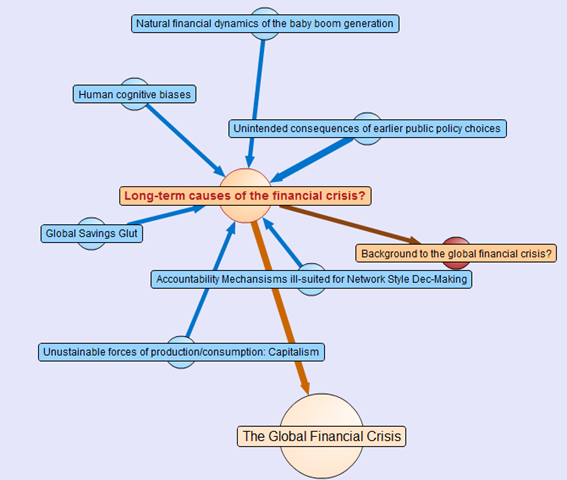
    Attached to this “Global Financial Crisis” map is several root questions covering the cause, consequences, triggers and response to this problem. If you hover your mouse over any of the nodes, you will find a more detailed view of the question. Hover your mouse over the arrows between nodes, and you will find that the questions “arise from” the central “global financial crisis” node.

    Also, note the thickness of the arrows between nodes. The width represents the importance placed on this node by the community of users that have developed this map.

    The node colours are important too. Click on the “Long term causes of the financial crisis?” node above, and it will break out to a sub-map. Here the nodes are blue, rather than orange as shown below. The difference in colour is because these nodes are possible responses to the question “Long term causes of the financial crisis?” Once again, the width of the arrows indicate the community’s view of the validity of the responses. Now let’s look at a response that would potentially be divisive. One of the potential answers to the long term causes of the current crisis is “Natural financial dynamics of the baby boom generation.” So, it’s all the baby boomers fault, is it? 😉

    image

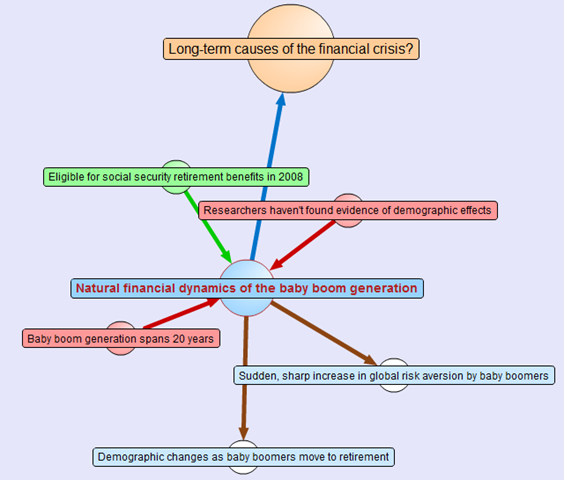
    Clicking on the “Natural financial dynamics of the baby boom generation” and we see a map with a few different coloured nodes. This is because there are some supporting and opposing arguments to this idea. The green nodes support the idea and the red nodes oppose the idea. This is the essence of the pro and con type arguments used when you create IBIS maps.

    image

    There are also some other nodes where the direction of the arrow is the opposite to the ones we have examined so far. These are links to other maps, and if you highlight the outward arrows, you can see that our current map relates to nodes in completely separate maps.

    This highlights a really important point about DebateGraph. It links related issues into a “web” of argumentation allowing readers to fully explore the myriad of interlocking issues that make up complex problems without “drowning” in information overload.

    Contributing to debates

    If you feel strongly on a particular subject then you are free to contribute to the debate. All DebateGraph maps have a toolbar that allows you to perform more advanced activities.

    image

    From left to right, the icons perform the following tasks

    • Open the DebateGraph home page
    • Show detailed text and comments for the currently selected item
    • Add comments to the selected item
    • Open this map in mapper (map edit) view
    • Edit this map in mapper (map edit) view
    • Search all DebateGraph maps for a given term
    • Share this map view or embed it in your own site
    • View the map in full screen mode
    • Key and explanatory notes for maps

    SharePoint Governance?

    Andrew Woodward suggested that I should create a DebateGraph map for us all to collectively explore how we could save Tom Cruise from complete agonising lameness. I chose not to do this for three reasons.

    1. Tom Cruise cannot be saved
    2. Tom Cruise’s lawyers would sue my ass
    3. There are more important topics to explore

    Let’s instead talk about a pet topic of mine: SharePoint governance.

    Governance in SharePoint is pretty misunderstood. There are many definitions of governance and they are all equally right, when judged through the lens of the person defining it. I have my own interpretation of governance (which is, of course, the definitive and completely correct one! – hehe). Maybe we should debate the issue?

    Joel talks about a SharePoint governance plan needing to be a ‘living’ document and in fact he states this explicitly in the sample governance plan that he did for Microsoft. I agree wholeheartedly on this notion. The reality is that documents like MSWord documents are not overly conducive to this ideal. The paradox is that the bigger and more comprehensive the governance plan is initially, the harder it can be to maintain and manage over time, and therefore, the greater the likelihood that it can go out of date or fall into disrepair over time.

    As a result, it occurred to me some time back that a DebateGraph map is the sort of “living” document that a governance plan really aspires to be. So, I roped in a couple of friends, most notably Andrew Jolly and Ruven Gotz, and together we experimented with DebateGraph to explore our own questions and ideas on the topic of SharePoint governance. The result is the map below which you can explore.

    Seven Sigma web part for DebateGraph

    It then occurred to me that others could benefit from this experimental exploration of the topic of SharePoint governance. This gave me the idea that having a “SharePoint governance web part” that could be added to any enterprise SharePoint portal would be a really great way to augment internal governance efforts. Additionally, one of my clients is responsible for conservation and sustainability at a local level in the community. They loved the DebateGraph debates around environmental, social and economic sustainability and this web part idea would work equally well for them.

    Accordingly, my company, Seven Sigma, has just released a free webpart for SharePoint that allows you to embed DebateGraph debate maps into your SharePoint sites and tune their display to fit into enterprise SharePoint portals. The default debate is the SharePoint Governance debate shown above, but you can view any of the many Debategraph maps via the web part properties.

    I have recorded a couple of webcasts, covering the installation and usage of the web part which can be viewed below. Otherwise, click here to download this free web part from the Seven Sigma web site.

    dginstall  dgusage

    Conclusion

    This new web part and the SharePoint governance debate, are essentially an experiment in trying to tackle collaboration a novel way. Like any wiki, to make it truly “living”, the maps need contributions from people who have something to offer on the topic. I fully accept that this initiative is not going to be everybody’s cup of tea, but I hope that it might get people to think about the sort of possibilities presented by this sort of wiki based display. The fact that all of the issues, ideas and argumentation can so easily be made available to a wide audience via a simple web part I think is unique.

    Thus, if you would like to contribute to this SharePoint governance debate sign up to Debategraph and we will add you to the governance debate.

    I think that DebateGraph, and applications like it, may well represent the next step in the evolution of collaborative applications. While Twitter and Facebook have found interesting ways to bring people together, those applications aren’t exactly going to provide you with the sort of ‘container’ required to tackle really wicked problems. I foresee a lot of development in this sub-genre of collaborative applications in the future.

    In other words, watch this space!

    Thanks for reading

    Paul Culmsee

    www.sevensigma.com.au


    Perth SharePoint Users Group wrap

    Today I presented a session at the Perth SharePoint Users Group. I was a little unsure whether my non-technically focussed content would be of interest to the geeks but the turnout was terrific and the feedback has been brilliant. (The 3 copies I gave away of Dux’s excellent “SharePoint for Project Management” book may have sweetened the deal – hehe )

    My sincere thanks to new user group president Sezai Komur for giving me the opportunity to present this material as it was the first time it has seen the light of day in Perth.

    If you want to check out the slide deck from the session, you will find it below. Expanded information that builds on this content can be found at the Seven Sigma site, as well as here at CleverWorkarounds.

    Thanks for reading

    Paul Culmsee

    www.sevensigma.com.au


    « Previous PageNext Page »

    Today is: Wednesday 3 June 2026 -