Back to Cleverworkarounds mainpage
 

Form Services and SPD Workflows…

For those of you who are developers and have to program XSL and XSLT, you have my deepest sympathies. I thought that regular expressions were bad, but this takes the cake! Despite my best efforts as a SharePoint architect/consultant, I seem to invariably have to deal with programming issues more often than I’d like.

In saying that though, XSL/XSLT is very powerful of course and I fully appreciate why the Data View web part is popular among developers. Anyway, I digress. This post is about forms services and SharePoint Designer workflow, but I had to dabble into this world to solve my problem. A word of warning though, this is a workaround but it’s not that clever.

The Symptom

You create a SharePoint designer workflow and attach it to a forms library, configured to run in forms server mode (in the browser). You create a “Collect Data From a User” workflow action, and when the workflow recipient clicks on the task, the “Related list item” field in the task is not rendered in the browser.

Continue reading “Form Services and SPD Workflows…”


STSDEV – Pure Genius

When I am in SharePoint Admin (Nazi) mode, I flatly refuse to accept any significant customisation/code changes unless they are packaged up as a solution that is activated via features. Some developers hate this and feel I am being “difficult” and I get the old chestnut excuse “oh but this will now take me twice as long to do“. I have little sympathy for them, and in fact I see this as a good test of whether a developer has a decent appreciation or understanding of governance.

This is because all they are doing increasing my governance risk because they do not want to do the extra work to make their work easier to deploy/ upgrade/retract etc. The risk increases exponentially when you maintain a farm with several WFE servers.

When consulting to clients, I deliberately try to scare the crap out of younger developers who are been earmarked to work with SharePoint and try and instil a sense of what governance is all about. These sorts of considerations tend not be given too much thought until you have been through something bad happening 🙂

So when Yoda Sezai put me onto a codeplex project called STSDEV, I took a look and was very, very impressed.

Now all you developers have no excuses!! Stop what you are doing and go to codeplex and watch the introduction video right now!

I like it so much, I’m thinking of now mandating that all development is performed via STSADM projects 🙂


CleverWorkArounds Rating: Exceptional


Sharepoint for Cisco Fanboys (beyond TFTP) – Part 5

Greetings SharePoint fans and Cisco people who are soon to be SharePoint fans! I’m back with part 5 of this series on leveraging features of MOSS 2007 and WSS 3.0 to help manage Cisco infrastructure.

For those of you who hate programming topics and have no interest in TFTP issues, we may well have finally gotten to a topic that you are interested in! For the rest of you, who have read the first four articles, we now shift our focus from getting Cisco configurations into SharePoint, to doing something useful with them once we have done so.

In this post, we will examine the out of the box capabilities of workflow in SharePoint and delve a little deeper into document libraries and content management. So this is more aimed at Cisco people than it is at SharePoint Pros. SharePoint people, much of the topics I cover in this article you may have seen before.

I personally don’t think this post has a high coffee requirement rating in terms of complexity of concepts, compared to the last two anyhow. However be prepared: it is a long read.

CleverWorkArounds Coffee requirement rating: imageimage

Continue reading “Sharepoint for Cisco Fanboys (beyond TFTP) – Part 5”


SharePoint for Cisco Fanboys (and more developers) – Part 4

Welcome to part 4 of my series on demonstrating SharePoint’s usefulness for storing Cisco configuration backups. What a hard slog it’s been! The last article (part 3) of this series focused on how to modify an open source C# TFTP server to upload files into a SharePoint document library using the SharePoint SDK.

Here is the quick recap on what we have covered so far

  • Part 1 illustrated how it it possible to use SNMP to tell a Cisco IOS device to dump its configuration to TFTP. We talked about the version control feature of SharePoint and why it makes sense to TFTP your configs to a SharePoint document library. We covered the WEBDAV network provider supplied with XP and Win2003 and finished off with a basic example using the TFTP server TFTPD32.
  • Part 2 went into more detail about the issues you can face when using the WEBDAV network provider. It also went into more detail on 3 TFTP server products (WinAgents TFTP, SolarWinds TFTP Server and TFTPD32 and why TFTPD32 ended up being the best choice for this purpose.
  • Part 3 then looked at a wonderful open source TFTP server written in C# called TFTPUtil. We modified the source code of this TFTP server to use the SharePoint SDK and upload files to a SharePoint document library.

Now both the WEBDAV and SDK methods had some issues. The WEBDAV method was obviously easy to set up because pretty much any application (theoretically anyway) can be made to work with it. I, however, had reliability issues with this method as part 2 detailed. The SDK method was much more reliable, but had its own problems. Many people would be uncomfortable with having to perform custom modification of an existing open source TFTP server, but more importantly, there are security implications with this method too.

So we have one remaining method that we can explore. This method is still based around modifications to the TFTPUtil source code but instead of using the SharePoint SDK, we instead use the SharePoint web services.

Continue reading “SharePoint for Cisco Fanboys (and more developers) – Part 4”


SharePoint for Cisco Fanboys (and developers) -Part 3

As I write this series, it is getting less and less about Cisco and more and more about SharePoint. This article is definitely developer centric, but since Cisco guys tend to be interested in the guts of the detail, I decided to keep going :-).

If you read my articles I tend to take the piss out of IT role stereotypes just to make it more entertaining reading. Sales guys and IT Managers tend to cop it the most, but I also like to have a dig at the expense of the nerds too. Cisco nerds on the whole are a great bunch, but I have to say, the scariest nerd I have ever met drank Cisco kool-aid in jumbo size!

If you have gotten to this article after reading the first two and you are scoffing at my audacity to suggest you TFTP your configs into SharePoint, chances are most people think you’re scary! If you are hitting this series of articles for the first time, go back and read part 1 and part 2 before being scary!

Seriously now, I thought that this would be a 2 part set of articles, but I got all bogged down in the methods of getting files into SharePoint. The WEBDAV based methods described in the previous article is easy to do, but ultimately is not the recommended method. So now, we will look at the ‘proper’ ways to do it and see if they are worth the effort. They work okay, but are more complex and I’m not convinced that the governance issues are necessarily worth it for many readers.

Degree of difficulty for this article is varied.

CleverWorkArounds Coffee requirement rating (for an application developer): image 

CleverWorkArounds Coffee requirement rating (for a non developer): image  image image image

Continue reading “SharePoint for Cisco Fanboys (and developers) -Part 3”


SharePoint for Cisco Fanboys (darn WEBDAV) – Part 2

imageHere I am back again, illustrating some of the interesting possibilities that SharePoint offers for Cisco people.

To recap my last post, I showed you a little perl script I wrote to get an IOS router or switch to dump its current configuration to a TFTP server. I then used one of several freeware TFTP servers to show how you can have a TFTP server save the captured file into a version enabled document library.

I then hit a snag in relation to using a Windows Service to do this task. In this article we will delve into this issue in more detail. In addition, I ended up delving much deeper than I intended. So, like my branding series, this is going to turn into a multi-part series too, covering some application development, configuration, security and governance issues. How many parts it will end up being is anybody’s guess!

This is a technically oriented series of articles for the most part, so for you people who like the governance and finance stuff, you may not get too much out of this one. Although this article (part 2) focuses on my issues and observations with the Windows WEBDAV client, if you are one of these people who have ‘special’ feelings when you see those pretty blue Cisco boxes like the image above, then you may find some useful content here. 🙂

SharePoint developers and architects may also find this of interest.

Continue reading “SharePoint for Cisco Fanboys (darn WEBDAV) – Part 2”


SharePoint for Cisco Fanboys – Part 1

Cisco nerds! This series is just for you! I know that you think you’re way too cool for collaborative portals, especially a Microsoft one at that. Instead you are more interested in delving into the IOS command line, to perform arcane arts such as debugging that OSPF route redistribution into BGP or getting off on planning and implementing a large scale DMVPN solution. Maybe you’re into QOS and VOIP and simply dig all of those DSCP-COS mappings, class and policy maps and the like.

Although packets, cells and frames are your world, *nix is cool, Nagios is your idea of a portal and anything remotely connected to Microsoft fills you with contempt and is beneath you right? 🙂

Well if this is you, I do understand your point of view because I was you once, but after some therapy, I’m now out of rehab and doing just fine!

Having Cisco/general networking expertise will help you with this article, so depending on who you are, the amount of caffeine required to follow this will vary:

CleverWorkArounds Coffee requirement rating (for a CCNP or CCIE): image 

CleverWorkArounds Coffee requirement rating (for a non Cisco person or CCNA 🙂 ): image  image image

Continue reading “SharePoint for Cisco Fanboys – Part 1”


SQL Logins and AD Accounts can bite

This one had me going for a while.

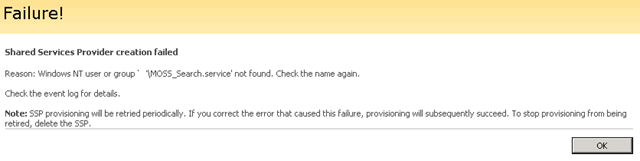
I was minding my own business doing a MOSS install. I successfully created the Office Server Search Service and onto the creation of the Shared Service Provider. Created the SSP and MySite Web Applications and then at the final step of creating the SSP, it bombed out after a long period of time with an error.

image

Reason: Windows NT user or group ‘MyDomain\MOSS_Search.service’ not found. Check the name again.

Continue reading “SQL Logins and AD Accounts can bite”


"Fair, Good, Better, Best" or "Crap, Unbearable, Barely Tolerable, Good"?

I’m still on holidays, and the cricket between Australia and India was great (despite the poor umpiring), thus this post will be brief by my standards!

A question I often get asked by clients is along the lines of “Do I have to upgrade from Office [insert old version here] to use the latest version of SharePoint?”

Microsoft technology evangelists (very nice people too I might add) often mention the “Fair, Good, Better, Best” mantra when explaining the intricacy of integration with Office client tools and the Office Server (SharePoint). You can read it for yourself via the latest version of the white-paper can be found here.

The content in this white-paper is good, but I’m amused at the choice of terms for the client and server combinations. IT Managers, if you want me to paraphrase the entire content of the article I can summarise it like this.

  • Fair = Crap
  • Good = Unbearable
  • Better = Barely Tolerable
  • Best = Good

Continue reading “"Fair, Good, Better, Best" or "Crap, Unbearable, Barely Tolerable, Good"?”


"You’re not ready" – SharePoint kung fu

A while back I tried to make records and collaborative document management an interesting blog topic by using death metal music to get my point across. Today I have another SharePoint related bone to pick with the world. Hmm, how to make it interesting?

Aha! … Kung fu baby!

(Apologies to all you people who’s work access blocks youtube – read this article at home).

(Back in the late eighties and early nineties, I used to go to the only Chinese movie theatre in town. Jet Li and Jackie Chan left me in awe, and I couldn’t understand why the western world didn’t get it. Such a pity that it took crap movies like Rush Hour and Lethal Weapon 4  to show the world what they were missing).

But, where was I? That’s right – SharePoint and company readiness.

Continue reading “"You’re not ready" – SharePoint kung fu”


« Previous PageNext Page »

Today is: Tuesday 10 March 2026 -