Back to Cleverworkarounds mainpage
 

To the company about to make me an offer too good to refuse…

Tags: Offbeat @ 9:40 am

My mother went to a psychic yesterday and apparently, sometime this year, I get an job offer from an overseas mining company that is so staggeringly good, the family and I pack up and head overseas for around two years.

The only thing is, the psychic didn’t tell my mother which company it is and where exactly we are going. Damn – I am picky when it comes to temporary adopted countries – there had better be a squash court or there will be hell to pay!.

Anyhow, since I have my existing evil plans for world domination, if said mining company can kindly contact me with their incredible offer as soon as possible, that would be much appreciated πŸ™‚

Thanks for your time,

Paul


Why do SharePoint Projects Fail? – Part 2

Hey there.

Welcome to Part 2 of a series that examines why SharePoint projects fail. If you have come straight from Part 1, you probably still have a hang over and would most likely not want to see tequila ever again! But if you missed the first article, there is a drinking game to be played first πŸ™‚ .

Now as it happens, we haven’t even gotten to SharePoint yet. That’s because to examine why SharePoint projects fail, one has to examine why “projects” fail. Part 1 introduced the work of Horst Rittel and the term ‘Wicked Problem’. His work was not related to IT problems per se, but most of the ten characteristics he described 35 years ago are applicable to IT projects. Although subsequent academic works have refined (and in some cases criticised) his work, it still stands up pretty well in my opinion.

When you examine the various survey based studies undertaken on the success rate of IT projects, bad projects have a significant root cause at the initiating and planning phases. My own personal experience pretty much corroborates the studies and in hindsight, it’s plain that the worst of them were wicked problems.

In this post, I am going to play the role of the “ghost of wicked problems past” (think Dickens: A Christmas Carol). I am going to take you on an exciting, magical journey back in time, to examine some of the early work on wicked problems, and show that in the 25-35 years since they were written, not a heck of the wisdom imparted has found its way to prominence πŸ™‚

CleverWorkarounds tequila shot rating with a redbull thrown in (on account of the history lessons):

imageimageimageimage

Β 

Continue reading “Why do SharePoint Projects Fail? – Part 2”


Why Do SharePoint Projects Fail? – Part 1

In honour of the CleverWorkarounds’ coffee rating system used in other posts, this post is rated on tequila shots. You will soon find out why…

CleverWorkarounds tequila shot rating: imageimageimage

Asking why SharePoint projects fail is like asking why people pay money to see Steven Seagal movies, why Americans think Australians actually drink Fosters or why men leave the toilet seat upright. The answer is, they just *do*.

So let’s peel back the onion that is a SharePoint project going bad and see what we can find (apart from tears).

To make this exercise more palatable, let’s play a drinking game. If you answer YES to any of the questions below, you have to down a double tequila slammer. So get your salt and lemon ready and let’s go.

(Quick reference: Part 2, Part 3, Part 4, Part 5, Part 6, Part 7, Part 8)

Continue reading “Why Do SharePoint Projects Fail? – Part 1”


Fun with "wicked problems"

How the hell can wicked problems be fun? I’d better explain, hadn’t I…

I’ve been struggling with a blog post for a few days. I’ve wanted to blog about SharePoint’s propensity to become a  dreaded “wicked problem”. I will get to that post eventually, but for now I thought that I would share with you something that made me smile while researching it.

First up, a really quick (wikipedia) definition of a “wicked problem”, particularly Jeff Conklin’s definition. According to Jeff’s research, wicked problems have four characteristics:

    • The problem is not understood until after formulation of a solution.
    • Stakeholders have radically different world views and different frames for understanding the problem.
    • Constraints and resources to solve the problem change over time.
    • The problem is never solved.

    SharePoint projects can easily become wicked problems, and I promise that I will post more details on the varied reasons. But while researching into the nature of wicked problems and strategies for mitigating the risk of them, I came across some literature that suggests that one of the key strategies is to counter them is … wait for it …

    …collaboration!

    So in short, to stop SharePoint projects from turning into wicked projects, we have to collaborate!

    Collaborate, eh? Then we’d better undertake a project to implement a collaboration system so we can collaborate better. Oh wait – we *are* implementing a collaboration system. It’s this new cool tool called SharePoint…

    Oh, dude this is too hard man… I have the munchies.


    "Guru of governance?"

    My old mate from employers yonder, Mike Stringfellow is one of those developers who always liked to take a step back and think through the bigger picture implications of various design/coding decisions. It’s just a pity that at that particular company we worked at, he was in the minority. (Not helped by some unbelievably poor executive level management wacky views of reality).

    So I became one of those bitter and twisted anal infrastructure guys who always seemed to default to "No", when asked a question. (Usually "no" was the right answer nonetheless). I was told by another colleague that some of the (web) developers were scared of me… but Mike at least understood why πŸ™‚

    He recently blogged the idea of using features to modify web.config file of a web application. After all, the SharePoint SDK offers the WebConfigModifications property (of the SPWebApplication) class. He suggested that as a governance nazi I might have issues with this idea. As it turns out I do, but only for you developers that have been slack-arsed and not done your homework! πŸ™‚

    Continue reading “"Guru of governance?"”


    More on SOX and subprime

    In 2002, a high profile client asked the company I was involved with what our position/compliance was on ISO17799. The managing director called me up and asked if I could “put something together for him” by the next day.

    So I put something to him. Two words to be exact. “Non compliant”.

    The irony was that I had actually been trying to win support for adopting *some* ISO17799 principles as a yardstick to measure ourselves, knowing full well that at some point we were going to be asked. But I never was able to get any management behind the idea. Why? Because it was seen as not particularly critical to the business.

    Then, they were asked by a client, and heaven forbid, it has to be done by the next day!

    What this highlights to me is the general disinterest among many in business of things that are seen as ‘getting in the way’. These days I’m better at appreciating why this is the case and I’m better at providing quantifiable explanation/justification, but it is still disheartening nonetheless.

    So I was thinking to myself whether the attitude I experienced was similar at all to the current subprime victim in the news, Bear Stearns.

    Continue reading “More on SOX and subprime”


    Compliance is about to get worse…

    I think SharePoint is an excellent platform for quality improvement, PMO and compliance efforts. But this is a non SharePoint oriented post. I’m sick of writing nerdy stuff at the moment.

    In 2001, the supposedly blue chip US multinational called Enron filed for bankruptcy. For you younglings who were still at school, this made pretty big news around the world. Many of the senior executives are still in jail for fraud related offenses. the whole sorry tale is one of greed, corruption, deceit, insider trading, huge theft of workers’ entitlements and massive job losses. As part of the collateral damage, Enron’s auditing firm, “Arthur Anderson” was also obliterated as its reputation dissolved quicker than Paris Hilton’s credibility.

    google “enron scandal” – it’s interesting reading

    Sarbanes-Oxley (real brief version)

    Anyway, one of the things that came out of this and other scandals like Worldcom, was the Sarbanes-Oxley act. Its intent was to:

    Protect investors by improving the accuracy and reliability of corporate disclosures made pursuant to the securities laws, and for other purposes.

    It did this by creating new standards for corporate accountability, and significantly beefed up penalties for acts of wrongdoing. Boards and executives are now personally accountable for the accuracy of financial statements. There are additional financial reporting responsibilities, with particular focus on the verifiable application of internal controls and procedures designed to ensure the validity of their financial records.

    Now executives tend to like spreading the love (risk) around, and if they are going to go down, they like to take others with them. So IT professionals also have to do their bit for the common good. This is because the financial reporting processes of organisations heavily utilise IT technology. As a result, IT controls that relate to financial risk are fair game.

    So how to account for IT controls?

    COBiT

    COBiT is not the only IT control methodology used for SOX compliance, but it’s the only one I am familiar with πŸ™‚ COBiT (Control Objectives of Information and Related Technology) is commonly used as the framework to cover all your IT controls. I won’t get into detail here, as COBiT is a big subject in itself, and I have some information here already.

    SOX Criticisms

    Was SOX an over-reaction to isolated indecent’s of large scale fraud? It is clear that some believe this to be the case. “Compliance cost is too onerous” is very commonly cited, particularly with smaller affected firms. Most scarily for me, is seeing the term ‘SOX’ being used as a sales tool for products that at best, have little relevance to what SOX compliance is really about. The same criticism can be levelled against service companies as well, who are happy to bag Microsoft’s amateurish use of FUD, yet use disturbingly similar methods to sell products and services that have questionable relevance.

    When researching my training material last year, I came across this nugget of information that gave an indication of the level of frustration that SOX has caused.

    A global study from European accountants Mazars, found that close to 20% of EU companies are planning to de-list from the US market to avoid complying and more than half feel the costs outweigh the benefits 

    But I then found this interesting snippet.

    However this has the potential to impact on the cost of credit for such companies as warned in July 2006 by Moodys. “The cost of capital for public companies in countries that choose not to implement US Sarbanes-Oxley (SOX) type corporate governance rules may soon increase to reflect the additional risk premium resulting from companies and their auditors concealing the true level of audit risk” 

    So now we come to the point of this post. What did they say above? “Cost of credit”? So Moodys implies that SOX compliance offers a level of assurance to suppliers of capital.

    Six Years Later

    I liked Moodys’ quote in the previous section. Fast forward to the present and the word “credit crunch” is on the news quite a lot. So is it fair to rate the effectiveness of SOX compliance based on the current turmoil in financial markets?

    To answer that question, we have to look at the current problems that have led to the current financial crisis affecting world markets.

    Here is a pretty good layman’s summary that explains the sub-prime issue and the problems with stagnant or falling property values. However we need to delve a little deeper here. The New York Times has a great article that goes into the necessary detail but it is large, and I’ll try and paraphrase it as briefly as I can.

    In the past decade, there has been an explosion in complex derivative instruments, such as collateralized debt obligations and credit default swaps, which were intended primarily to transfer risk.

    These products are virtually hidden from investors, analysts and regulators, even though they have emerged as one of Wall Street’s most outsized profit engines. They don’t trade openly on public exchanges, and financial services firms disclose few details about them 

    Among the topics they discussed were investment vehicles that allowed Citigroup and other banks to keep billions of dollars in potential liabilities off of their balance sheets β€” and away from the scrutiny of investors and analysts. 

    Now what was the intent of SOX again? “To protect investors by improving the accuracy and reliability of corporate disclosures made pursuant to the securities laws, and for other purposes”. What do we see above? “potential liabilities off the balance sheet” … hmm

    But there’s more..

    Credit rating agencies, paid by banks to grade some of the new products, slapped high ratings on many of them, despite having only a loose familiarity with the quality of the assets behind these instruments.

    Still others say the primary reason the Fed moved so quickly was to divert an even bigger crisis: a meltdown in an arcane yet huge market known as credit default swaps. Like C.D.O.’s, which few outside of Wall Street had ever heard about before last summer, the credit default swaps market is conducted entirely behind the scenes and is not regulated.

    Ratings agencies have similarly been under fire ever since the credit crisis began to unfold, and new regulations may force them to distance themselves from the investment banks whose products they were paid to rate.

    If you research into the fate of Arthur Anderson, they were screwed by a sudden and fatal loss of reputation as a result of their association and conflict of interest issues in relation to Enron. Disturbingly, the last quote above criticising ratings agencies reminds me very much of the conflict of interest criticisms levelled at audit firms like Arthur Anderson.

    Crystal Ball Time

    Since the practices quoted above are not necessarily illegal, and it is too early to determine whether the SOX laws will be used in a punitive sense to institutions caught up in the current crisis. I’m not a lawyer and as a result, my opinion here is naively uninformed. But like the Enron/Worldcom scandals, regulatory authorities and other interested parties will rightfully ask questions about risk management, and therefore the effectiveness of the controls for SOX compliant organisations.

    This current crisis makes previous scandals pale into insignificance. A news site that I frequent reports that US investment bank Goldman Sachs  suggests that credit losses will amount to 1.2 trillion US dollars. That is a freakin’ *insane* amount of money and many people affected do not even realise it yet until they see their next pension/superannuation statement.

    Consider that the world population is some 6.6 billion people. The above loss is therefore 180 US dollars per person on the planet! … Mind boggling isn’t it.

    Notwithstanding the directly affected people who are defaulting on their mortgage, getting margin called, etc. Many, many people will be royally pissed. Politicians will react to this by forming committees to look at how to prevent this from happening again. SOX will be revised, or new regulations will be developed. More checks and balances, more compliance overheads, more disclosure.

    Thus, more accountants, more lawyers, more business advisers, more IT security professionals, and of course, smelling a new FUD angle, more snake oil salesmen selling irrelevent products and services.

    If companies think that their compliance costs are high now, just wait. I think it’s going to get a lot worse.


    SharePoint External Storage API – Crushing My Dream

    When I read several months back, that Microsoft was going to supply an API for external storage in MOSS/WSS, I sprang from my desk and danced around the room and babbled incoherently as if I’d been touched by Benny Hinn.

    Okay, well maybe I didn’t quite do that. But what I did do was forward the KB article to a colleague whose company is the leading reseller for EMC Documentum in my town. We’d previously had one of those conversations over a few beers where we questioned the wisdom of SharePoint’s potentially unwise, yet unsurprising use of SQL Server as the storage engine.

    …so what’s wrong with SQL?

    I am going to briefly dump on SQL here for a minute. But first, let me tell you, I actually like SQL Server! Always have. I hated other Office Server products like Exchange until the 2003 version and SharePoint until the 2007 version. But on the whole, I found SQL to be pretty good. So hopefully that will stop the SQL fanboys from flaming me!

    Those readers who appreciate capacity planning issues would appreciate the challenges SQL based storage brings to the table.Additionally, those who have used Enterprise Information Management products like Documentum or Hummingbird (now OpenText) would nod as if Microsoft have finally realised the error of their ways with this updated API.

    All of the SharePoint goodies like version control, full text indexing and records management come at a price. Disk consumption and performance drain.  Microsoft say to plan for 1.5 times your previous growth in disk usage. In my own real-world results it is more like 2.5 times previous growth. Disk I/O is also increased markedly.

    “So what? Disk is cheap”, you reply. Perhaps so, but the disk itself was never the major cost. Given that this is a SQL database we are talking about, a backup of a 100 gigabyte SQL database could take hours and a restore possibly longer. A differential backup of a SQL database would be the entire 100 gig as it is generally one giant database file! So the whole idea of differential backups during the week and full backups on weekends suddenly has to be re-examined. Imagine a disk partition gets corrupted rendering the data useless. In a file server, this might mean 20% of shared files are unavailable while a restore takes place. In a SQL world, you have likely toasted the whole thing and a full restore is required. Often organisations overlook the common issue of existing backup infrastructure not being scalable enough to deal with SQL databases of this size.

    “100 gig”, you scoff, don’t be ridiculous”. Sorry but I have news for you. At an application level, there is a scalability issue in that the lowest logical SharePoint object that can have its own database is a Site Collection, not an individual site. For many reasons, it is usually better to use a single site collection where possible. But if one particular SharePoint site has a library with a lot of files, then the entire content database for the site collection is penalised.

    Now the above reasons may be the big ticket items that vendors use to sell SAN’s and complex Backup/Storage solutions, but that’s not the real issue.

    The real issue (drumroll…)

    It may come as a complete shock to you, but documents are not all created equal. No! Really? πŸ™‚ If they were, those crazy cardigan wearing, file-plan obsessed document controllers and records managers wouldn’t exist. But as it happens, different content is handled and treated completely differently, based on its characteristics.

    Case in point: Kentucky Fried Chicken would have some interesting governance around the recipe for its 11 herbs and spices, as would the object of Steve Balmer’s chair throwing with their search engine page ranking algorithms.

    I picked out those two obvious examples to show an extreme in documents with high intrinsic value to an organisation. The reality is much more mundane. For example, you may be required by law to store all financial records for seven years. In this day and age, invoices can be received electronically, via fax or email. Once processed by accounts payable, invoices largely have little real value.

    By using SQL Server, Microsoft is in effect allocating an identical cost of each document in terms of infrastructure cost. Since all documents of a site collection reside inside a SQL content database, you have limited flexibility to shift lower value documents to lower cost storage infrastructure.

    How do the big boys do it then?

    Documentum as an example stores the content itself in traditional file shares and then stores the name and location of that document (and any additional metadata) in the SQL database. Those of you who have only seen SharePoint may think this is a crazy idea and introduce much more complex disaster recovery issues. But the reality is the opposite.

    Consider the sorts of things you can do with this set-up. You can have many file shares on many servers or SAN’s. Documentum for example, would happily allow an administrator to automatically move all documents not accessed in three months to older, slower file storage. It would move the files and then update the file location in SQL so the new location is hidden from the user and they don’t even know it has been moved. Conversely, documents on older, slower storage that have been accessed recently can be moved back to the faster storage automatically.

    It also facilitates geographically dispersed organisations having a central SQL repository for the document metadata, but each remote site has a local file store, to make retrieval work at LAN speeds for most documents. This is a much simpler geographically dispersed scenario than SharePoint can ever do right now.

    Restores from backup are quite simple. If a file server corrupts, it only affects the documents stored on that file server. Individual file restores are easy to perform and you don’t have to do a major 100gig database restore for a few files.

    Furthermore, documents that have a compliance requirement, but do not need to be immediately available, can easily be archived off to read-only media, thus reducing disk space consumption. The metadata detail of the file can still be retrieved from the SQL database, but location information in the SQL database can now refer to a DVD or tape number.

    For this reason, it is clear that SharePoint’s architecture has some cost and scalability limitations when it comes to disk usage and management, largely due to SQL Databases and the limitation of Site Collections for content databases.

    So how can we move less valuable documents onto less expensive disk hardware? Multiple databases? Possibly, but that requires multiple site collections and this complicates your architecture significantly. (Doing that is the Active Directory equivalent of using separate forests for each of your departments).

    Note to SharePoint fanboys: I am well aware that you can ‘sort of’ do some of this stuff via farm design, site design and 3rd party tools. But until you have seen an high end enterprise content management system, there is no contest.

    So you might wonder why SharePoint is all the rage then – even for organisations that already have high end ECM systems? Well the short answer is other ECM vendors’ GUIs suck balls and users like SharePoint’s front end better. (And I am not going to provide a long answer πŸ™‚ )

    Utopia then?

    As I said at the start of this post, I was very happy to hear about Microsoft’s external storage API. In my mind’s eye, I envisaged a system where you create two types of document libraries: ‘standard’ document libraries that use SQL as the store and ‘enhanced’ document libraries that look and feel identical to a regular document library, but it stores the data outside of SQL. Each ‘enhanced document library’ would be able to point to various different file stores, configured from within the properties of the document library itself.

    Utopia my butt!

    Then a few weeks back some more detail emerged in SDK documentation and my dream was shattered. This really smells like a “just get version 1 out there and we will fix it properly in version 2” release. I know all software companies partake in this sales technique, but it is Microsoft we are talking about here. Therefore it it my god given right…no…my god given privilege to whine about it as much as I see fit.

    Essentially this new feature defines an external BLOB store (EBS). The EBS runs parallel to the SQL Server content database, which stores the site’s structured data. You will note that this is pretty much the Documentum method.

    In SharePoint, you must implement a COM interface (called the EBS Provider) to keep these two stores in sync. The COM interface recognizes file Save and Open commands and invokes redirection calls to the EBS. The EBS Provider also ensures that the SQL Server content database contains metadata references to their associated BLOB streams in the external BLOB store.

    You install and configure the EBS Provider on each Web front end server in your farm. In its current version, external BLOB storage is supported only at the scope of the farm (SPFarm).

    Your point being?

    If you haven’t realised why I marked the previous sentence in bold, it is this. Since this EBS provider can only be supported at farm scope, then every document library on every site on every site collection in your farm now saves its data via the EBS provider.

    So there is utterly nil granularity with this approach. It’s an all or nothing deal. (There goes my utopian dream of two different types of document libraries). All of your documents in the farm are doing to be stored in this EBS provider!

    But it gets worse!

    The external BLOB storage feature in the present release will not remain syntactically consistent with external BLOB storage technology to be released with the next full-version release of Microsoft Office and Windows SharePoint Services. Such compatibility was not a design goal, so you cannot assume that your implementation using the present version will be compatible with future versions of Microsoft Office or Windows SharePoint Services.

    So basically, if you invest time and resources into implementing an EBS provider, then you’re pretty much have to rewrite it all for the next version. (At least you find this out up front).

    No utility is available for moving BLOB data from the content database into the external BLOB store. Therefore, when you install and enable the EBS Provider for the first time, you must manually move existing BLOBs that are currently stored in the content database to your external BLOB store.

    Okay that makes sense. It is annoying but I can forgive that. Basically if you implement an EBS provider and enable it, your choices for migrating your existing content into it is a backup and restore/overwrite operation or simply wait it out and allow the natural process of file updates do the job for you.

    When using an external BLOB store with the EBS Provider, you must re-engineer your backup and restore procedures, as well as your provisions for disaster recovery, because some backup and restore functions in Windows SharePoint Services operate on the content database but not on the external BLOB store. You must handle the external BLOB store separately.

    I would have preferred Microsoft to flesh this statement out, as this will potentially cause much grief if people are not aware of this. It implies that STSADM isn’t going to give you the sort of full-fidelity backup that you expect. Yeouch! I feel I might get a few late night call-outs on that one!

    Ah, but wait a minute there, sunshine, is that any different to now? STSADM backup and restore is not exactly rock solid now!

    Any error conditions, resource drag, or system latency that is introduced by using the EBS Provider, or in the external BLOB store itself, are reflected in the performance of the SharePoint site generally.

    Yeah whatever, this is code word for Microsoft’s tech support way of getting out of helping you. “I’m sorry sir, but call your EBS vendor. Thank you come again!”

    Conclusion

    I can’t say I am surprised at this version 1 implementation, but I am disappointed. If only the granularity extended to a site collection or better still an individual site, I could forgo the requirement to extend it to individual document libraries or content types.

    So it will be interesting to see if this API gets any real uptake and if it does, who would actually use it!

    later

    Paul



    Free MOSS Web Part – Hide Controls via JavaScript

    Note: version 0.2 posted with minor bugfix 15th March 08!

    Note2: Only works with MOSS 2007 sorry as you WSS guys do not have audiences targeting πŸ™

    This is my small contribution to the SharePoint world. It is a web part that once added to a web part page, allows you to customise the display by adding JavaScript to selectively hide controls on the page . Ever needed to hide a field from display/edit for a certain audience? Well here is a way do it without requiring SharePoint Designer and having to break a page from it’s site definition (unghosting).

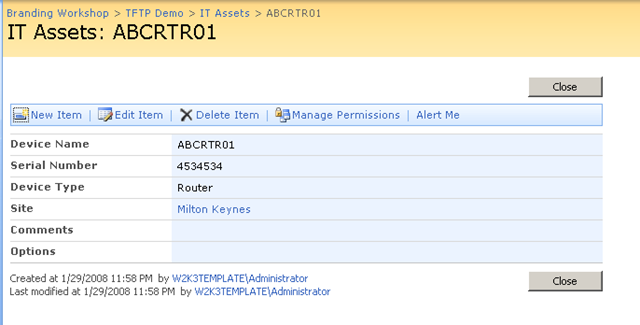
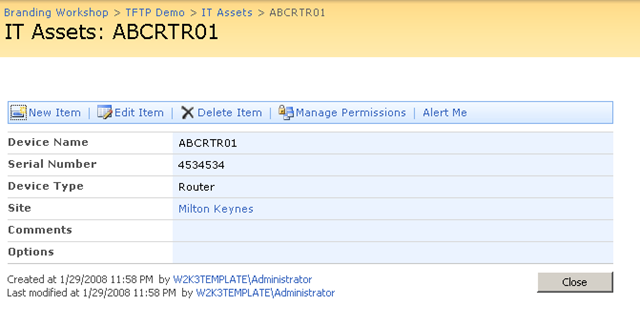
    Before and after shots below (look ma – no top button!)

    imageΒ  image

    To fully understand what is being done here, I suggest you read my series of articles on the use of JavaScript in SharePoint. Part 3 in particular will show you how to safely add this web part to pages with editing disabled (NewForm.aspx, EditForm.aspx and DispForm.aspx)

    The full series can be found here: Part 1, Part 2, Part 3, Part 4, Part 5 and Part 6.

    Kudos to Jeremy Thake for feedback and some code contribution. Despite being seriously metrosexual, he is otherwise otherwise very cool :-P.

    Now two important warnings:

    Warning 1: This is an alpha quality release and I may never touch it again πŸ™‚ So you very likely *will* break it. If there is enough interest, I am happy to pop it on codeplex

    Warning 2: This web part should NOT be considered as a security measure and thus used in any security sensitive scenario (such as an extranet or WCM site). JavaScript by its very nature can be trivially interfered with and thus other methods (server side) should be employed in these scenarios to prevent interference at the browser.

    You can download by reading the disclaimer and clicking the button below..

    THIS CODE IS PROVIDED UNDER THIS LICENSE ON AN “AS IS” BASIS, WITHOUT WARRANTY OF ANY KIND, EITHER EXPRESSED OR IMPLIED, INCLUDING, WITHOUT LIMITATION, WARRANTIES THAT THE COVERED CODE IS FREE OF DEFECTS, MERCHANTABLE, FIT FOR A PARTICULAR PURPOSE OR NON-INFRINGING. THE ENTIRE RISK AS TO THE QUALITY AND PERFORMANCE OF THE COVERED CODE IS WITH YOU. SHOULD ANY COVERED CODE PROVE DEFECTIVE IN ANY RESPECT, YOU (NOT THE INITIAL DEVELOPER OR ANY OTHER CONTRIBUTOR) ASSUME THE COST OF ANY NECESSARY SERVICING, REPAIR OR CORRECTION. THIS DISCLAIMER OF WARRANTY CONSTITUTES AN ESSENTIAL PART OF THIS LICENSE. NO USE OF ANY COVERED CODE IS AUTHORIZED HEREUNDER EXCEPT UNDER THIS DISCLAIMER

    Use at your own risk!

    To install perform the following commands

    1. stsadm.exe” -o addsolution -filename CleverWorkAroundsHideFields.wsp
    2. stsadm.exe” -o execadmsvcjobs
    3. stsadm.exe” -o deploysolution -name CleverWorkAroundsHideFields.wsp -immediate -allowgacdeployment -allcontenturls
    4. stsadm.exe” -o execadmsvcjobs

    To remove/reinstall perform the following commands

    1. stsadm.exe” -o retractsolution -name CleverWorkAroundsHideFields.wsp -immediate -allcontenturls
    2. stsadm.exe” -o execadmsvcjobs
    3. stsadm.exe” -o deletesolution -name CleverWorkAroundsHideFields.wsp
    4. stsadm.exe” -o execadmsvcjobs
    5. stsadm.exe” -o addsolution -filename CleverWorkAroundsHideFields.wsp
    6. stsadm.exe” -o execadmsvcjobs
    7. stsadm.exe” -o deploysolution -name CleverWorkAroundsHideFields.wsp -immediate -allowgacdeployment -allcontenturls
    8. stsadm.exe” -o execadmsvcjobs


    More SharePoint Branding – Customisation using JavaScript – Part 6

    God help me, I’m up to part 6 of series about a technology I dislike and still going. For those of you that have just joined us, then you might want to go back to the very beginning of this series where I used JavaScript to improve the SharePoint user experience. Since then, I’ve been trying to pick a path through the thorny maze of what you could term, ‘sustainable customisation’.

    By that, I mean something that hopefully will not cause you grief and heartache the next time a service pack is applied!

    So no mood for jokes this time – I want to get this over with so let’s get straight to it and finish this thing!

    So where are we at?

    • Part 1 looked at how we can use JavaScript to deal with the issue of hiding form elements from the user in lists and document libraries.
    • Part 2 examined some of the issues with the part 1 JavaScript hacks and wrapped it into a web part using the content editor web part.
    • Part 3 then examined the various issues of adding this new web part to certain SharePoint pages (NewForm.aspx, EditForm.aspx and DispForm.aspx). I also covered using SharePoint Audience targeting to make the hiding/unhiding of form elements personalised to particular groups of users.
    • Part 4 started to address a couple of remaining usability issues, and introduced ‘proper’ web-part development using Visual Studio and STSDEV. I created a project to perform the same functionality in part 3, but would not requiring the user to have any JavaScript knowledge or experience.
    • Part 5 then used STSDEV to create a solution package that allowed easy debugging, deployment and updating of the web part developed in part 4.

    So what could we possibly have left to cover? Basically this article will revisit the web part code and make some functionality improvements and then I will cover off some remaining quirks/issues that you should be aware of.

    [Quick Navigation: Part 1, Part 2, Part 3, Part 4, Part 5 and Part 6]

    Continue reading “More SharePoint Branding – Customisation using JavaScript – Part 6”


    « Previous PageNext Page »

    Today is: Tuesday 10 March 2026 -